Perceptive storage
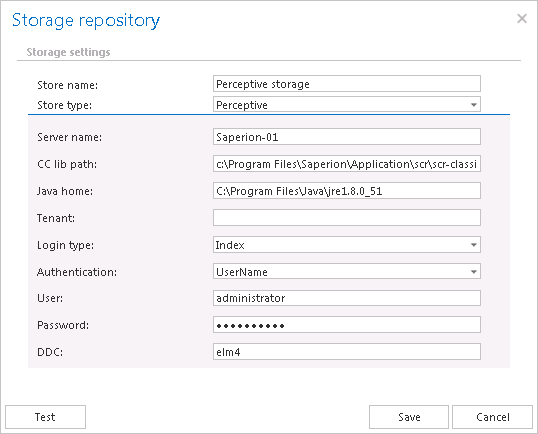
After this store type has been selected, name your storage. contentACCESS will use this name for the given storage on the Storages page. The user is further required to specify the following connection parameters:
- Server name: the server name where the storage is installed
- CC library path: path on which the Classic Connector jar files can be reached, e.g. C:Program FilesSAPERIONApplicationscrscr-classicconnectorlib
- JAVA_HOME: JAVA home directory must be set depending on the application bitness, x64 or x86, e.g.: C:Program FilesJavajre1.8.0_66
- Tenant: in case of non-multitenant system this fields is blank, otherwise the Perceptive tenant should be specified
- Login type: "INDEX", “ADMIN” or “ELM” can be used, the recommended type is “INDEX”
- Authentication: choose the applicable authentication from the dropdown list; the recommended is “UserName”
- User, Password: specify the applicable user and credentials to be applied for the connection with the storage
- DDC: the DDC name where the files will be packed