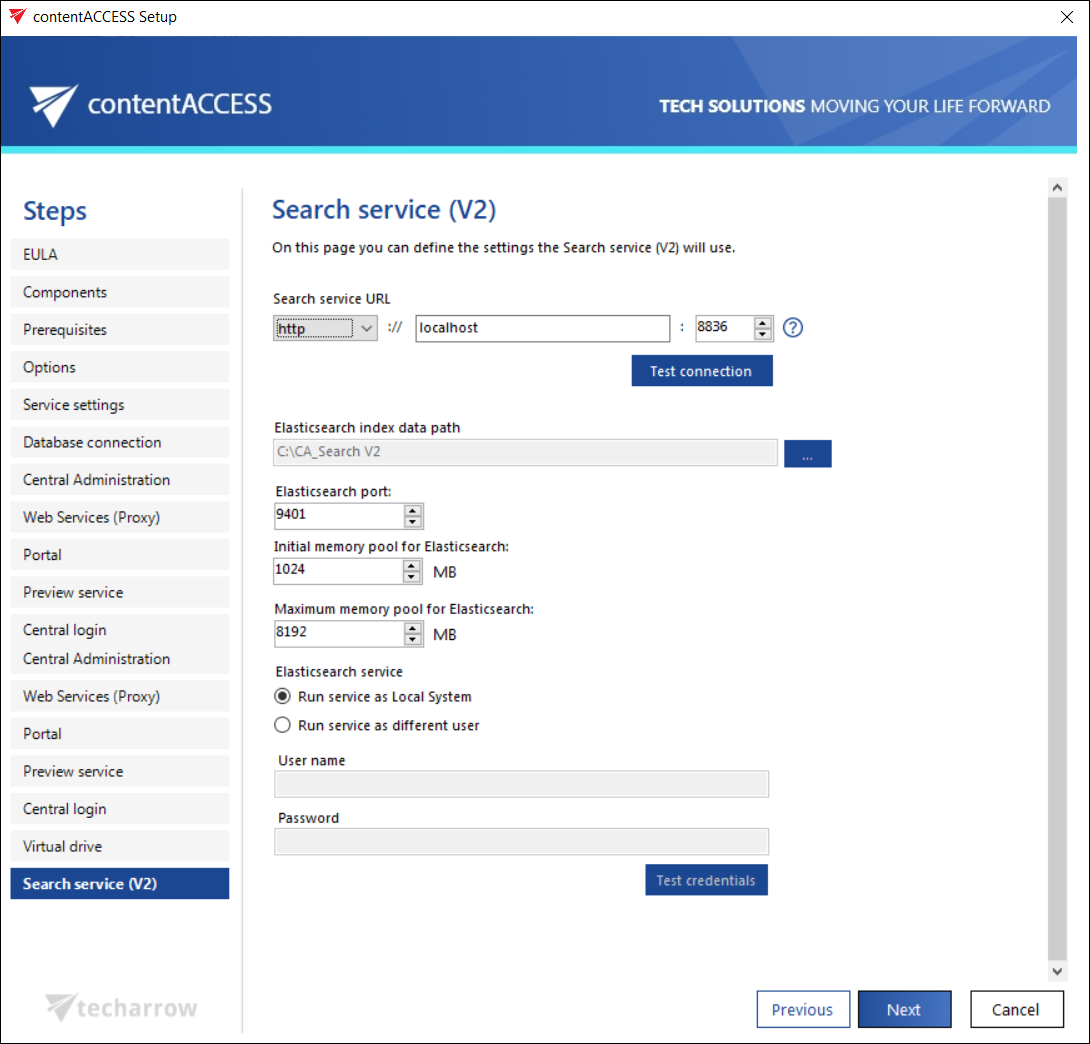
Search service (V2)
To use Search service V2, Java and .NET Framework 6.x must be installed on the computer where the user is installing the search components (read more in section Prerequisites above).
Here you define the settings that Search service (V2) will use:
Search service URL
URL used for communication with the contentACCESS server. The Search service V2 uses the http communication type. With this, you can establish a direct connection with contentACCESS. If a direct connection should be used, do not change the port number prefilled by the setup package (8836). Otherwise, the contentACCESS Proxy connection will be used automatically.
The installation package writes/reads these parameters into/from the Search service (V2) settings section of Central Administration (System -> Services group -> System page) during each install/product update.
Elasticsearch index data path
The path where the indexes will be saved. This path must be filled, or you can't continue the installation process.
Important: The two search services need to run on different ports and different paths. Otherwise, the indexes will be conflicted.
Elasticsearch maximum memory allocation
The maximum amount of memory in megabytes which can be used by the Elasticsearch service.
Further specify the user credentials used to run the Search service (V2). This can be either Local system user, or an explicit user.