Configuring aliases
What are aliases?
Aliases are multiple folder paths with different names, which point to the same folder/set of files.
Currently, contentACCESS uses aliases when mapping remote location paths to local paths, which is a must-to configuration for the Remote shortcutting job. (For more information refer to section Configuration of Remote shortcutting job.)
Configuring an alias for the Remote shortcutting job.
If you are shortcutting remote shares, but contentACCESS has archived the matching files on a local share, the shortcutting job must "pair" the remote share with the local share to be able to replace the matching files with shortcuts on the remote share and to open them. This “pairing” by the job can be done only if remote and local shares are “paired” in contentACCESS, too (i.e. Aliases are specified).
Navigate to File Archive ⇒ Settings ⇒ Aliases tab on the Central Administration's ribbon. On the Aliases page click on + new:
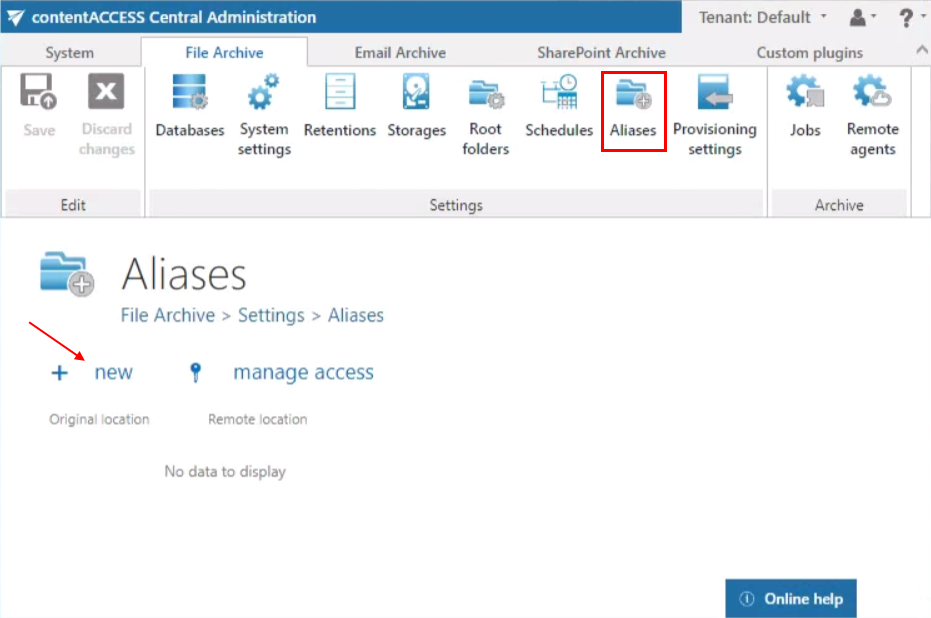
Note: The “+ new” option is unavailable for the logged on user if the “Add repository items” permission on the tenant is not allowed in his role assignment.
The “manage access” option allows to grant access permissions on the selected alias for a second user. This “manage access” option is available for the logged on administrator if his role assignment contains the Edit repository item – All allowed permission on the tenant. Read more in Managing access to contentACCESS objects.
The Alias repository will open. The repository requires to specify the
- Original location: select the file archive root folder from the dropdown list; this is the file path used by the archive job
- Remote location: add the matching remote file path that needs to be replaced with shortcuts
Further click on Save. The Remote location that you configured here can be selected on the Remote shortcutting job’s configuration page later on.

Note: A path extension can be added when setting the remote file location on the Remote shortcutting job’s configuration page.