Site connections in the SharePoint archive
_Important:_This tab is accessible only if the On-premise type is selected on the System settings page.
In this section the administrator configures the connections to the SharePoint sites that will be archived. The site connections define the start point of the SharePoint site to be archived. Every item in the SharePoint hierarchy, that can be archived, can be defined as a site connection as well. These archivable SharePoint items and their sample URLs (to be defined in the site connection) are:
- a site collection – with URL like: http://sharepointserver.com/sites/testcompany
- a subsite of the site collection like http://sharepointserver.com/sites/testcompany/hr
- a SharePoint library (SharePoint document libraries, picture libraries, lists, tasks, contacts etc.) like
http://sharepointserver.com/sites/testcompany/hr/testlibraryA - a SharePoint folder like http://sharepointserver.com/sites/testcompany/hr/testlibraryA/testfolderA
The URL cannot be a parent URL or a sub URL of an existing connection.
Example: If you've got a site connection with URL http://sharepointserver.com/sites/testcompany/hr then you’re not allowed to add another site connection with URL http://sharepointserver.com/sites/testcompany or http://sharepointserver.com/sites/testcompany/hr/division1. This feature prevents the users from archiving the same content into two different databases/storages. If the user wants to add a site which already exists in the system database, he will be prompted about this.
When you’re adding a new site connection, you need to specify the following parameters:
- Url: URL of the site collection, subsite, library or folder you want to archive
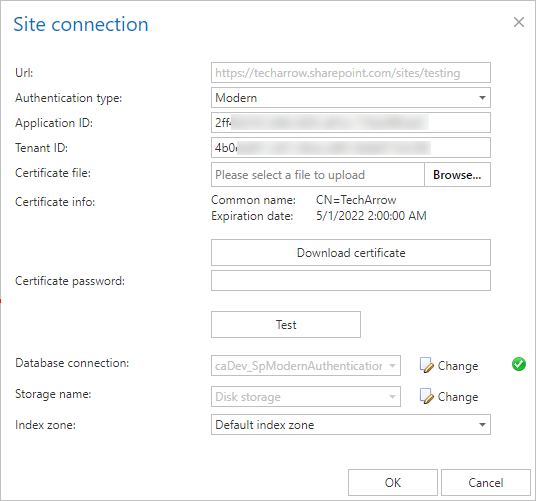
- Authentication type: From this dropdown list, you can select one of the three authentication types: Basic, Integrated and Modern.
- Database connection: The database where the archived data will be stored
- Storage name: The storage where the binaries will be stored
Basic authentication
With this authentication, you will need to enter your username and password that will be used to access the specified SharePoint site.
- User name: The name of the user who’s got the rights to access the site collection, subsite, library or the folder
- Password: The password of the above specified user
- Confirm password: Re-enter the password
Integrated authentication
The user’s current Windows identity will be sent to the SharePoint server and used for authentication.
Modern authentication
The modern authentication applies to Microsoft 365. You can check the Prerequisites for Microsoft 365 archiving here.
Application ID: the ID of the registered Azure application
Tenant ID: the tenant/directory ID of the Azure tenant, can be acquired from the Azure app Overview page
Certificate file: .pfx file, which contains the private and public key of the certificate. Must be the same certificate as the .cer file that has been uploaded to Azure during app registration. The app can be registered by using this PowerShell script too.
Certificate password: the password for the .pfx file.
Important: contentACCESS supports also AAD groups in Sharepoint archive. This support works only with Modern authentication.
Note: It is recommended to add a site collection or subsite as a site connection, the libraries, folders etc. can be specified later as a relative URL on the respective archive jobs’ configuration page.
To view the details and archive statistics of the selected site connection, click on Details in its context menu.
Details:
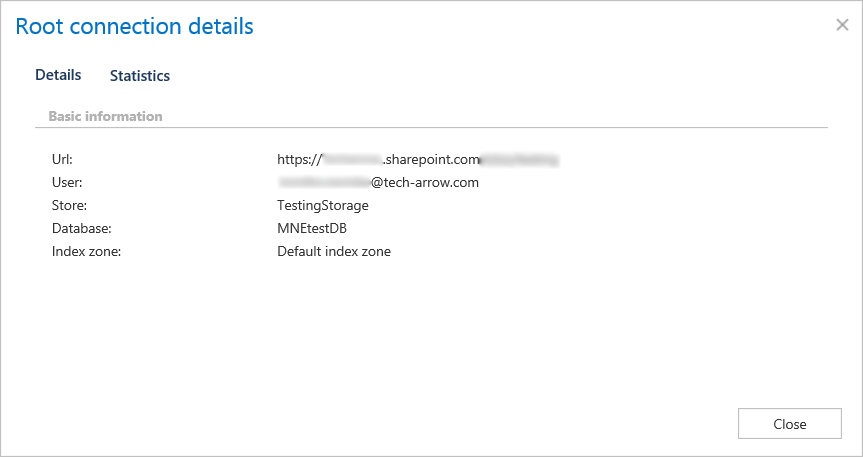
URL – URL of the site connection
User – the username used when connecting to the SharePoint site
Store – store assigned to the connection
Database – database assigned to the connection
Index zone – index zone assigned to the connection
Statistics:
Statistics show archived folders count, document count and total size of the files that were ar-chived.