Amazon S3
Introduction
Amazon S3 (Simple Storage Service) is a cloud-based storage solution by Amazon Web Services (AWS) that allows you to store and retrieve any amount of data from anywhere on the web. It is highly scalable, durable, and cost-effective, making it suitable for use cases such as backups, archiving, content delivery, and data analytics.
S3 organizes data into buckets, which act like folders, and stores individual files as objects identified by unique keys. It supports flexible storage classes for different needs, from frequently accessed data (S3 Standard) to long-term archiving (S3 Glacier). S3 is also highly secure, offering encryption, access controls, and integration with other AWS services.
Key features include pay-as-you-go pricing and ease of integration with tools and services. It is used for tasks such as hosting static websites, streaming media, and providing storage for applications. Whether you need high-speed access or affordable archival storage, Amazon S3 adapts to your needs, ensuring reliable and secure data management.
This page describes how to configure an Amazon S3 storage in contentACCESS, including the connection settings, bucket configuration, authentication, and the available storage options such as compression, object lock, and single instancing.
Configure the Amazon S3 storage
General settings
Configure the following general settings:
- Storage name: The name of the storage.
- Type: Set to Amazon S3.
- Role: None or Primary.
- Status: Enabled, Disabled, Unavailable, or Removed.
- Priority: The priority of the storage.
For more information about Role and Status, refer to the Storages chapter of the documentation.
Once the storage Type is set to Amazon S3 and the Role and Status are configured, you can select Amazon S3 from the service dropdown menu.
Service endpoint
The storage connects to the endpoint you select for a specific service. In contentACCESS, the service endpoints for Amazon Simple Storage Service and Alibaba Cloud Object Storage, which also uses the Amazon S3 interface, are preconfigured.
If you want to use a different cloud service that supports the Amazon S3 interface, select Custom service URL as the service and enter a custom URL for that service endpoint.
Bucket and authentication
- Bucket name: The name of the bucket used to store objects in Amazon S3. Ensure that the bucket already exists in your AWS account and that it is located in the selected region.
- Access Key: Used together with the Secret Access Key to authenticate the caller with the cloud service. This value is provided by the cloud storage service.
- Secret Access Key: Used together with the Access Key to authenticate the caller with the cloud service. This value is provided by the cloud storage service.
Additional storage options
This store type also supports:
-
Compression: All files larger than 4 kilobytes are compressed, except for already compressed file formats such as JPG, MP3, etc.
-
Enable Object lock: S3 Object Lock is a bucket-level setting that, once enabled, allows you to make objects immutable. You cannot use Object Lock features, such as setting retention periods or legal holds on individual objects, unless Object Lock is first enabled on the bucket itself.
When this option is enabled, contentACCESS verifies whether Object Lock is enabled on the target S3 bucket and throws an error if it is not. Retention settings are written to the bucket objects only if this checkbox is selected.
In environments using single instancing, the longer retention period is always applied and preserved across all instances. The retention changer function also works correctly in this mode, which is why Governance Object Lock is used in this setup.
warningImportant: Enabling Object Lock is a permanent action for a bucket. Once enabled, it cannot be disabled.
-
Use single instancing: Keeps only one copy of the physical file in the store.
-
Ignore SSL errors: The system bypasses and does not validate SSL/TLS certificate errors.
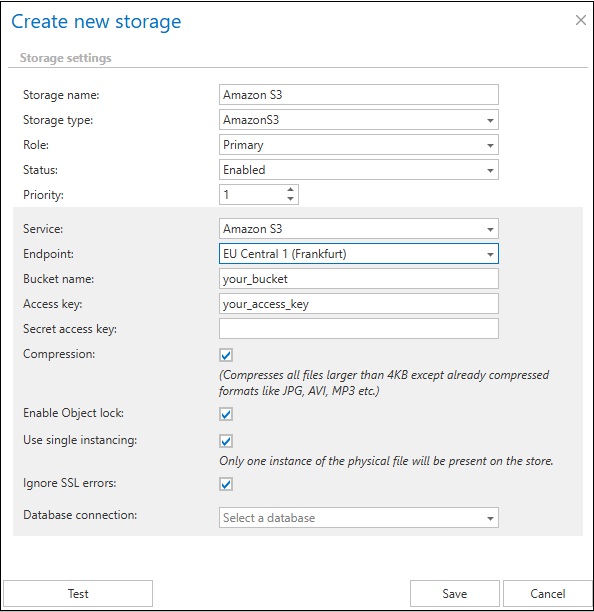 Screenshot 01 – configuring Amazon S3 storage with Amazon S3 service
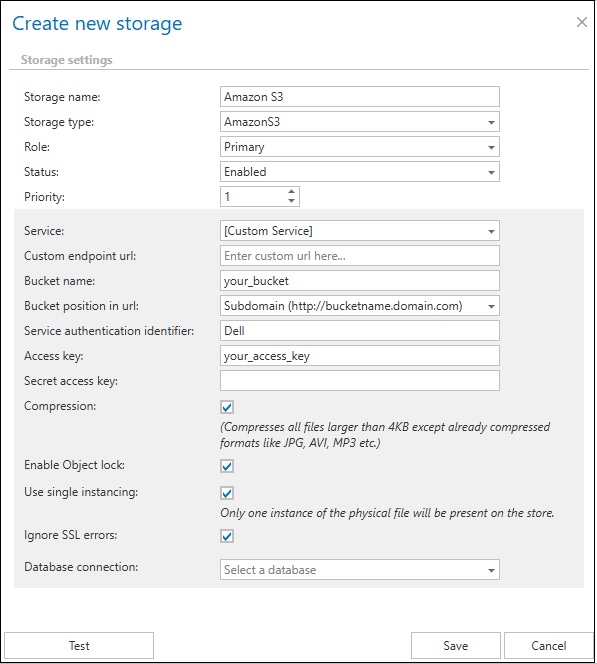 Screenshot 02 – configuring Amazon S3 storage with custom service