HybridStore
Introduction
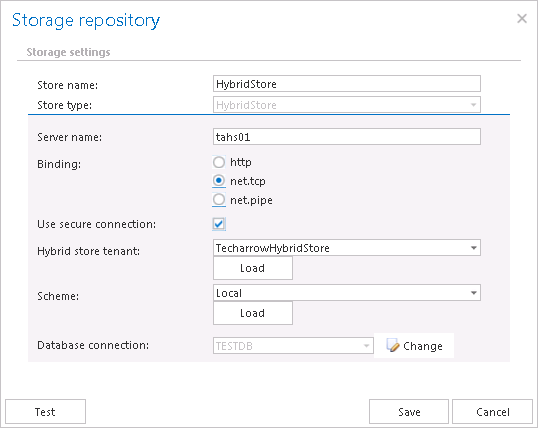
The HybridStore store type allows contentACCESS to connect to any third-party storage supported by the Hybrid Store. This page describes the connection settings required to configure a Hybrid Store as a storage target in contentACCESS.
If you want to store binaries in the Hybrid Store, select HybridStore from the Store type dropdown list and specify the required connection settings, described below.
Configure the Hybrid Store connection
- Store name: Optional name for the Hybrid Store that contentACCESS will use.
- Store type:
HybridStore. - Server name: The server where the Hybrid Store is installed.
- Binding: The protocol used to communicate with the Hybrid Store.
- http – Universal protocol.
- net.tcp – Can be used only if the Hybrid Store and contentACCESS are in the same domain.
- net.pipe – The fastest and recommended protocol. Can be used only if the Hybrid Store and contentACCESS are installed on the same server.
- Use secure connection: Check this option to allow a secure connection with the Hybrid Store. The communication will be secured by Windows authentication, using the contentACCESS service user.
Load the Hybrid Store tenant
Click Load next to Hybrid store tenant to load the list of available tenants based on your Hybrid Store configuration, and select the one that should be applied.
Loading the tenant list requires:
- A net.tcp or net.pipe connection. Loading is not supported over http.
- The contentACCESS service user must be a local system administrator on the Hybrid Store server.
Note: If the tenants cannot be loaded, you need to enter the Hybrid Store tenant ID (GUID) manually.
Load the scheme
Click Load next to Scheme to load the available Hybrid Store schemes and select the one that should be applied.
Note: If the Hybrid Store uses a secure connection and the Use secure connection option is not checked in the dialog, the schemes will not be loaded.
Configure database settings
Under Database settings, select an already created database that contentACCESS will use to store the necessary data.
Important: It is not recommended to change the database that is already configured for the Hybrid Store. If it is really necessary, the database can be changed using the Change button.
It is recommended to verify the database connection using the Test button at the bottom of the dialog.