Kendox storage
Introduction
The Kendox storage is a storage type in contentACCESS that can be used for various operations, including email and file archiving, SharePoint archiving, and publishing data into SharePoint libraries and custom lists.
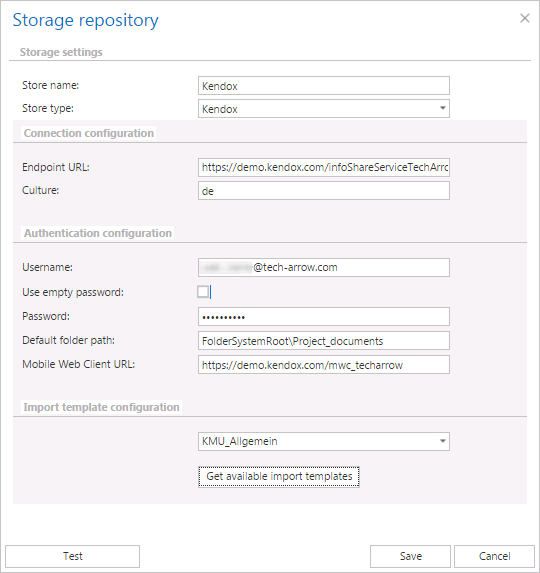
This page describes how to configure a Kendox storage in the Storage repository window, including the connection settings, authentication settings, and import template configuration.
Configure a Kendox storage
In the Storage repository window, select the Kendox store type, name your storage, and configure the connection as described below.
Connection configuration
- Endpoint URL: The Kendox service URL.
- Culture: The language in which folder names and properties are displayed. The value can be a country code (for example,
de) or a combination of language and country code (for example,de-CH).
Authentication configuration
- Username and password: Specify the username and password used to connect to the storage.
- Use empty password: If checked, an empty password string is saved. Otherwise, if the username was not changed, the previously saved password is retained.
- Default folder path: The folder from which data is saved or published during the archiving or publishing process.
- Mobile Web Client URL: This option only needs to be set if the storage is used in a SharePoint Publishing job that is configured to create custom lists with links pointing to the source documents. The URL must be the Kendox Mobile Web Client's URL, where the published documents can be accessed. It is used to generate the retrieve URL of the published document.
Import template configuration
During the archiving process, the import template is used to map metadata between the source document and the newly created document in the Kendox store. Click Get available import templates to retrieve the available import templates.
Note: The import template is only used if the target folder does not have a default import template. Otherwise, it is ignored.