Perceptive storage
Introduction
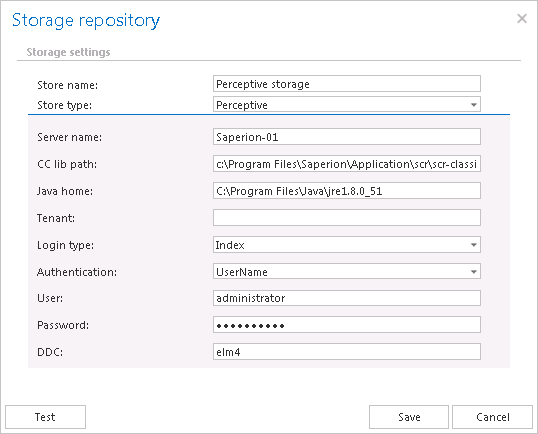
The Perceptive storage type allows contentACCESS to connect to a Perceptive (Classic Connector-based) repository for archiving purposes. This page describes the connection parameters required to configure a Perceptive storage in contentACCESS.
Configure Perceptive storage
After selecting this store type, name the storage. contentACCESS uses this name to identify the storage on the Storages page.
You must then specify the following connection parameters:
- Server name: The server name where the storage is installed.
- CC library path: The path where the Classic Connector jar files can be reached, e.g.
C:\Program Files\SAPERION\Applications\crs\crs-classicconnector\lib. - JAVA_HOME: The Java home directory, set depending on the application bitness (x64 or x86), e.g.
C:\Program Files\Java\jre1.8.0_66. - Tenant: Leave this field blank for a non-multitenant system. Otherwise, specify the Perceptive tenant.
- Login type:
INDEX,ADMIN, orELMcan be used.INDEXis the recommended type. - Authentication: Choose the applicable authentication method from the dropdown list.
UserNameis recommended. - User, Password: The user and credentials to be used for the connection with the storage.
- DDC: The DDC name where the files will be packed.