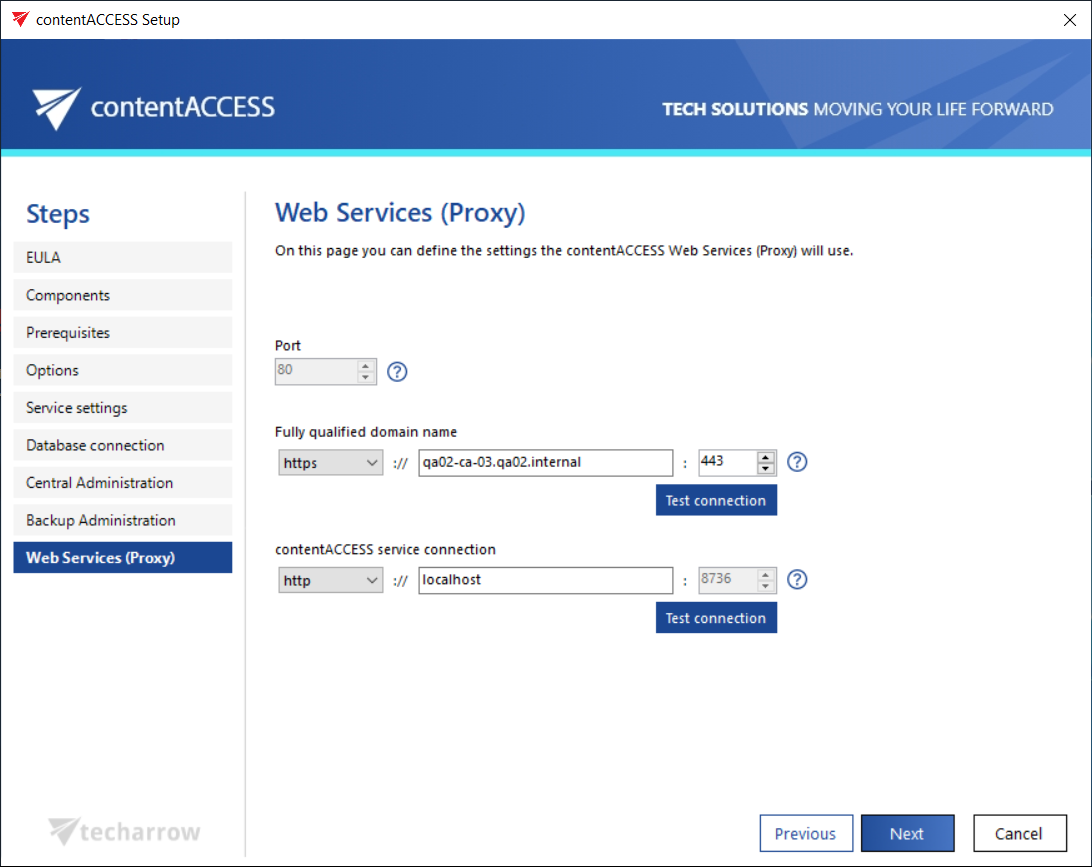
contentACCESS Web Services (Proxy)
Introduction
The contentACCESS Web Services (Proxy) page allows administrators to define the settings used by the contentACCESS Web Services (Proxy) component. The same configuration rules apply here as for the contentACCESS Central Administration settings.
Note: The Proxy server is a must-have tool for customers who have contentACCESS Email Archive (or any other email-based jobs) and want to retrieve their archived emails from shortcuts, or who use contentACCESS Mobile.
Configure contentACCESS Web Services (Proxy)
-
Port: The physical port of contentACCESS Web Services used by the Internet Information Services (IIS) on the current server.
infoNote: It is always a good idea to select
80as the port number, because this port is enabled on the firewall in most cases. -
Fully qualified domain name: The URL must be accessible from everywhere the user connects from. If you want to enable a secure connection for the user, choose
https. Keep in mind that https must be configured manually on the IIS (see contentACCESS Web Services (Proxy) for more information). This value is also used for Email Archive shortcut retrieval.The FQDN defined here is written to the System settings (System tab → Services group → System page, section External accessibility settings: Retrieve server FQDN) in Central Administration, and can be changed from there at any time. By the next update, the setup will automatically read the value defined on the System page.
If Proxy uses https, the FQDN URLs of further contentACCESS components (contentACCESS Portal, Central login page) will automatically be prefilled by the package with an https connection as well.
infoNote: If the user wants to use contentACCESS MailApp, a secure connection (https) must be selected here.
-
contentACCESS service connection: The URL used by the contentACCESS Web Services to communicate with the contentACCESS server. If the contentACCESS server is installed on the same server, you can use
localhostas the host name.infoHint: If the communication port with the contentACCESS server is changed, the communication between the given component and the contentACCESS service is ensured by the contentACCESS Proxy. If the Proxy is not installed and the port is changed, the service connection will not be established. The same rule applies to the connection between the contentACCESS service and other contentACCESS components (in the Central Administration and Central login page setup windows, changing the port number is disabled).