Search service
Introduction
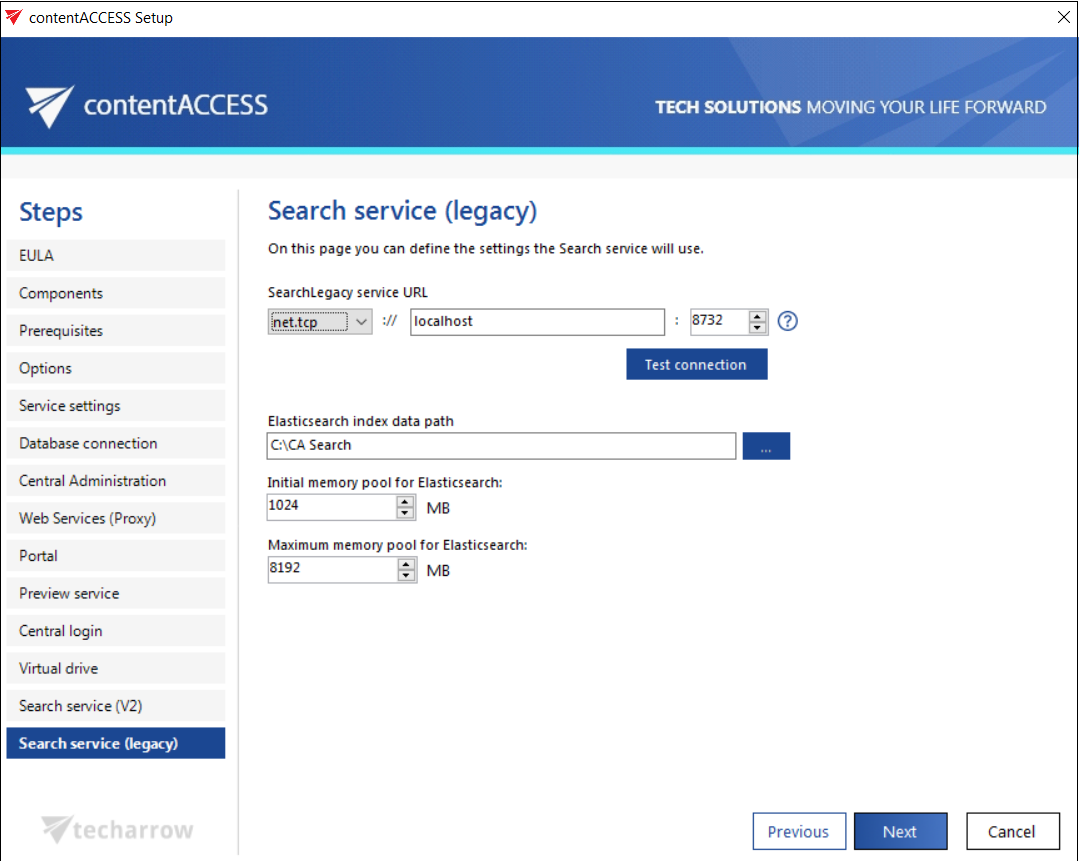
The Search service installation step allows you to configure the settings required for contentACCESS full-text search functionality, including the communication URL, the Elasticsearch index data path, and the memory allocation for the Elasticsearch service.
Note: Java must be installed on the computer where the search components are being installed. For more information, see the Prerequisites section.
Configure the Search service
-
Search service URL: The URL used for communication with the contentACCESS server. Three communication types are supported:
- http: Use this option to establish a direct connection with contentACCESS. If a direct connection is required, do not change the port number prefilled by the setup package (
8736). Changing this port will cause the contentACCESS Proxy connection to be used automatically instead. - https: Use this option to establish a secure connection through the contentACCESS Proxy server.
- net.tcp: Use this option if Virtual Drive and contentACCESS are installed on the same server. This is the fastest and most recommended connection type.
The installation package writes and reads these parameters to and from the Search service settings section of Central Administration (System → Services group → System page) during each installation or product update.
- http: Use this option to establish a direct connection with contentACCESS. If a direct connection is required, do not change the port number prefilled by the setup package (
-
Elasticsearch index data path: The path where the indexes will be saved. This field must be filled in before the installation process can continue.
-
Elasticsearch maximum memory allocation: The maximum amount of memory, in megabytes, that can be used by the Elasticsearch service.