Search service (V2)
Introduction
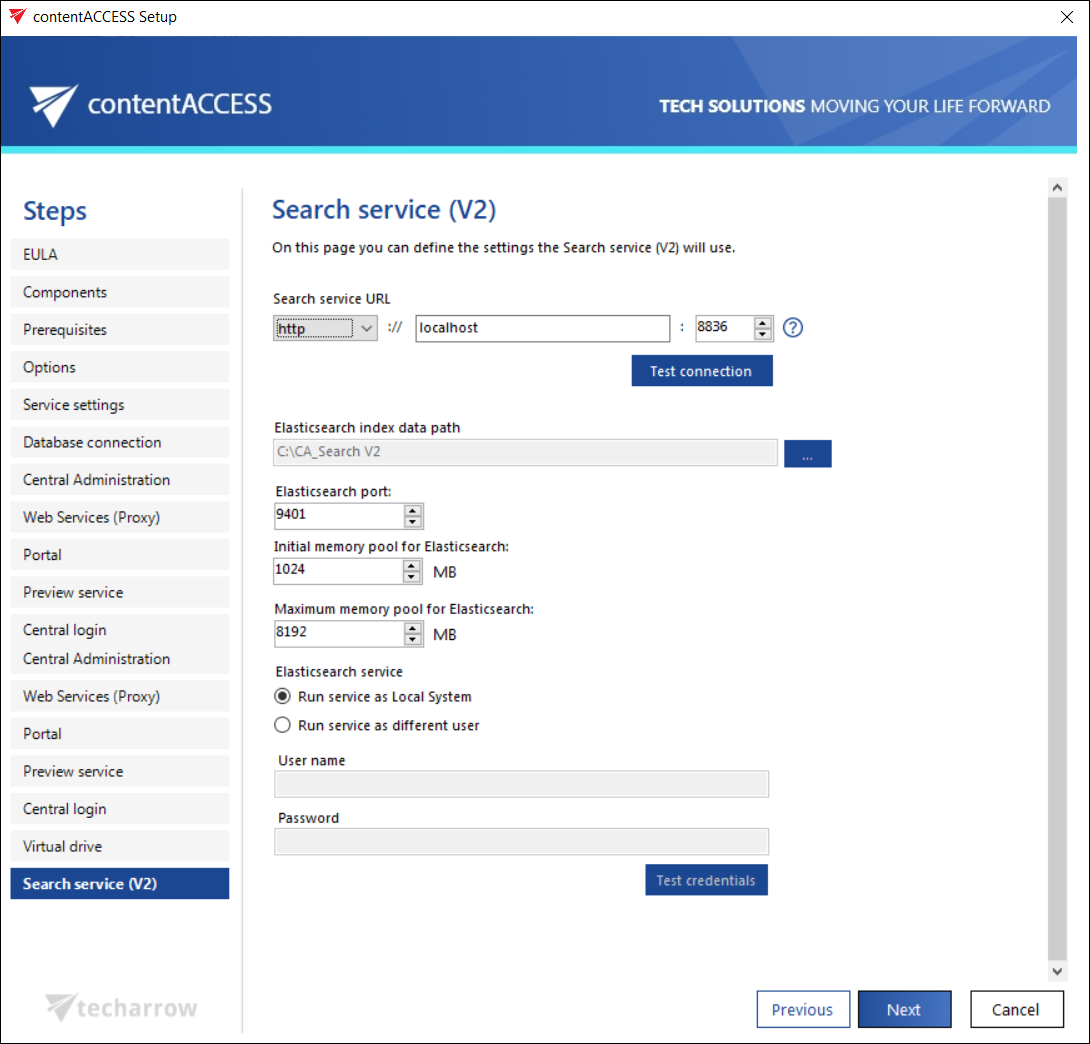
The Search service (V2) installation page allows you to configure the settings required to install and run the Search service (V2) component, which contentACCESS uses for indexing and searching data through Elasticsearch. On this page, you define the connection settings, the index data path, memory allocation, and the user account under which the service will run.
Prerequisites
To use Search service (V2), Java and .NET Framework 6.x must be installed on the computer where the search components are being installed. For more information, see the Prerequisites section.
Configure Search service (V2)
Define the following settings that Search service (V2) will use:
- Search service URL: URL used for communication with the contentACCESS server. Search service (V2) uses the http communication type, which allows you to establish a direct connection with contentACCESS. If a direct connection should be used, do not change the port number prefilled by the setup package (
8836). Otherwise, the contentACCESS Proxy connection will be used automatically. - Elasticsearch index data path: The path where the indexes will be saved. This path must be filled in, or you cannot continue the installation process.
- Elasticsearch maximum memory allocation: The maximum amount of memory, in megabytes, that can be used by the Elasticsearch service.
Also specify the user credentials used to run the Search service (V2). This can be either the Local system user or an explicit user.
The installation package writes and reads these parameters to and from the Search service (V2) settings section of Central Administration (System -> Services group -> System page) during each installation and product update.
Important: The two search services need to run on different ports and different paths. Otherwise, the indexes will conflict.