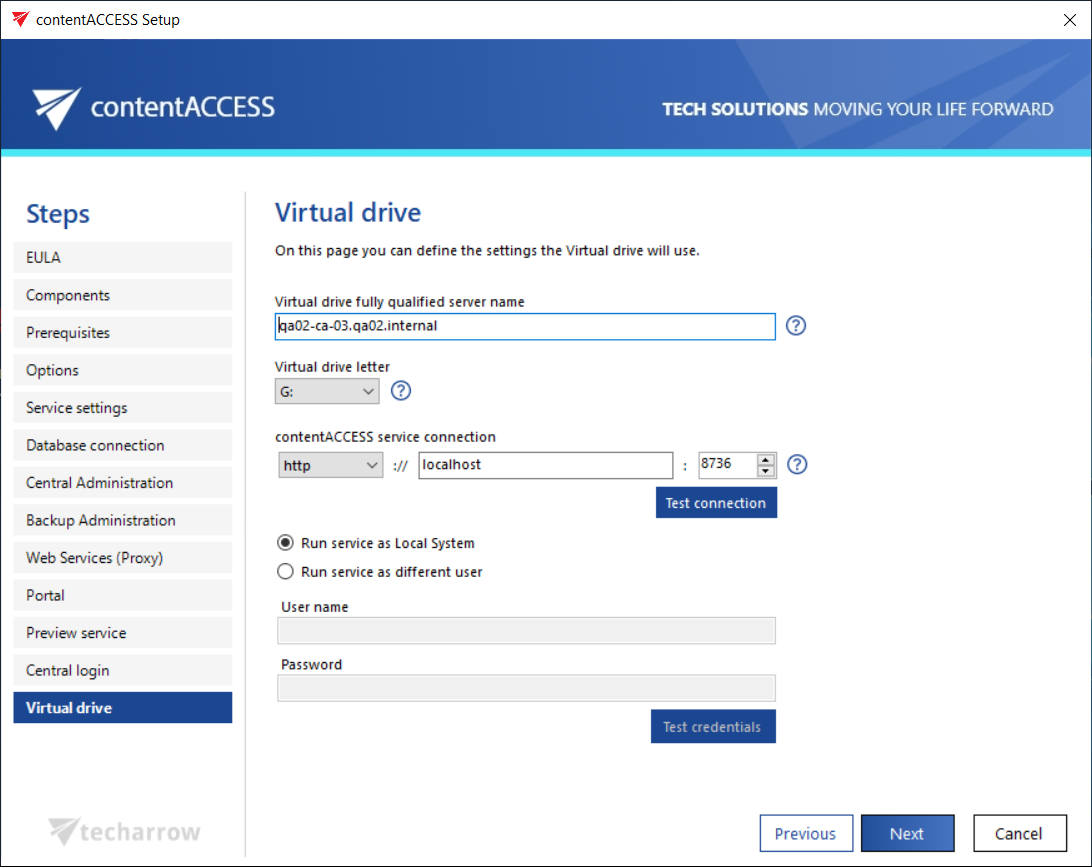
Virtual drive
Introduction
The Virtual drive configuration defines the settings used by the Virtual drive component to publish archived files as a mapped drive and to communicate with the contentACCESS server. This page describes the available configuration options, the supported communication types, and the credentials used to run the Virtual drive service.
Configure Virtual drive settings
- Virtual drive fully qualified server name: This value is used to retrieve archived files from shortcuts.
- Virtual drive letter: The drive letter used for publishing the virtual drive content (the archived files).
- contentACCESS service connection: The URL used for communication with the contentACCESS server. Three communication types are supported:
- http: Use this option to establish a direct connection with contentACCESS. If a direct connection is required, do not change the port number prefilled by the setup package (
8736); otherwise, the contentACCESS proxy connection will be used automatically. - https: Use this option to establish a secure connection through the contentACCESS Proxy server.
- net.pipe: Use this option if Virtual drive and contentACCESS are installed on the same server. This is the fastest and most recommended connection type.
- http: Use this option to establish a direct connection with contentACCESS. If a direct connection is required, do not change the port number prefilled by the setup package (
info
Note: The installation package writes and reads these parameters to and from the Virtual drive configurations page in Central Administration (System tab → Client applications group → Virtual drive configurations page) during each installation or product update.
Configure service credentials
Specify the user credentials used to run the Virtual drive service. You can select either:
- Local system user, or
- An explicit user account.