Datengut job
Introduction
The Datengut job is a custom job that connects the Datengut Document Management System with officeGATE. Depending on its configuration, a Datengut job allows officeGATE users to:
- Collaborate on Datengut files using officeGATE.
- Collaborate on Datengut files using officeGATE and synchronize email categories across multiple mailboxes when the same email is assigned to one Datengut project using officeGATE.
This page describes the configuration settings available for a Datengut job, including login provider configuration, access management, and email synchronization.
Configure the Datengut job
If the Datengut job has not been created yet, refer to Creating new jobs in contentACCESS for instructions. If the job already exists, open its page to configure it.
Login provider configuration settings
Select the Datengut login provider that you have already configured in System ⇒ Security ⇒ Login providers. For more information about creating a login provider, refer to contentACCESS users in third party systems.
Access management
- To grant Datengut access to additional contentACCESS users, click Edit user permissions and configure a new user.
- To synchronize email categories across multiple mailboxes, check the Enable mailbox synchronization checkbox. If you do not want to synchronize emails, leave this checkbox unchecked and save your configuration.

Email synchronization
When email synchronization is enabled, the Datengut job updates the Email synchronizer job's queue with information about whether a given category should be added to or deleted from a given email. When a user drags and drops (assigns) an email to a Datengut project in officeGATE, the Datengut job periodically updates the necessary data in the queue.
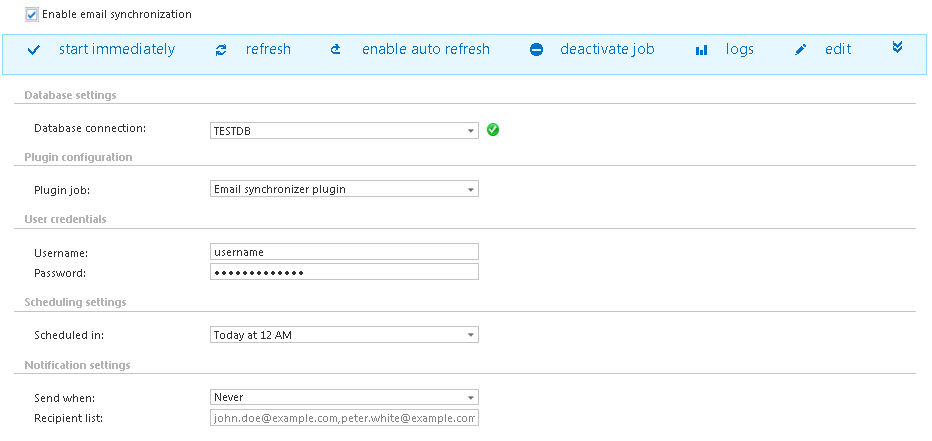
To enable email synchronization, configure the following additional settings:
- Database connection: Select the database where the Datengut job will write the metadata.
- Job: Select the already configured Email synchronizer job. For more information, refer to Email synchronizer job.
- Username, Password: Specify the user credentials used to connect to the Datengut system.
- Scheduled in: Set the scheduler that will trigger the job at the given time intervals.
- Notification settings: Configure a recipient list here if you want to receive emails about any warnings or errors.