Database and store assignment in email archiving
Introduction
This page explains the concept of database and storage assignment for mailboxes in email archiving, and how contentACCESS determines which database and storage a mailbox's archived data is stored in.
When the provisioning job synchronizes contentACCESS with the Exchange server, it adds mailboxes to the contentACCESS address book. At this point, these mailboxes are unassigned — they do not belong to any archive and have not yet been archived. This page describes how mailboxes become assigned to a database and storage, how to view and change this assignment, and why changing it is not recommended.
What "assigned to a database and storage" means
If the database and storage fields for a mailbox are empty, this indicates that the mailbox has never been archived by contentACCESS. Before the email archiving process starts, a database and storage should be assigned to the mailbox.
There are multiple ways to assign a mailbox:
- Go to Jobs and start the job. This assigns the mailboxes associated with the job to the storage and database configured in that job.
- Navigate to Email Archive ⇒ Archive ⇒ View address book and manually assign the mailboxes to databases and storages.
Automatic assignment
When something is archived from a mailbox for the very first time, the job automatically assigns the mailbox to the database and storage configured in that job. From this point onward, the mailbox belongs to that database and storage, and anything newly archived from it will go to the same database and storage.
It does not matter if the job settings are changed later on: the mailbox is already assigned and will always archive to the assigned database and storage, regardless of how the job is subsequently configured.
Note: This behavior might be confusing for the administrator, but it prevents a disaster: a mailbox should not have part of its data in a different database or storage. This also means it is possible to safely move mailboxes between groups without the risk that the same mailbox will be archived into two different databases or storages. A database and a storage can be associated with Exchange groups, or with a single mailbox.
Viewing the assignment
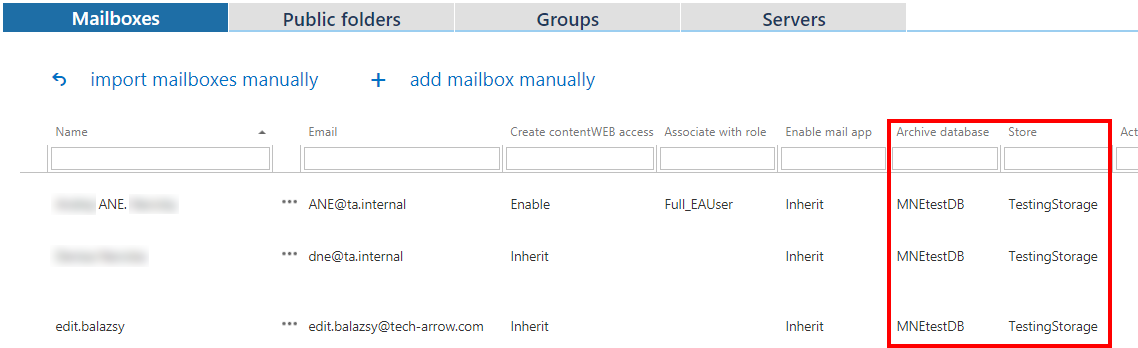
The administrator can see in the address book which mailbox belongs to which database and storage. This information is displayed on the right side of the corresponding mailbox row.
Changing the assignment
It is possible to change the database and storage assignment manually, as described above, but this is not recommended.
The reassignment of mailboxes is still allowed for the following reasons:
- It makes it possible to manually set the unassigned mailboxes if an archiving job is not currently running.
- It is a must-have tool if you want to select one (or just a few) mailboxes from a group to be associated with a different database. In this case, before starting the archiving process, you can assign one database to the whole Exchange group, then select one or a few mailboxes from this group and assign them to another database manually.