Hybrid Exchange Server configuration
Introduction
The Hybrid Exchange settings allow administrators to configure a connection to an on-premises Exchange Server together with a connection to Microsoft 365. When an on-premises Exchange Server is connected with a Microsoft 365 tenant, this setup is referred to as a Hybrid Exchange environment.
This page explains how the two connections relate to each other and how to extend an existing on-premises Exchange Server configuration with a Microsoft 365 connection to complete the hybrid setup.
Note: Hybrid Exchange configuration is also available for Hosted Exchange. The Hosted Exchange configuration is described on the Hosted Exchange configuration page.
Microsoft Graph and EWS considerations
For the Microsoft 365 part of a hybrid setup, contentACCESS uses EWS to connect to Microsoft 365. However, Microsoft has announced the retirement of EWS access for Microsoft 365, starting in October 2026 (see the official Microsoft announcement).
The replacement for EWS is Microsoft Graph, which contentACCESS now supports for connecting to Microsoft 365, with some limitations. For more details about these limitations, see Switching Microsoft 365 from EWS to Microsoft Graph.
Note: Graph access is currently in preview (Beta).
Configure the Hybrid Exchange environment
The two connections that make up a Hybrid Exchange environment are configured independently. Start with the on-premises Exchange connection, then extend it with the Microsoft 365 part.
The on-premises Exchange configuration is described on the On-premises Exchange Server configuration page.
To add the Microsoft 365 connection to the existing on-premises setup, activate the Hybrid Exchange settings section by enabling Use hybrid Exchange environment. The Microsoft 365 configuration in a hybrid environment follows the same steps as a standard Microsoft 365 connection, described on the Microsoft 365 configuration page.
The following screenshots show example configurations of the Hybrid Exchange settings section — one using EWS and one using Microsoft Graph.
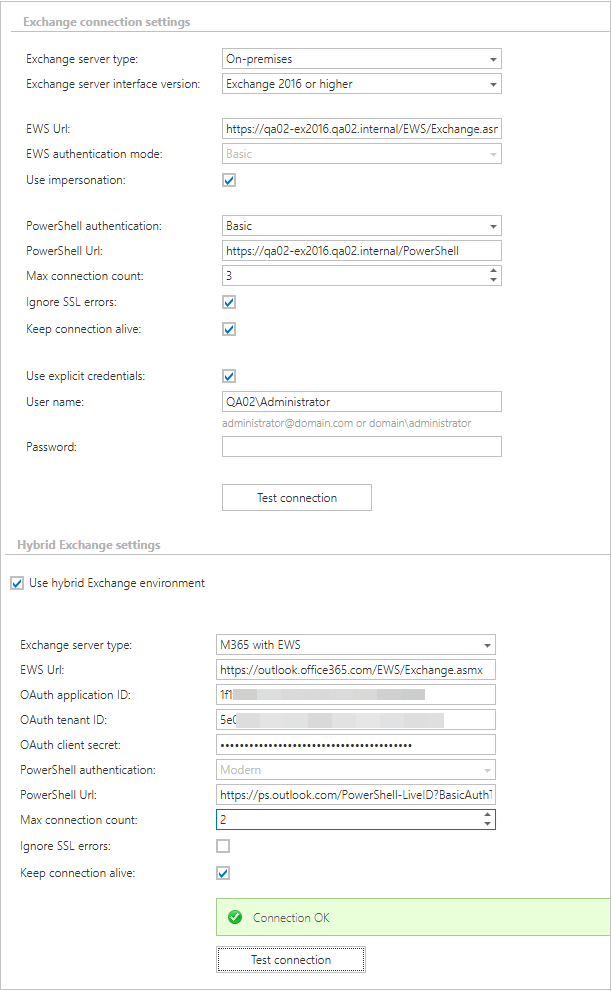 Screenshot A: Hybrid Exchange environment with EWS
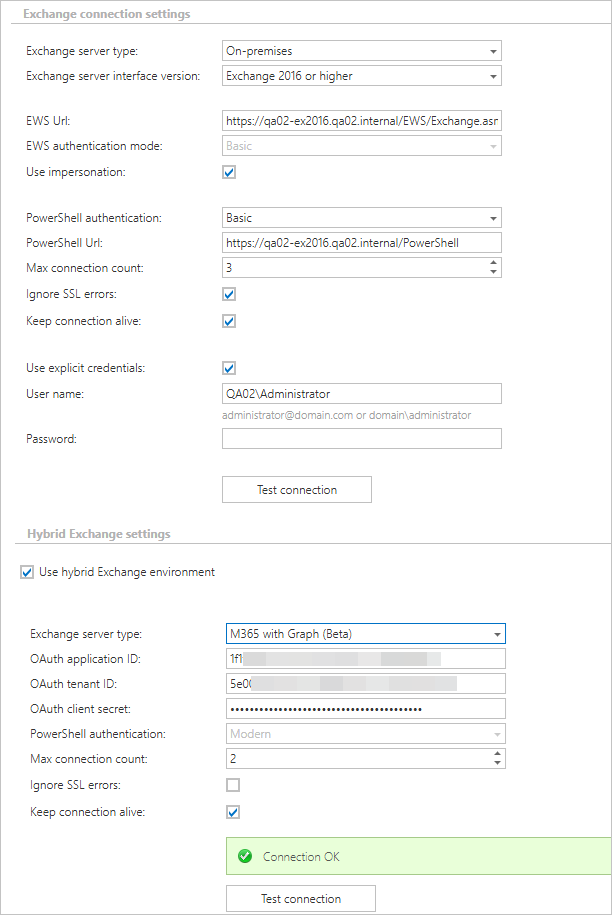 Screenshot B: Hybrid Exchange environment with Microsoft Graph