Microsoft 365 configuration
Introduction
The Microsoft 365 configuration settings allow administrators to configure the connection between contentACCESS and Microsoft 365 (Exchange Online), using either EWS or Microsoft Graph.
contentACCESS currently uses EWS to connect to Microsoft 365. However, Microsoft has announced that EWS access for Microsoft 365 will be retired starting in October 2026 (see the official Microsoft announcement). The replacement for EWS is Microsoft Graph, which contentACCESS now supports for connecting to Microsoft 365, with some limitations.
Microsoft has also introduced the EWSAllowedAppIDs setting as part of the transition from EWS. This tenant-level allow list allows administrators to specify which applications are permitted to continue accessing EWS in Exchange Online. This means that EWS can still be used for applications that require it, provided that the required App ID is included in the allow list. For more information about configuring this setting for contentACCESS, see How to allow EWS access in Exchange Online after October 2026.
Before you begin with the configuration, make sure to create the Entra ID application as described here.
Note: Microsoft Graph access is currently in preview (Beta). For more details about the current limitations, see Switching Microsoft 365 from EWS to Microsoft Graph.
This page describes how to configure:
- Microsoft 365 with EWS.
- Microsoft 365 with Microsoft Graph (Beta).
Prerequisites
Before configuring the connection to Microsoft 365, create the required Entra ID application as described in Azure app registration for Microsoft 365 archiving.
Note: The Entra ID app can also be registered by using this PowerShell script.
Configure Microsoft 365 with EWS
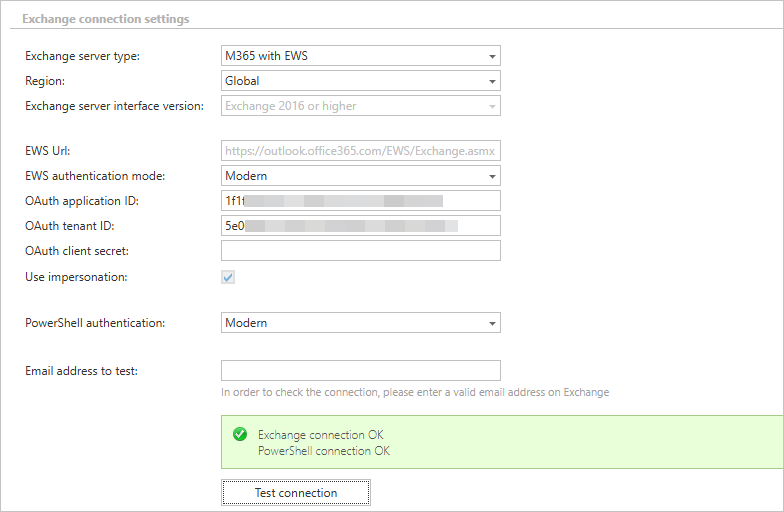
To configure EWS for Microsoft 365, select M365 with EWS as the Exchange server type.
- Region: Set to Global. Since Microsoft stopped supporting regions, it is no longer recommended to select a different region.
- Exchange server interface version: Set to Exchange 2016 or higher by default for Microsoft 365.

Enter the EWS URL in the following format: https://servername/EWS/Exchange.asmx.
The EWS authentication mode still supports "Basic" authentication, but Microsoft blocks all Basic authentication requests on Microsoft 365, so "Modern" authentication should be used instead.
Modern authentication uses the Entra ID app registration. Enter the following app registration details:
- OAuth application ID: The ID of the app registration.
- OAuth tenant ID: The ID of the Microsoft 365 tenant (also present in the app registration).
- OAuth client secret: The secret key created for the app registration.
EWS access also requires the application ID to be added to the EWSAllowedAppIDs allow list as described in How to allow EWS access in Exchange Online after October 2026.
The Use impersonation option is always enabled and cannot be changed.

For PowerShell access, it is recommended to set PowerShell authentication to "Modern", which uses the same app registration as EWS.
It is recommended to test the connection after each change. Both the EWS and PowerShell connections are tested, and testing requires a valid email address. If the PowerShell connection is working, it automatically finds a random mailbox in the organization and uses it for the test. If that mailbox is not valid, the test might fail — in that case, enter the email address manually in the Email address to test field.
Configure Microsoft 365 with Graph
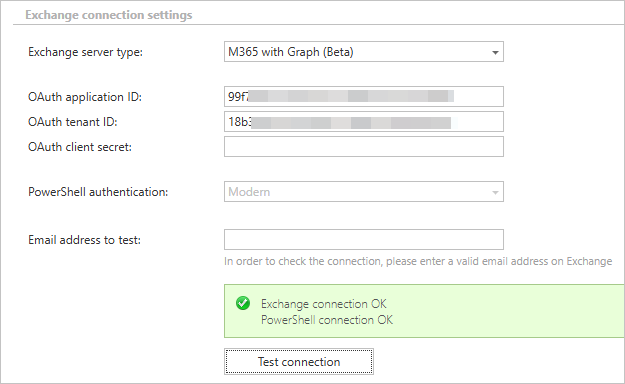
To configure Microsoft Graph for Microsoft 365, select M365 with Graph (Beta) as the Exchange server type.
Microsoft Graph requires an Entra ID app registration. Enter the following app registration details:
- OAuth application ID: The ID of the app registration.
- OAuth tenant ID: The ID of the Microsoft 365 tenant (also present in the app registration).
- OAuth client secret: The secret key created for the app registration.

For PowerShell access, PowerShell authentication is set to "Modern" and uses the same app registration as Graph.
It is recommended to test the connection after each change. Both the Graph and PowerShell connections are tested, and testing requires a valid email address. If the PowerShell connection is working, it automatically finds a random mailbox in the organization and uses it for the test. If that mailbox is not valid, the test might fail — in that case, enter the email address manually in the Email address to test field.
Note: When working with Microsoft 365, it is recommended to configure the Microsoft 365 login provider in contentACCESS. Users will then use Microsoft 365 authentication to log in to contentACCESS. The email archive will create the Microsoft 365 logins for the users and synchronize the permissions based on these logins.