Switching Microsoft 365 from EWS to Microsoft Graph
Introduction
Switching Microsoft 365 from EWS to Microsoft Graph describes the migration path required for contentACCESS to continue connecting to Microsoft 365 after Microsoft retires Exchange Web Services (EWS).
contentACCESS currently uses EWS to connect to Microsoft 365. Microsoft has announced the retirement of EWS access for Microsoft 365, starting in October 2026 (see the official Microsoft announcement). The replacement for EWS is Microsoft Graph, which contentACCESS now supports for connecting to Microsoft 365, subject to certain limitations.
Note: Microsoft Graph access is currently in preview (Beta).
This page explains:
- how to update or create the Entra ID app required for Graph access;
- how to switch existing Microsoft 365 connections from EWS to Graph;
- the current limitations of the Microsoft Graph connection.
Entra ID app (update or create)
contentACCESS uses an Entra ID app to access Microsoft Graph. This app is similar to the app used for EWS modern authentication.
If you already have an Entra ID app registered for EWS, you can reuse it by extending its list of permissions. The following Graph Application permissions need to be added to the app:
- Mail.ReadWrite
- Mail.Send
- MailboxFolder.ReadWrite.All
- MailboxItem.ImportExport.All
- MailboxItem.Read.All
- MailboxSettings.Read
- Calendars.ReadWrite
- Contacts.ReadWrite
- Tasks.ReadWrite.All
- User.Read.All
If you do not yet have an Entra ID app, create one by following the Microsoft Entra ID app registration documentation. The app created following this documentation already includes all the necessary permissions.
Update Exchange connections
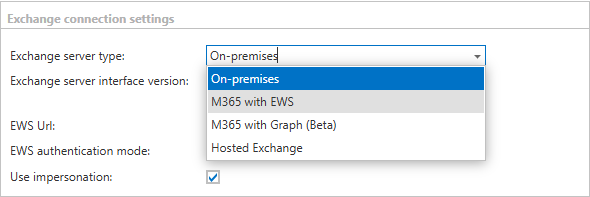
The switch from EWS to Graph does not happen automatically. Each Microsoft 365 connection must be edited manually to change M365 with EWS to M365 with Graph.
This setting can be found in the following two sections:
- Email archive - System settings
- System - Notifications (if the notification was using EWS instead of SMTP)
Limitations
The Microsoft Graph connection currently has the following known limitations.
In-place archives
Microsoft has announced General Availability for in-place archive mailbox access in Microsoft Graph worldwide beginning in late October 2026 and expected to complete by early November 2026. Until this support is actually available, contentACCESS is not able to archive in-place archive mailboxes using Graph.
Public folders
Microsoft Graph does not provide access to public folders, and most likely will not provide this access in the future, as Microsoft is moving customers away from public folders and has no plans to support them further. contentACCESS is not able to archive public folders using Graph.
Restore and recovery of calendar items
Due to a known limitation in Microsoft Graph, it is currently not possible to create a calendar item with full fidelity. As a result, recovery of calendar items is not currently working.
Note: TECH-ARROW is working on a solution or workaround to restore this functionality.
Calendar, contact, and task items in mail folders
Outlook and EWS allowed users to store calendar, contact, and task items inside a mail folder. These items are no longer accessible through Graph. Graph can only access calendar items inside a calendar, contacts in the contacts folder, and tasks in task folders.
Folder permission synchronization
Microsoft Graph has limited support for folder-level permissions. Permissions are accessible, but only the display name of the objects is available. This may lead to limited functionality when two users share the same display name, and some shared folders might not appear in the contentACCESS Portal for certain users.