Google settings
Introduction
To connect contentACCESS to Google Workspace, configure the required tenant and authentication details on this page. This defines which Google Workspace environment contentACCESS connects to and which credentials are used to access Gmail and related directory information.
After the credentials are validated, the integration can be activated to enable the Google provisioning process and the related functionality.
Connection settings
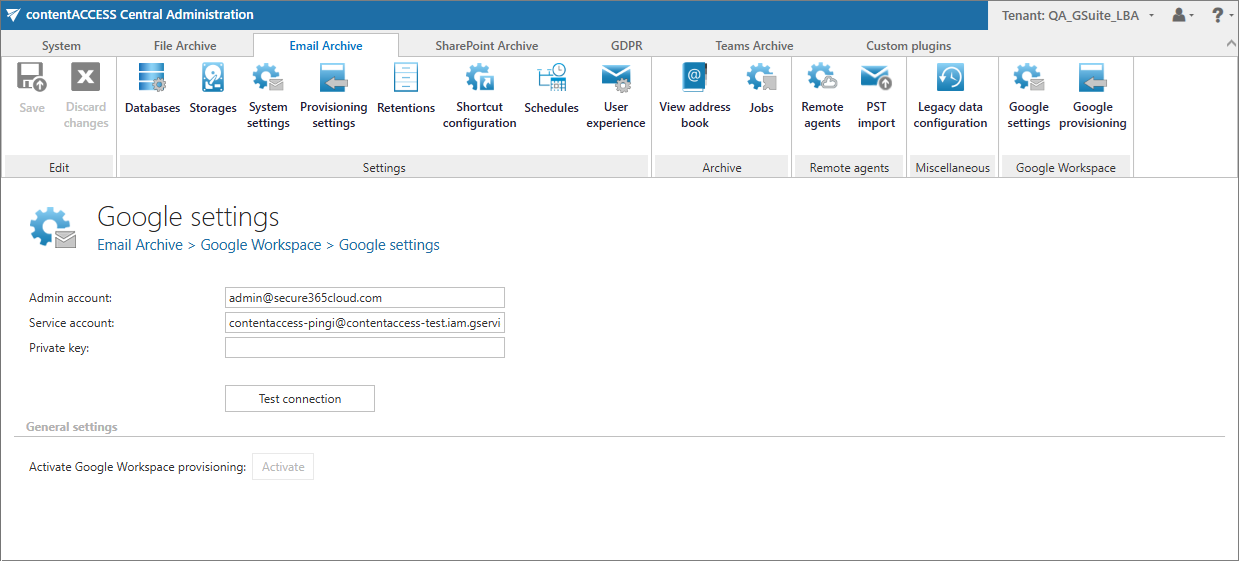
The form contains the main authentication parameters needed to connect contentACCESS to Google Workspace:
- Admin account: the Google Workspace administrator account used for the integration.
- Service account: the service account contentACCESS uses to access Google Workspace resources.
- Private key: the private key associated with the service account for secure authentication.
- Test connection: validates whether the configured credentials are correct and whether the system can connect successfully to Google Workspace.
General settings
This section contains the provisioning option:
- Activate Google Workspace provisioning: enables the synchronization of Google Workspace objects and related provisioning functions. After a successful configuration, click Activate. The Google provisioning tab appears only after activation. Once the integration has been activated, the Activate button becomes grayed out and inactive, and the Google provisioning tab cannot be deactivated.