Remote agents (email archive)
Introduction
The Remote agents tab under Email Archive lists the remotely installed agents used to archive files located on network shares or to upload PST files for later import. From this tab, administrators can download the Remote File Archiving agent setup, the contentACCESS Proxy setup, and agent configuration files, as well as manage the archiving rules assigned to each registered agent.
To access this tab, go to Email Archive -> Remote agents -> Remote agents.

Downloadable components
From this tab, you can download the following components:
- The Remote File Archiving agent (application) setup.
- The contentACCESS web services (Proxy) setup.
- The agent configuration file (
.XML).

Remote File Archiving agent
The Remote File Archiving agent is used to archive files that are not accessible to the contentACCESS server, and for which no regular archiving job can therefore be defined, or to upload PST files to be later used for PST import.
After the agent has been installed and configured on a computer (for more information, see the Remote File Archiving manual), it appears in the agent list and can be configured either from the Remote File Archiving client application locally or by using contentACCESS Central Administration.
contentACCESS Proxy
The contentACCESS Proxy is a web service that ensures communication between front-end applications and the contentACCESS server through a secure channel (using the HTTPS protocol, if configured that way). It forwards application requests to the contentACCESS server and isolates the server from the outer world.
Agent configuration
Since the agent configuration file can be downloaded directly from Central Administration, it is easy to install remote agents using GPO.
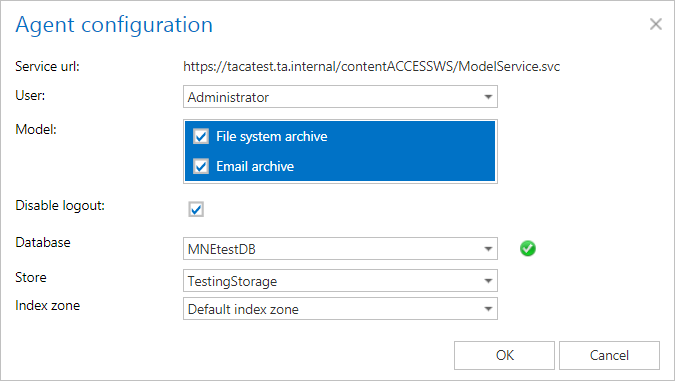
To configure the agent configuration file:
- Select the User the agent will log in under.
- Select the Models that define the features supported by the agent.
- Optionally, enable the Disable logout checkbox to prevent the logout option.
- Select a Database, Storage, and Index zone from the respective dropdown lists.
Refresh
Use Refresh to reload the list of remote agents.
Remote File Archiving configuration
Note: The agent must first be installed and registered; otherwise, the list will be empty.
Clicking the context menu of a selected agent displays the list of rules assigned to that agent. The RFA rule is identical to the File archive job configuration.
The context menu of the agent also allows you to:
- Assign a database, storage, and index zone.
- Enable or disable the agent.
- Create a new rule.
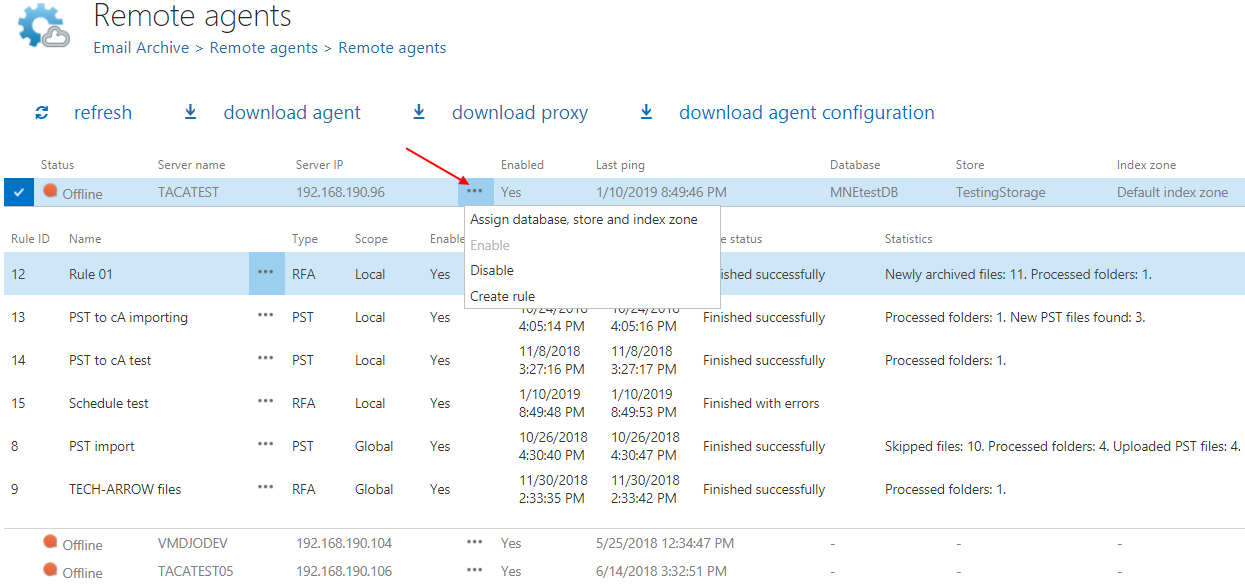
The context menu of a rule allows you to edit it, configure its settings, or delete it. Note that a PST rule can only be configured.

Note: For more information about Remote agents and Remote File Archiving, see the Remote File Archiving manual.