User experience
Introduction
The User experience page in Central Administration allows administrators to configure and install the client-side extensions used to access archived emails directly from Microsoft Outlook and Outlook Web App (OWA). From this page, administrators can install OWA 2010 integration, contentACCESS MailApp, and officeGATE, depending on the Exchange version in use.
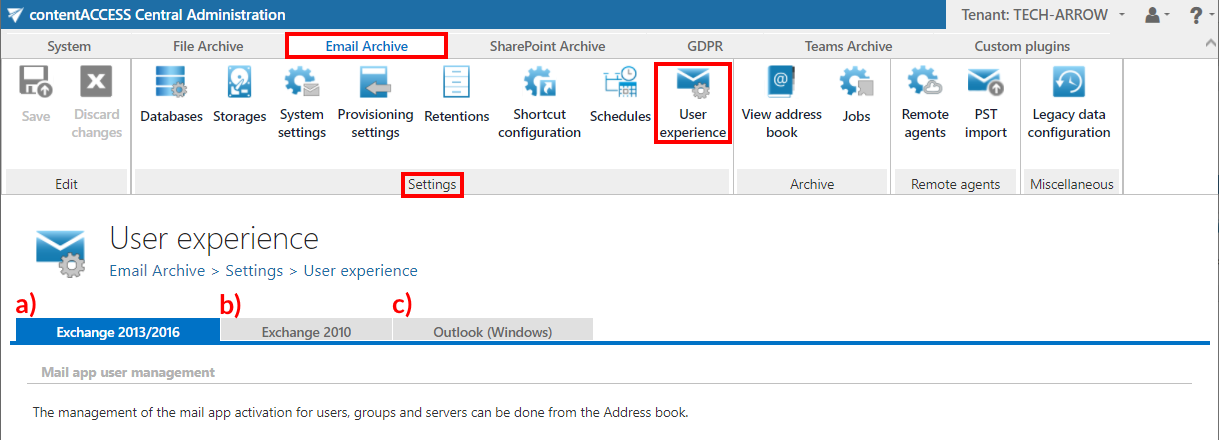
Access the page by navigating to Email Archive ⇒ Settings ⇒ User experience on the ribbon.
Exchange version and shortcut access
contentACCESS Email Archive can archive emails from Exchange 2010 or Exchange 2013 (or higher). The exact Exchange version used is the one configured on the Email Archive's System settings page, under the EWS settings section.
Items archived and replaced with shortcuts can be accessed from both the MS Outlook desktop version and OWA, provided the appropriate extension is installed:
- OWA 2010 integration for OWA 2010.
- contentACCESS MailApp for OWA 2013 (or higher) or MS Outlook desktop version 2013 (or higher).
Items archived with Metalogix Archive Manager Exchange Edition (MAM EE) and Email Lifecycle Manager (ELM) can also be retrieved. To retrieve MAM EE and ELM shortcuts, the corresponding legacy retrieve service must be installed and configured in contentACCESS. For more information, see Legacy email archive connectors.
Available tabs
The User experience page contains three tabs, depending on the Exchange version and client used.
Exchange 2013/2016
If this version is used, you may use contentACCESS MailApp with OWA 2013 (or higher) and the MS Outlook desktop version (2013 or higher) directly. This allows manual archiving of mailbox items and manual restoring of shortcuts directly from the mailbox.
Emails and attachments archived with MAM EE and ELM can also be opened from the legacy shortcuts, provided the legacy retrieve service is installed and configured. For more information, see Legacy email archive connectors.
Exchange 2010
If this version is used, you may integrate contentACCESS with OWA 2010 to allow transparent opening of shortcuts in OWA. The extension allows manual archiving of mailbox items and manual restoring of contentACCESS shortcuts directly from the mailbox.
Emails and attachments archived with MAM EE and ELM can also be opened from the legacy shortcuts, provided the legacy retrieve service is installed and configured. For more information, see Legacy email archive connectors.
Outlook (Windows)
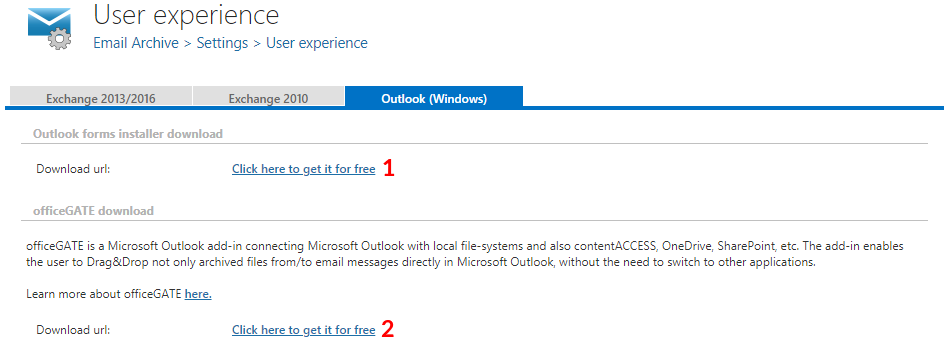
On this tab, you can:
- Download the Forms.zip (1) – this ZIP file includes the Outlook forms installer and a PDF installation manual.
- Request officeGATE for free (2) – clicking this redirects you to the officeGATE download request page.