contentACCESS Outlook add-in certificate issue
Introduction
The contentACCESS Outlook (VSTO) add-in can encounter a certificate issue that prevents it from loading correctly in Outlook. This page describes the symptoms of the issue, explains its underlying cause, and lists the components required on the client machine to resolve it.
Problem
The contentACCESS Outlook (VSTO) add-in does not work because of a certificate issue.
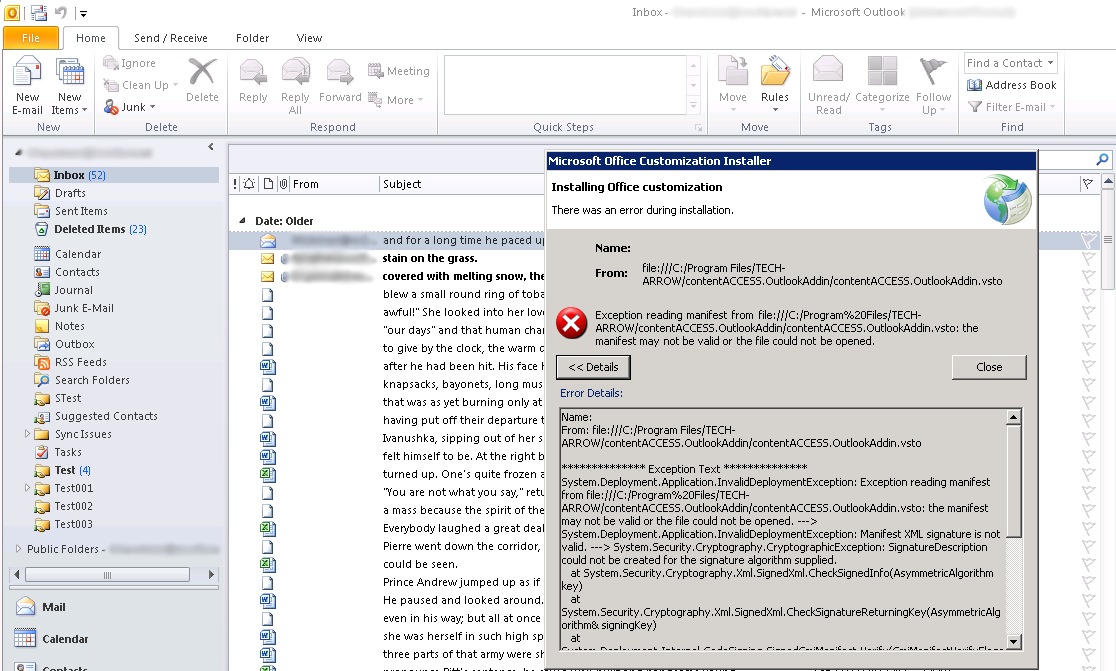 Screenshot 1: Outlook add-in error.
Cause
Outlook is not able to load the add-in correctly because of the certificate signature algorithm. The contentACCESS Outlook add-in supports the SHA2 signature, which can cause problems when used with older Outlook clients.
Solution
The following components must be present on the client machine(s) where the add-in is installed:
- .NET 4.8
- Visual Studio 2010 Tools for Office Runtime 10.0.60724 (can be downloaded here)
For additional guidance on resolving this issue, refer to this discussion thread.