Configuring aliases
Introduction
Aliases in contentACCESS are multiple folder paths with different names that point to the same folder or set of files. This page explains what aliases are and how to configure them on the Aliases page in Central Administration for use with the Remote shortcutting job.
Aliases are used to map remote location paths to local paths, which is a required configuration for the Remote shortcutting job. For more information, refer to Configuration of Remote shortcutting job.
Configuring an alias for the Remote shortcutting job
If you are shortcutting remote shares, but contentACCESS has archived the matching files on a local share, the Remote shortcutting job must "pair" the remote share with the local share to be able to replace the matching files with shortcuts on the remote share and open them. This pairing can only be performed by the job if the remote and local shares are also paired in contentACCESS — that is, if aliases are specified.
To configure an alias:
- Navigate to File Archive ⇒ Settings ⇒ Aliases on the Central Administration ribbon.
- On the Aliases page, click + new.
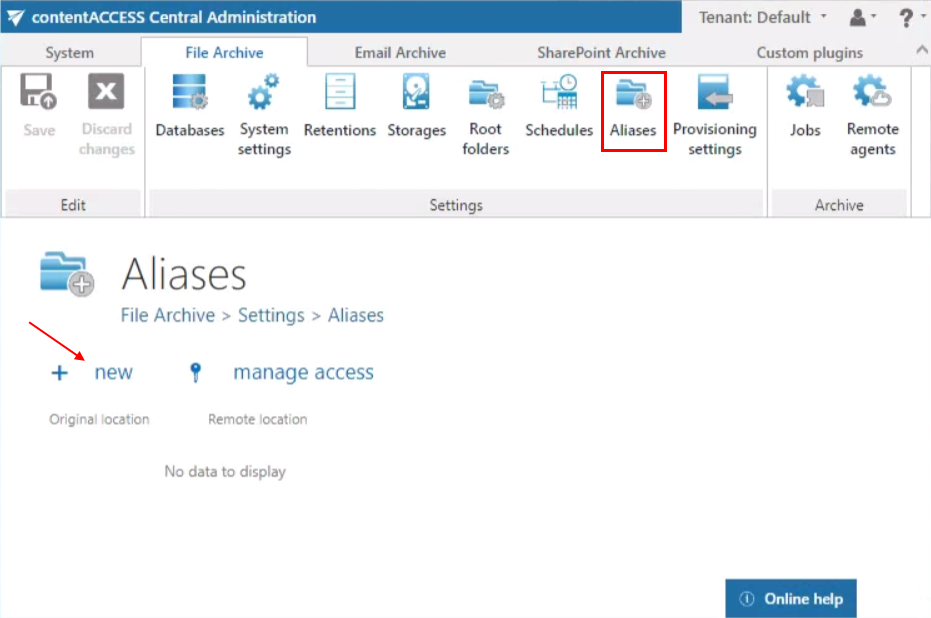
Note: The + new option is unavailable to the logged-on user if the Add repository items permission on the tenant is not granted in their role assignment.
The manage access option allows access permissions on the selected alias to be granted to another user. This option is available to the logged-on administrator if their role assignment includes the Edit repository item – All permission on the tenant. Read more in Managing access to contentACCESS objects.
- In the Alias repository window that opens, specify:
- Original location: select the file archive root folder from the dropdown list; this is the file path used by the archive job.
- Remote location: add the matching remote file path that needs to be replaced with shortcuts.
- Click Save.
The Remote location configured here can be selected on the Remote shortcutting job's configuration page later on.

Note: A path extension can be added when setting the remote file location on the Remote shortcutting job's configuration page.