Indexing
Introduction
Content indexing jobs assign previously created index zones to files and emails belonging to selected entities. These jobs use Elasticsearch as the back-end (third-party) index server to manage and store indexes and to perform searches. The indexing job crawls the contentACCESS archive and sends document text and metadata to the Elasticsearch server.
This page describes how to configure a content indexing job, including its scheduling, resource, and filtering settings, and how index zones are used to organize indexed data.
Note: Document text is extracted from various document formats through IFilter components. The appropriate IFilter pack must be installed on the server where contentACCESS is also installed. Filters are used to extract plain text content from binary formats such as .doc, .pdf, and others.
Configure the indexing job
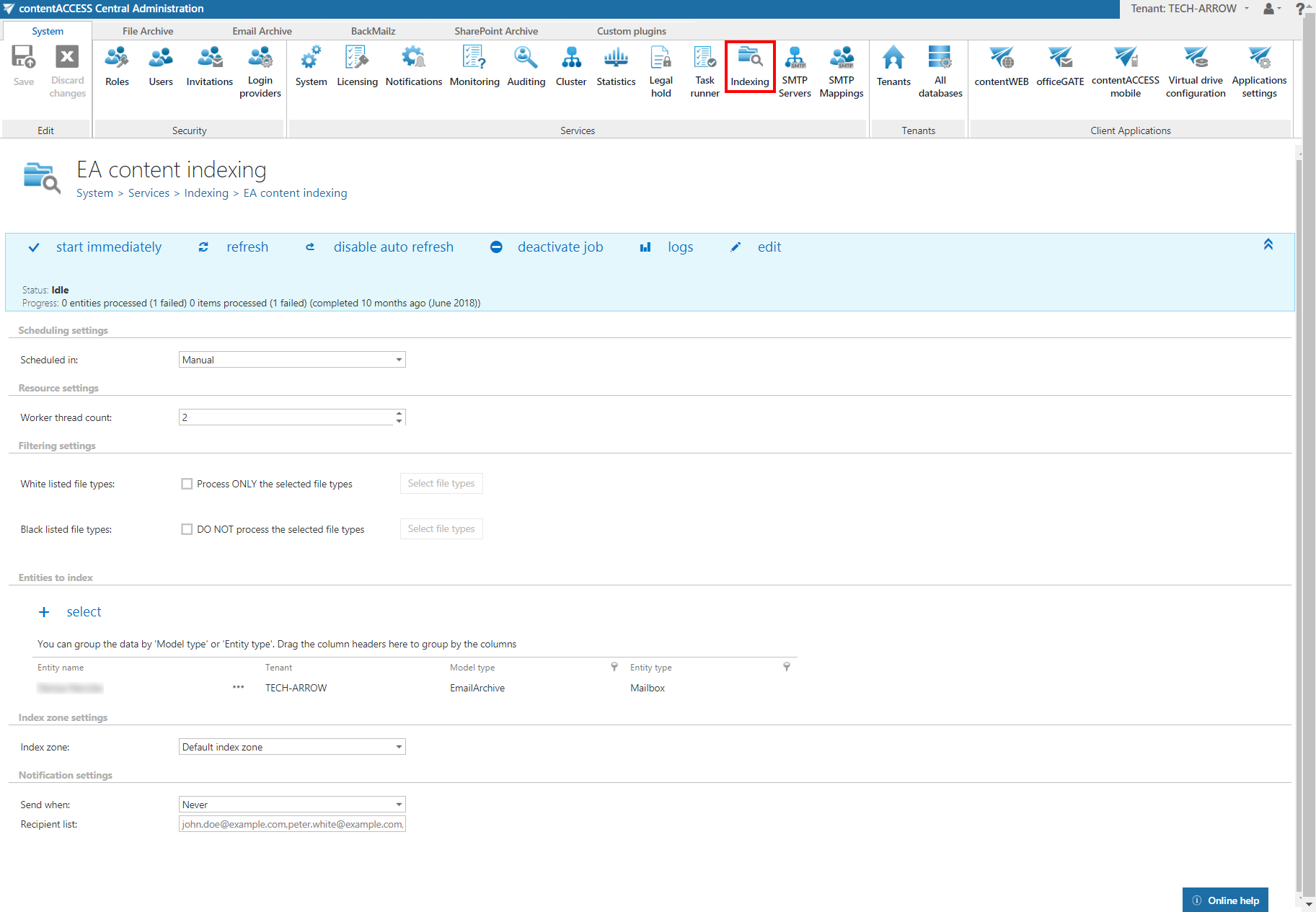
On the configuration page of the indexing job, the following settings must be specified.
Scheduling settings
Select the running time(s) of the job. You can either select an existing scheduler from the list or create a new one using the create new … option from the dropdown list. Schedulers allow the administrator to automate the running times of the job. Mailboxes are periodically synchronized with the categories written into the queue at the time intervals set here.
For more information on how to configure schedulers, see the Schedules page.
Resource settings
Set the value that determines how many items will be processed simultaneously by the job. The recommended value is 2.
Filtering settings
Specify which file types should and should not be processed. File types can be added individually, or you can use the grouping functionality. Composed filtering allows the administrator or user to select a group of file extensions at once, instead of selecting each required file type individually.
The following extension groups are predefined and ready to use:
- Office Documents – contains the extensions:
docx,doc,pptx,ppt,sldx,xls,xlsx,pdf,one,accdb,pub,htm,html,csv,odt. - All text documents – contains the extensions:
txt,log,config,rtf,zip,7z,vcf,rar,msg,eml,ics,mhtm,mhtml.
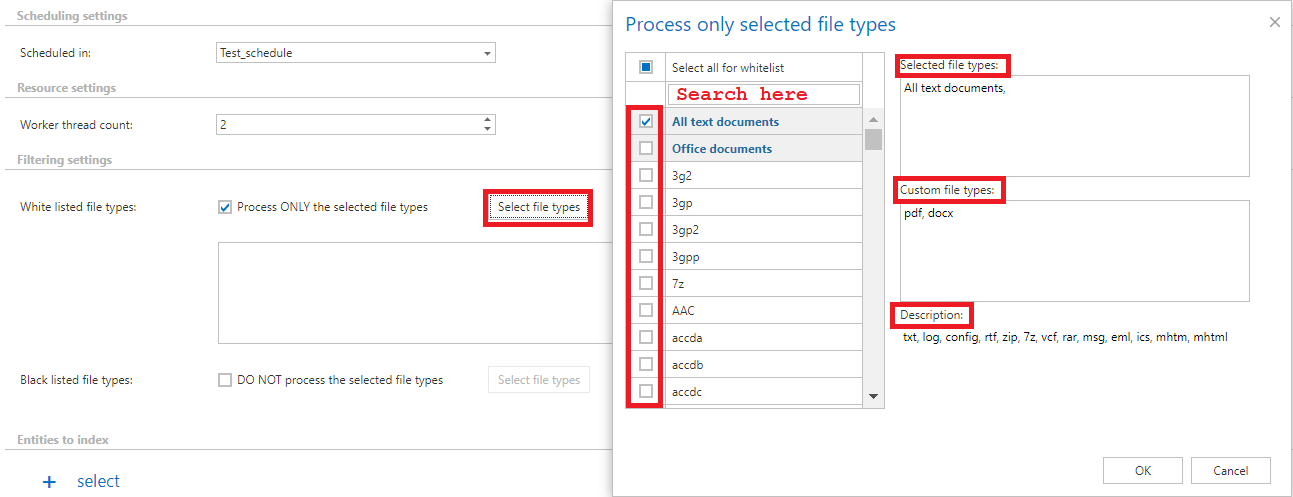
Composed filtering works for both White listed and Black listed file types. Click Select file types on the Indexing page to open a pop-up window listing all available groups and individual extensions. In this window, you can select multiple file types and groups at once.
Extensions can be selected in the following ways:
-
Using the search bar, you can search for extensions individually or search for groups.
infoNote: If you search for, for example, "pdf" and the Office Documents group contains this extension, then Office Documents will also appear as a filtered result.
-
Scrolling down the list.
-
Adding extensions manually to the Custom file types text box.
In the right section of the Select file types window, three text boxes are available:
- Selected file types – a read-only text box listing the currently selected file types.
- Custom file types – allows you to manually add extensions or file types that are not present on the list.
- Extensions can be added with or without commas and dots (for example,
.txt,txt,, ortxt). - A comma is required only when selecting multiple file types at the same time.
- Extensions can be added with or without commas and dots (for example,
- Description – lists the file types that are part of the selected group.
Entities to index
Set the entities that will be processed by the indexing job.
Index zone settings
Set the index zone that will be assigned to items by the indexing job.
Index zones
Index zones are defined as a set of one or more Elasticsearch indexes, used for the logical and physical separation of indexed documents. Index zones were introduced to keep Elasticsearch indexes small, since smaller indexes are easier to move and distribute across multiple Elasticsearch servers.
Index zones can be assigned to entities directly, or assigned and later overwritten by indexing jobs.
The Maximum entities per group column shows the number of entities that will use the same indexes on Elasticsearch. Grouping is performed automatically by the indexing job. By default, the maximum number of entities per group is 10. The recommended value is 2 for File archive and 10 for Email archive. When the limit is reached, a new zone is opened and the remaining entities are included in it.
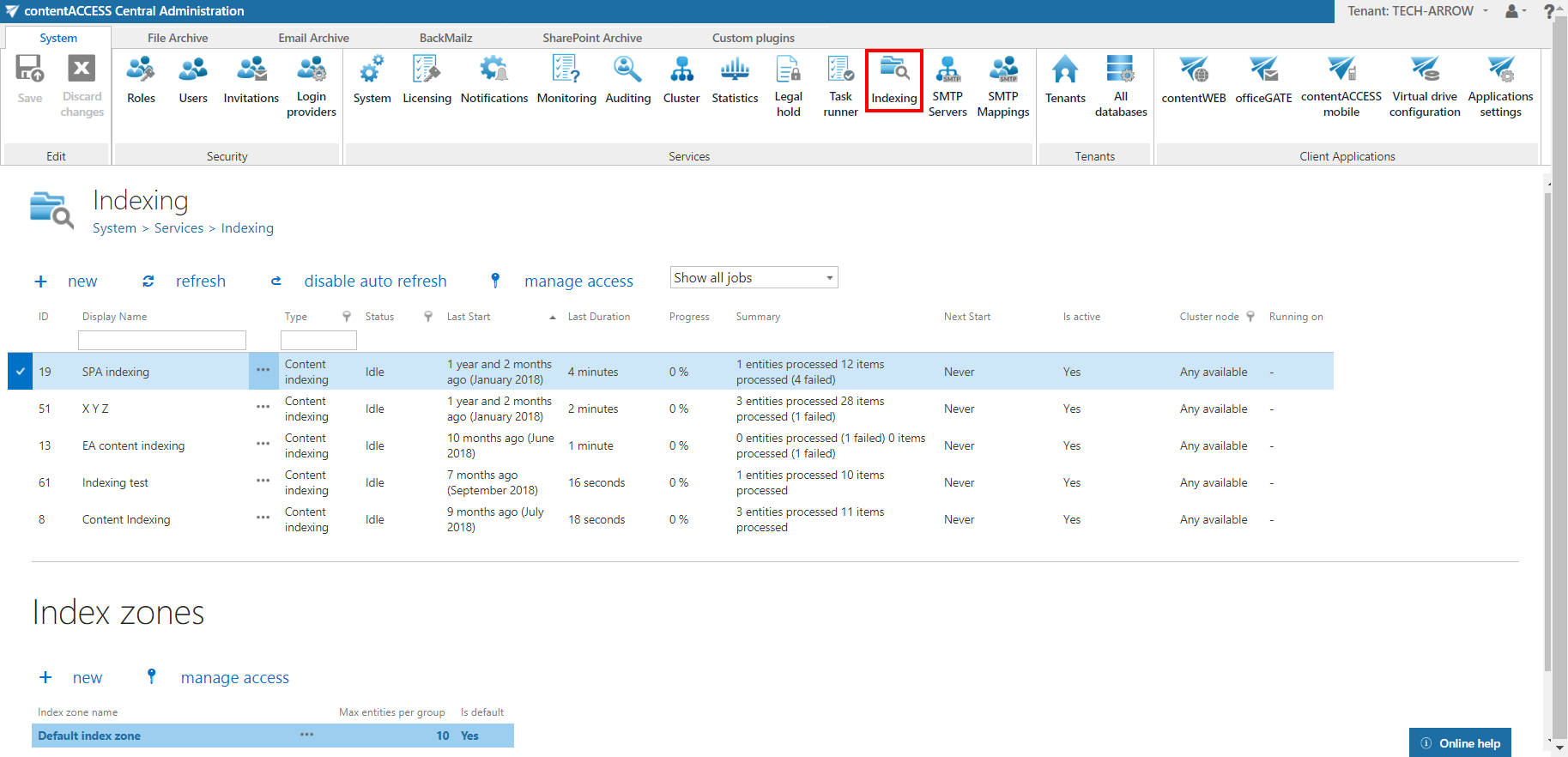
The Index zone name and Maximum entities per group value can be changed by selecting Edit from the context menu of the index zone. Specify the desired name and value, then click Save.
