Defining specific permissions of a role assignment
Introduction
Specific permissions in contentACCESS allow administrators to restrict a user's role assignment to only certain (specific) objects of a selected tenant, rather than granting access to all objects of that type. For example, a user can be granted permission to manage only certain jobs of a tenant instead of all jobs belonging to that tenant.
This page explains how specific permissions work, which objects they can be applied to, and how to define them for a role assignment using the Assign specific permissions page.
Definition of terms:
- Specific permissions — User permissions which allow managing only certain (specific) objects of the selected tenant (for example, certain jobs of the TECH-ARROW tenant only).
- Objects — Specific objects (databases, schedulers, jobs, etc.) of the selected tenant.
Objects supported by specific permissions
Specific permissions can be granted for the following objects of the selected tenant(s):
- Jobs
- Repository items: databases, storages, aliases, retentions, shortcuts, and Exchange connections
- Schedulers
- Processed contentACCESS data (for example, permission to manage the archive mailbox)
The administrator decides which objects of which tenants the user, with the given permissions, will be able to manage.
Only objects with Specific allowed permissions are listed on the Assign specific permissions page. For example, if the TECH-ARROW tenant is selected, only TECH-ARROW's jobs, repositories, and other objects that have "Specific allowed" permissions are displayed.
Open the Assign specific permissions page
The Assign specific permissions page can be opened from:
-
The Create/invite user dialog, when creating or inviting a user.

-
The Role assignment dialog, accessed from the user's Assign role context menu option, when assigning a role to an already existing user.

Define specific permissions
- In one of the dialogs above, select the predefined role that includes specific permissions.
- Select a tenant whose specific objects the user will be allowed to manage.
When a given role is assigned to a user, the "All allowed" permissions and the manage tenant specific permission are assigned to the user. contentACCESS then verifies whether any specific permissions are defined in the respective role.
If specific permissions are found, the user is automatically redirected to the Assign specific permissions page, where the objects that the given user will be allowed to manage can be selected:
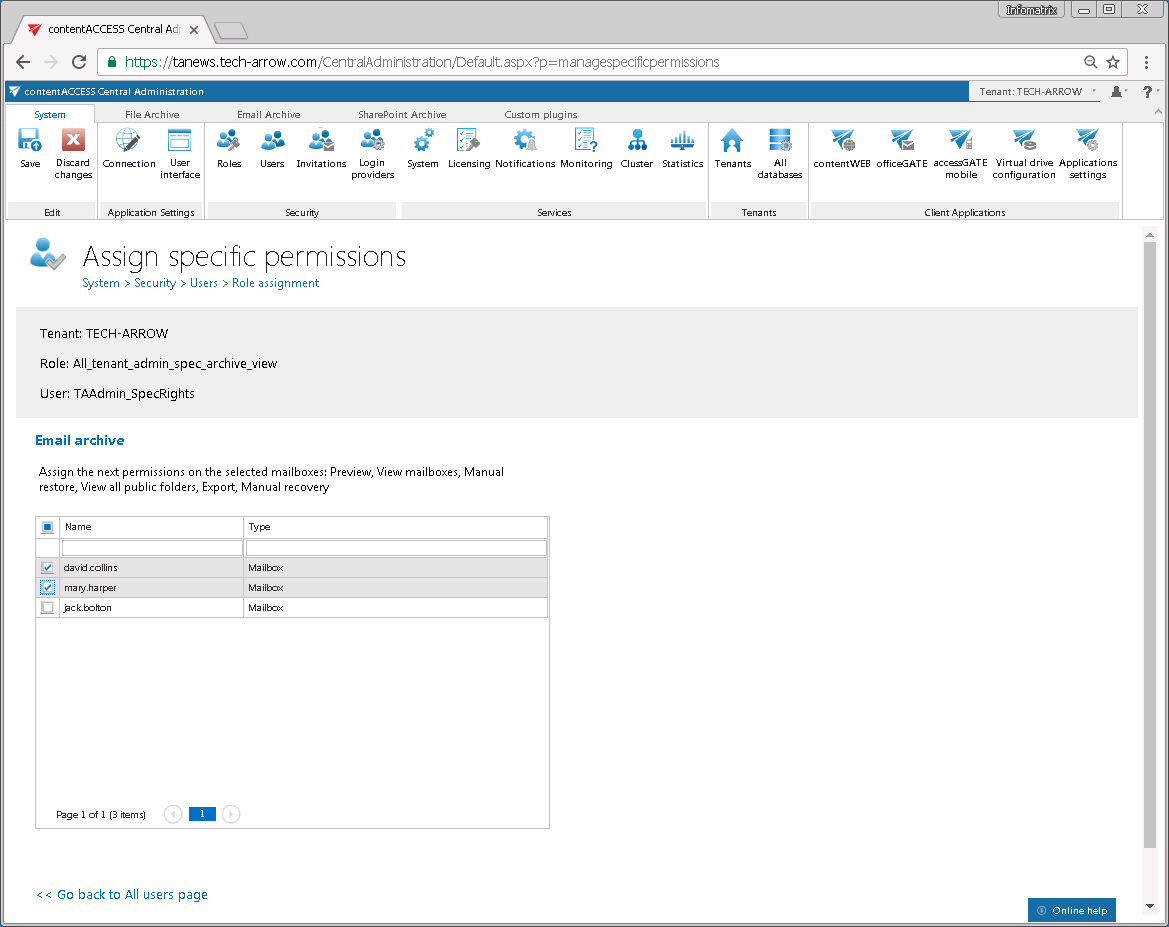 Tenant administrator role with specific permissions on the selected archive mailboxes.
Important: If the user selects All tenants in the dialog (this option is available if the "Manage all tenants" permission is defined in the given role), the Assign specific permissions page will not open. The "All allowed" permissions (global permissions) are automatically granted to All tenants.