OneDrive archive
Introduction
The OneDrive archive job allows administrators to archive files and personal data from OneDrive. Archived items can later be viewed in contentACCESS Portal.
OneDrive archiving is part of the SharePoint archive job, which means both use the same Settings and Archive page. This page explains how OneDrive archiving relates to the SharePoint archive configuration, and describes the system settings, provisioning settings, shortcut configuration, and address book relevant to creating a OneDrive archive job.

If the SharePoint archive job has already been activated and configured, it is not required to configure the SharePoint settings again to create a OneDrive archive job. Different settings can be applied if needed, but this is not necessary by default. Only the System settings and Provisioning settings need to be updated.
If the SharePoint archive job has not previously been activated and configured, all the SharePoint settings required to create a OneDrive archive job can be found on the SharePoint Settings page (SharePoint Archive tab → Settings group). For more information about how to configure the SharePoint archive settings, refer to the SharePoint archive settings chapter of this guide.
Configure system settings
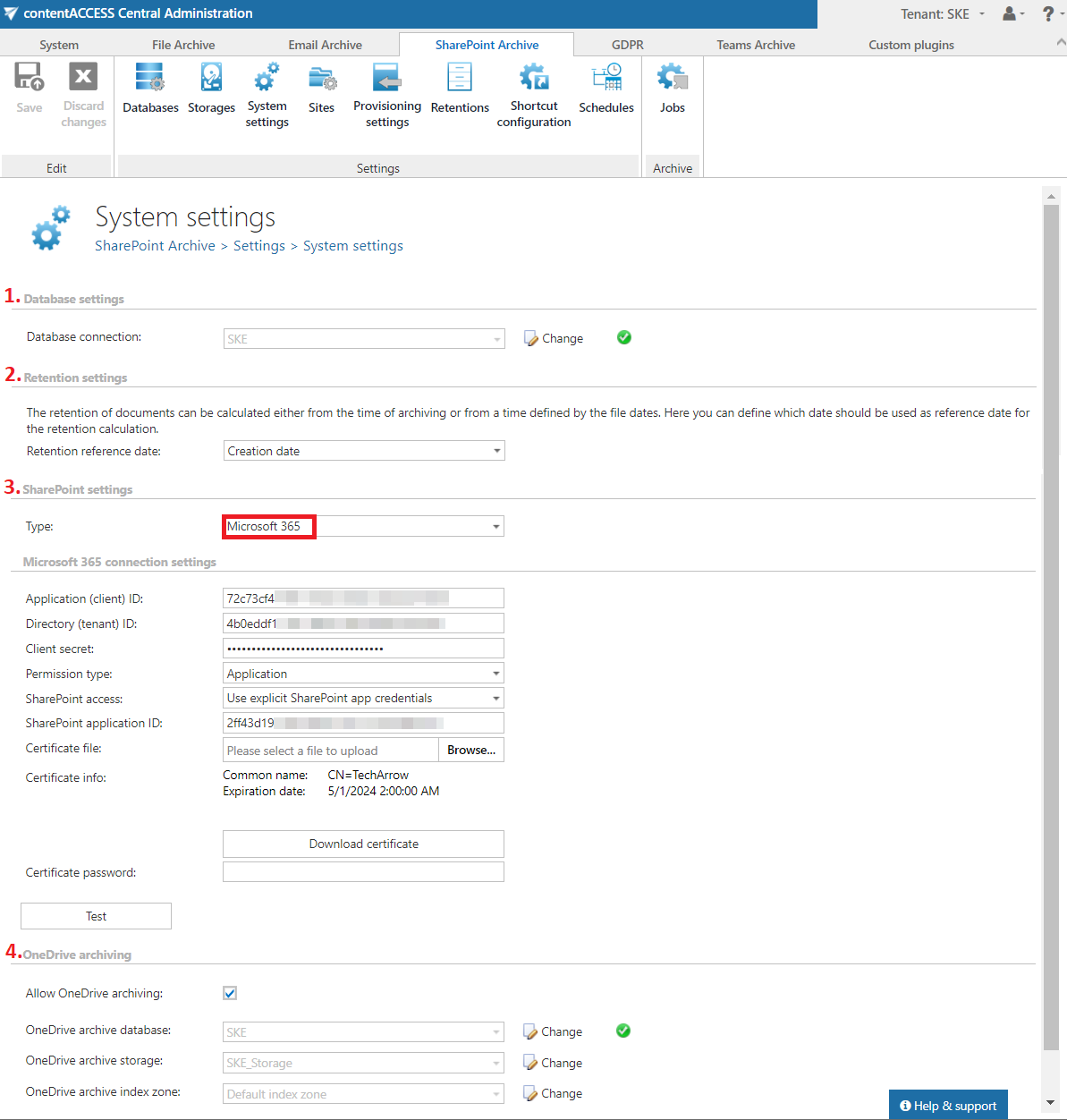
OneDrive archiving must first be enabled on the System settings page. Check the Allow OneDrive archiving checkbox and configure the following:
- OneDrive archive database: Select an already configured connection from the dropdown list. This is where the metadata will be stored. For more information on how to set up database connections, refer to the Databases section.
- OneDrive archive storage: Choose an already configured storage from the dropdown list. The processed binaries will be stored here. For more information on how to set up storages, refer to the Storages section.
- OneDrive archive index zone: Set the Index zone that will be assigned to the items by the archiving job.
Important: The OneDrive archiving section is only visible if the Microsoft 365 SharePoint type is selected on the System settings page. In On-premise mode, OneDrive archiving is not allowed.
Configure provisioning settings
The provisioning job creates and updates contentACCESS users and assigns contentACCESS roles to them based on information gathered from SharePoint.
In the OneDrive groups to provision (AAD) section, administrators can select OneDrive groups to add to the Address book for later use in OneDrive archiving. This option is only visible if OneDrive archiving is enabled on the System settings page.
Important: The OneDrive groups to provision (AAD) section is visible only if the Microsoft 365 SharePoint type is selected on the System settings page.
For more information about the provisioning job, refer to the SharePoint archive provisioning settings chapter of this guide.
Configure shortcut configuration
This section allows administrators to configure the archive methods and shortcut types the archive job will use. For a detailed description, refer to the Shortcut configuration in SharePoint section of this guide.
View address book
Important: The View address book tab is only visible if Microsoft 365 SharePoint is selected on the System settings page.
The address book contains a read-only list of objects that are provisioned in the address book. Objects can be added to the address book by the provisioning job (sites, users, AAD groups), or they can be created manually from the address book. Provisioned OneDrive groups are listed on the OneDrive tab. For more information, refer to the SharePoint archive address book page.
Important: After a contentACCESS package update from a version where the OneDrive archive function was not supported (prior to 5.2), reindexing is required if items were archived and indexed in the OneDrive entity with the previous version. Otherwise, search will not work.