Site connections in the SharePoint archive
Introduction
The Site connections tab in the SharePoint archive job allows administrators to configure the connections to the SharePoint sites that will be archived. A site connection defines the start point of the SharePoint site to be archived. This page explains which SharePoint items can be used as a site connection, which parameters must be configured for each authentication type, and how to view the details and archive statistics of an existing site connection.
Important: This tab is accessible only if the On-premise type is selected on the System settings page.
Archivable SharePoint items
Every item in the SharePoint hierarchy that can be archived can also be defined as a site connection. These archivable SharePoint items and their sample URLs, as to be defined in the site connection, are:
- a site collection — with a URL like
http://sharepointserver.com/sites/testcompany - a subsite of the site collection — with a URL like
http://sharepointserver.com/sites/testcompany/hr - a SharePoint library (SharePoint document libraries, picture libraries, lists, tasks, contacts, etc.) — with a URL like
http://sharepointserver.com/sites/testcompany/hr/testlibraryA - a SharePoint folder — with a URL like
http://sharepointserver.com/sites/testcompany/hr/testlibraryA/testfolderA
The URL cannot be a parent URL or a sub-URL of an existing connection. For example, if you have a site connection with the URL http://sharepointserver.com/sites/testcompany/hr, you are not allowed to add another site connection with the URL http://sharepointserver.com/sites/testcompany or http://sharepointserver.com/sites/testcompany/hr/division1. This restriction prevents users from archiving the same content into two different databases or storages. If a user attempts to add a site that already exists in the system database, they will be prompted about this.
Note: It is recommended to add a site collection or subsite as a site connection. Libraries, folders, and similar items can be specified later as a relative URL on the respective archive jobs' configuration page.
Add a site connection
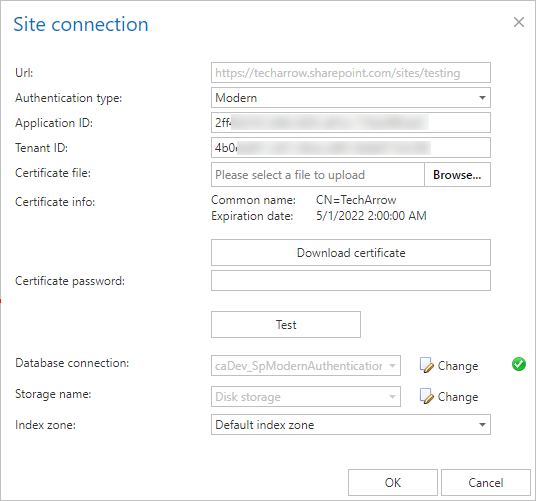
When adding a new site connection, you need to specify the following parameters:
- Url: URL of the site collection, subsite, library, or folder you want to archive.
- Authentication type: The authentication method used to access the site. Select one of the following: Basic, Integrated, or Modern.
- Database connection: The database where the archived data will be stored.
- Storage name: The storage where the binaries will be stored.
Basic authentication
With this authentication type, you need to enter the username and password that will be used to access the specified SharePoint site.
- User name: The name of the user who has the rights to access the site collection, subsite, library, or folder.
- Password: The password of the specified user.
- Confirm password: Re-enter the password.
Integrated authentication
The user's current Windows identity is sent to the SharePoint server and used for authentication.
Modern authentication
Modern authentication applies to Microsoft 365. Check the Prerequisites for Microsoft 365 archiving before configuring this authentication type.
- Application ID: The ID of the registered Azure application.
- Tenant ID: The tenant/directory ID of the Azure tenant. It can be acquired from the Azure app Overview page.
- Certificate file: A
.pfxfile containing the private and public key of the certificate. It must be the same certificate as the.cerfile that was uploaded to Azure during app registration. The app can also be registered using this PowerShell script. - Certificate password: The password for the
.pfxfile.
Important: contentACCESS also supports AAD groups in the SharePoint archive. This support works only with Modern authentication.
View site connection details and statistics
To view the details and archive statistics of a selected site connection, click Details in its context menu.
Details:
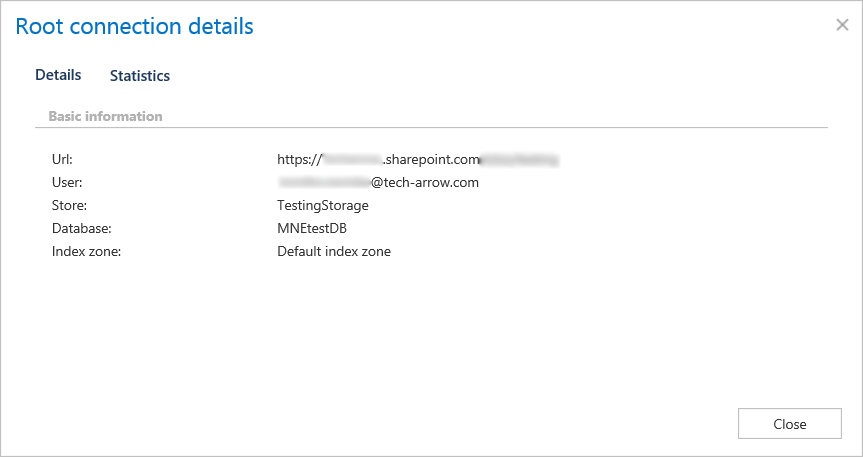
- URL: URL of the site connection.
- User: The username used when connecting to the SharePoint site.
- Store: The storage assigned to the connection.
- Database: The database assigned to the connection.
- Index zone: The index zone assigned to the connection.
Statistics:
The statistics show the archived folder count, document count, and total size of the files that were archived.