How to provide access to a tenant (adding new tenant administrators)
Introduction
The Manage access to tenant feature in System ⇒ Tenants allows administrators to grant tenant administrator access to additional users. A tenant can have one or more tenant administrators. This page describes how to open the manage access page for a tenant and how to add new tenant administrators to it.
Open the manage access page
To provide access to a tenant for one or more users, in addition to the existing tenant administrator, use one of the following methods:
- Open the Tenants page (System ⇒ Tenants ⇒
 Tenants), select the tenant from the list, left-click the ellipsis (…) to open its context menu, and choose Manage access to tenant.
 - Select the tenant in the grid and click the
 manage access option on the same page. This button is only active when a tenant is selected in the grid.
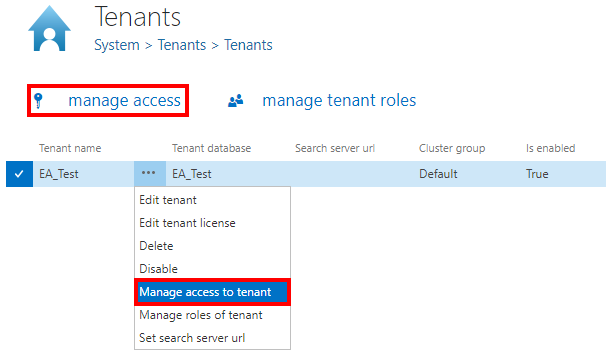
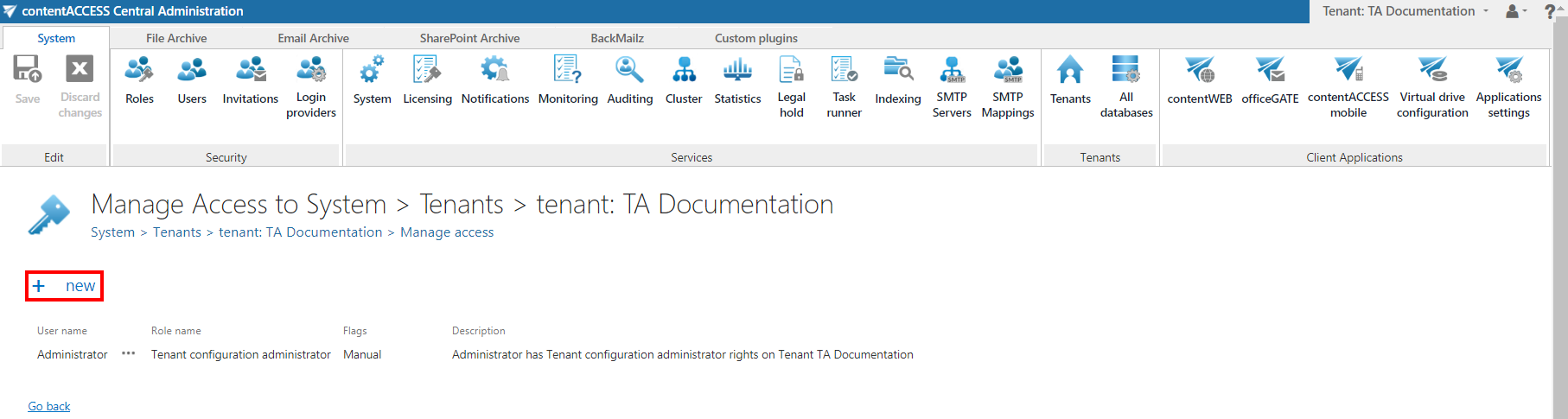
Both methods redirect you to the manage access page of the selected tenant, where all currently existing tenant administrators for that tenant are listed.
Add a new tenant administrator
- On the manage access page, click + new.
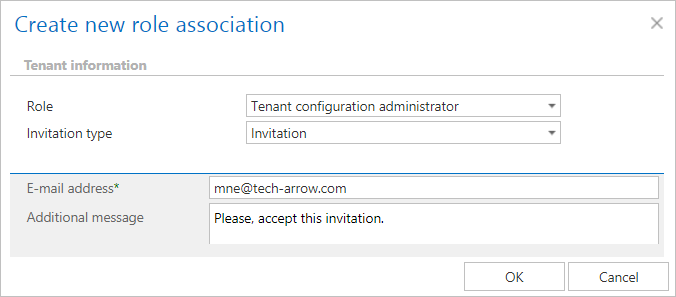
- In the Create new role association window, select one of the available options to add a new tenant administrator.