Tenant administrator invitation types
Introduction
The Create new role association window allows administrators to grant the Tenant administrator role to a user through several different invitation types. Depending on whether the person already exists as a contentACCESS user, you can create a new user, search for an existing user, or send an email invitation to someone who is not yet a contentACCESS user.
The following invitation types are available:
- Create new
- Search for existing (Assign to existing user)
- Send invitation
To assign the role, select Tenant administrator from the Role dropdown list in the Create new role association window, then choose the invitation type that matches your scenario.
Create new
Use this option to create a brand-new user account and assign it the Tenant administrator role.
- Select Create new.
- Enter a Display name for the new user.
- Select the default tenant from the Default tenant dropdown list.
- From the Login type list, select the authentication provider configuration that this user will use when logging in to the system.
- Fill in the credentials. If the Forms type is chosen, both Login name and Password are required.
- Click OK.
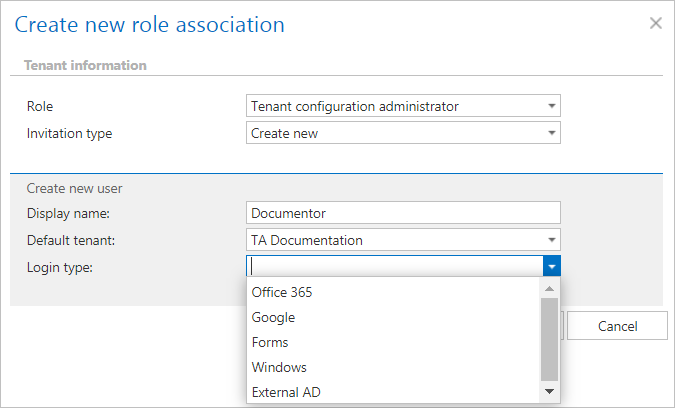
Note: Only provider configurations set up in the Login providers control (System tab ⇒ Security ⇒ Login providers) can be selected from the list of login types. Forms and Windows are enabled by default.
Search for existing / Assign to existing user
Use this option to grant the Tenant administrator role to a user who already exists in the system. The user will continue to use their existing credentials to log in to Central Administration.
- In the Search for existing user field, enter part of the name of the person you want to find.
- Select the user from the search results.
- Click OK.
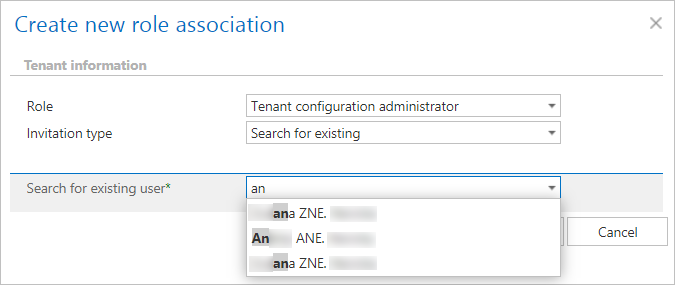 Screenshot: Granting tenant administrator rights if user searching is enabled.
Note: This invitation type can be used only if user searching is enabled in the User search settings. For more information, see the System settings page.
Send invitation
Use this option to invite a person who is not yet a contentACCESS user to become a tenant administrator on your tenant.
- Select Send invitation.
- Confirm that the Tenant administrator role type is selected.
- Enter the E-mail address of the new user you wish to invite.
- Fill in the Additional message textbox. This text will be included in the invitation email the user receives from you.
- Click OK.
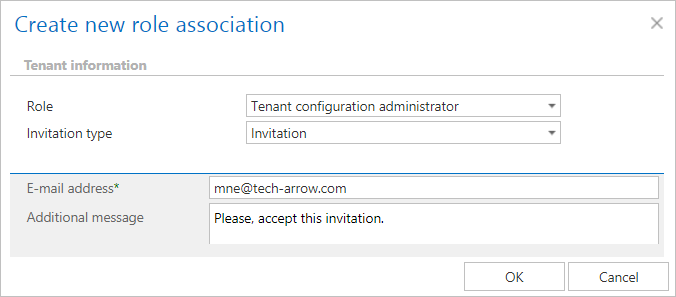
The invited person will receive an invitation message. If the user accepts the invitation, they will be redirected automatically to the contentACCESS login page, where they can configure the authentication provider they prefer to use for future logins. This configuration can later be adjusted by navigating to System ⇒ Security ⇒ Login providers.