Datengut storage
Introduction
The Datengut storage is a storage type used when synchronizing emails across multiple mailboxes. It allows administrators to connect contentACCESS to a Datengut storage endpoint, configure the necessary connection and credential settings, and link the storage to an email synchronizer job that collects metadata for archived emails.
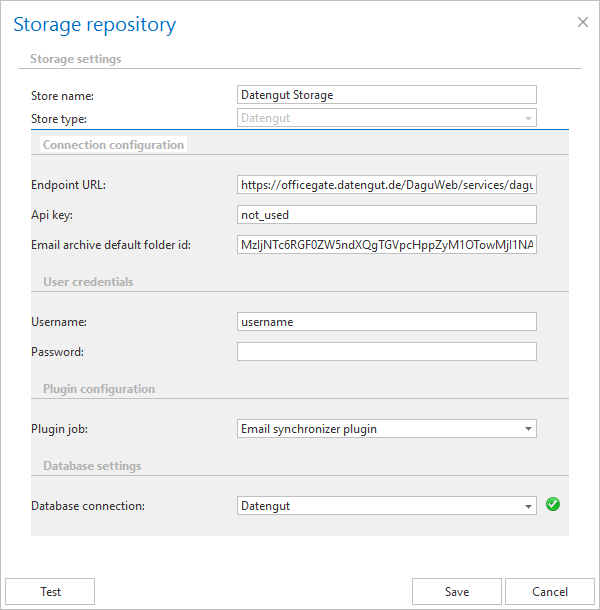
This page describes how to configure a Datengut storage in Storage settings, including the connection configuration, user credentials, job configuration, and database settings required for it to function.
Note: For more information about email synchronization, see the Email synchronizer job page.
Configure Datengut storage
After selecting this storage type in Storage settings, name your storage. contentACCESS uses this name to display the storage on the Storages page.
Configure the following sections in the dialog:
Connection configuration
The Connection configuration section contains the settings necessary to establish a connection with the Datengut storage.
- Endpoint URL: the Datengut service URL.
- Api key: optional setting; any value can be entered here.
- Email archive default folder id: during the archiving process, the Datengut storage saves the data into a specific storage folder. The ID of this folder must be set here.
User credentials
Set the Username and Password used to connect to the storage.
Job configuration
The email synchronizer jobs already created in Custom jobs ⇒ General ⇒ Jobs are listed in the dropdown list. Select the Email synchronizer job that will collect the metadata of the archived emails in a queue.
This job is used to synchronize the email message categories in multiple mailboxes based on the metadata saved into its queue.
Note: For more information, see the Email synchronizer job page.
Database settings
Select an already created database that the Datengut storage will use to store the necessary data.