Backup Administration for Microsoft 365
Introduction
The Backup Administration for Microsoft 365 setup page allows administrators to configure the network and connection settings used by Backup Administration for Microsoft 365. On this page, you can define the port number, the fully qualified domain name (FQDN), and the connection URL used to communicate with the contentACCESS server.
Configure Backup Administration
-
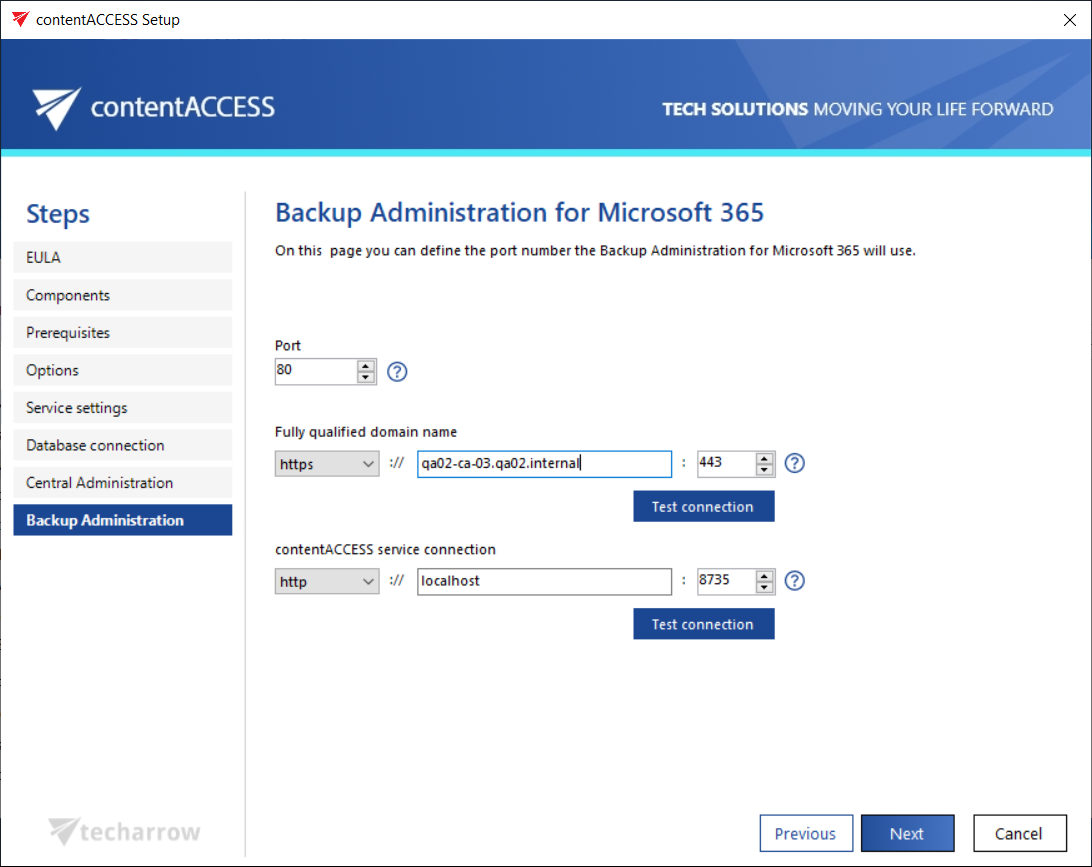
Port: The physical port of Backup Administration for Microsoft 365 used by the Internet Services (IIS) on the current server.
-
Fully qualified domain name: The FQDN allows users to access Backup Administration from anywhere (for example, from home or from the office). The FQDN defined here is written to the Application settings page in Central Administration (System tab → Client applications group → Application settings), and can be changed from there at any time. During the next update, the setup will automatically read the value defined in Application settings.
-
contentACCESS service connection: The URL used by Backup Administration to communicate with the contentACCESS server. If the contentACCESS server is installed on the same server, you can use
localhostas the host name. Two communication types can be used between Backup Administration and the contentACCESS server:- http – Use this to establish a direct connection with contentACCESS. If a direct connection is used, do not change the port number prefilled by the setup package (
8735); otherwise, the contentACCESS proxy connection will be used automatically. - https – Use this to establish a secure connection through the contentACCESS proxy server.
- http – Use this to establish a direct connection with contentACCESS. If a direct connection is used, do not change the port number prefilled by the setup package (