contentACCESS Central Administration
Introduction
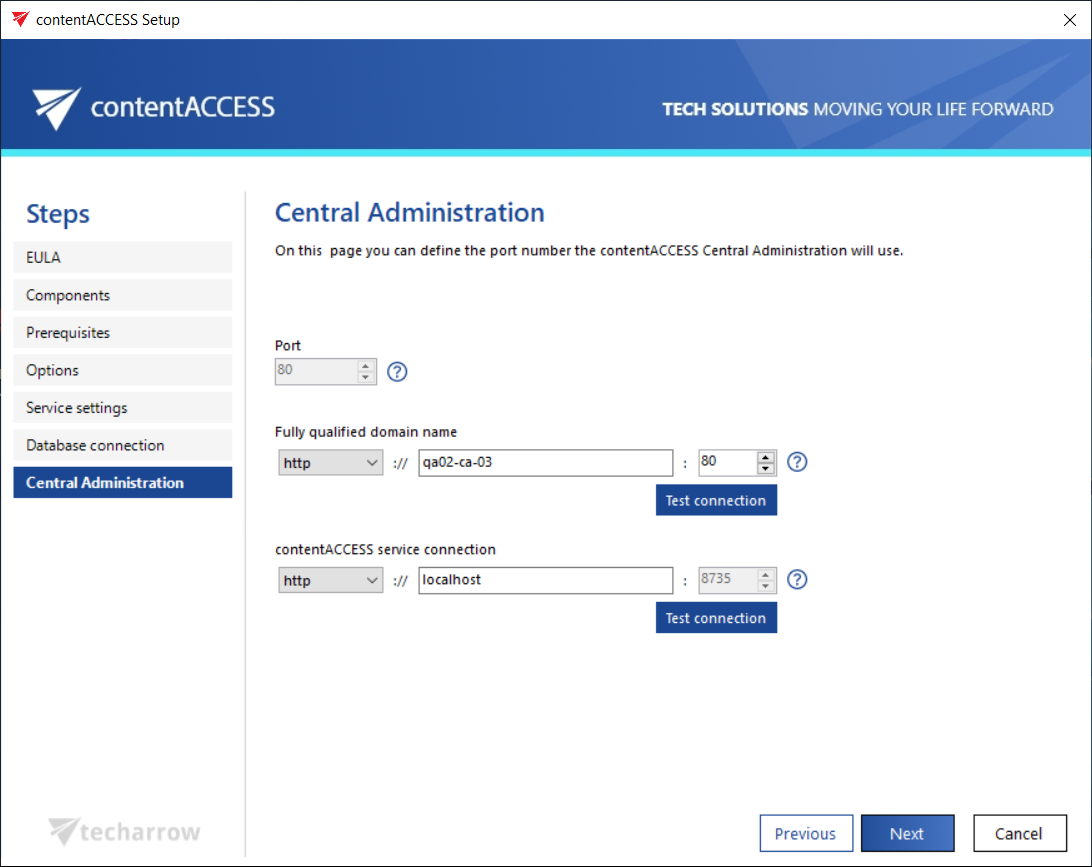
The contentACCESS Central Administration installation page allows you to configure the connection settings required by this component, including its physical port, fully qualified domain name (FQDN), and the connection to the contentACCESS server.
Configure Central Administration
-
Port: The physical port of Central Administration used by Internet Information Services (IIS) on the current server.
warningImportant: The physical port cannot be changed later, for example when updating the product. To change it, the given component (in this case Central Administration) must first be uninstalled, and then the port can be reconfigured in the setup wizard. This rule applies to each contentACCESS component.
-
Fully qualified domain name: The FQDN allows users to access the given component (in this case Central Administration) from anywhere (from home, from the office, etc.). For this reason, this URL must be accessible from everywhere the user connects from.
The FQDN defined here is written to the Application settings page (System tab → Client applications group → Application settings) in Central Administration, and can be changed from there at any time. On the next update, the setup will automatically read the value defined in Application settings.
infoNote: Double-clicking the empty text field makes the wizard automatically fill in the FQDN of that server. This functionality is the same for the FQDN settings of other contentACCESS components on the following installation pages.
Usually, the physical port matches the port used by the FQDN. However, in special cases, the FQDN port can differ from the physical port on the IIS. In such cases, the following warning is displayed:
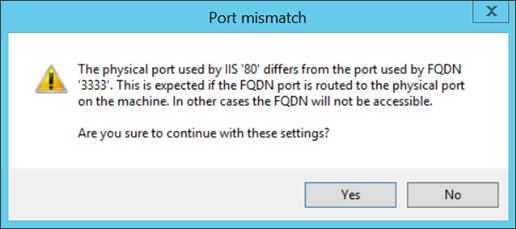
This is expected if the FQDN port is routed to the physical port. In such cases, you can continue with these settings. The same rule applies to other contentACCESS components as well.
-
contentACCESS service connection: The URL used by Central Administration to communicate with the contentACCESS server. If the contentACCESS server is installed on the same server, you can use
localhostas the host name.