contentACCESS Portal
Introduction
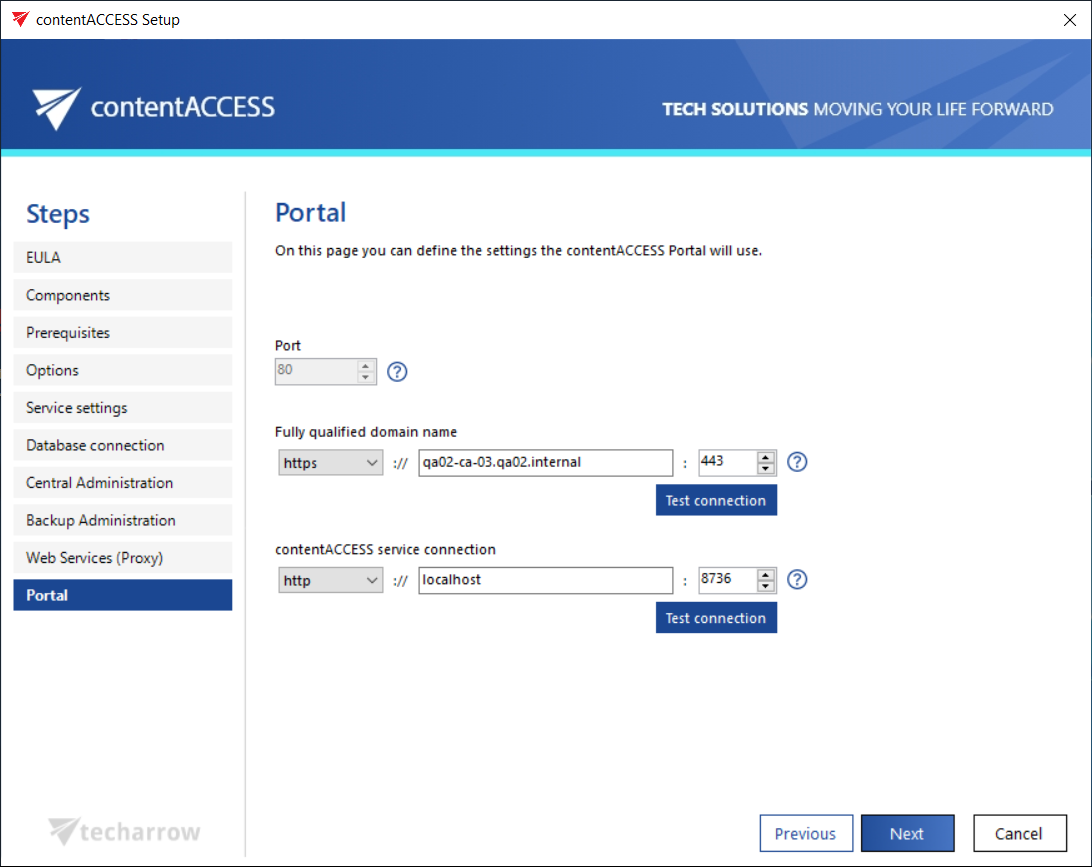
The contentACCESS Portal page in the setup wizard defines how contentACCESS Portal — the contentACCESS archive user interface — connects to and operates with the contentACCESS server. These settings are configured during setup and can be adjusted afterward through Central Administration.
Note: The same rules that apply to the contentACCESS Central Administration settings also apply to contentACCESS Portal, with one exception: the connection between contentACCESS Portal and the contentACCESS server also supports the net.pipe connection type.
Configure contentACCESS Portal
-
Port: The physical port used by contentACCESS Portal on the Internet Information Services (IIS) of the current server.
-
Fully qualified domain name: The URL must be accessible from everywhere the user connects from. Double-clicking the empty text field lets the wizard automatically fill in the FQDN of the server. To enable a secure connection for the user, choose
https.infoNote: The contentACCESS Portal FQDN defined here is written to the Application settings page in Central Administration (System tab → Client applications group → Application settings), where it can be changed at any time. During the next update, the setup will automatically read the value defined in Application settings.
-
contentACCESS service connection: The URL used by contentACCESS Portal to communicate with the contentACCESS server. If the contentACCESS server is installed on the same server, you can use
localhostas the host name.There are three communication types that can be used between contentACCESS Portal and the contentACCESS server:
- http: Use this to establish a direct connection with contentACCESS. If a direct connection should be used, do not change the port number prefilled by the setup package (
8736); otherwise, the contentACCESS proxy connection will be used automatically. - https: Use this to establish a secure connection through the contentACCESS Proxy server.
- net.pipe: Use this type if contentACCESS Portal and contentACCESS are installed on the same server. This is the fastest and most recommended connection type.
- http: Use this to establish a direct connection with contentACCESS. If a direct connection should be used, do not change the port number prefilled by the setup package (