Options
Introduction
The Options page of the contentACCESS installation wizard allows you to configure the common cache folder, common log folder, and resource storage path used by the system, as well as set the system administrator password. These settings determine where component data and logs are stored and how the system administrator account is secured before the installation proceeds.
Configure the installation paths
The contentACCESS installation base folder cannot be changed on this page. All components are automatically installed in the C:\Program Files\TECH-ARROW folder.
-
Common cache folder: Used by the Preview service and Virtual Drive. When users edit files through Virtual Drive or file shortcuts, all changes are stored in this folder until they are committed to the archive.
warningImportant: Make sure that the drive containing the common cache folder has plenty of free space.
-
Common log folder: Set a folder for all component logs (for example, contentACCESS Portal, Search service, etc.).
-
Resource storage settings: Storage location for job reports and files exported to PST or ZIP. Here, you can also configure access permissions:
- If the folder is accessed by the account under which the contentACCESS service runs, you do not need to enable this option.
- If the folder needs to be accessed by an account that does not have permissions for this path, enable this option.
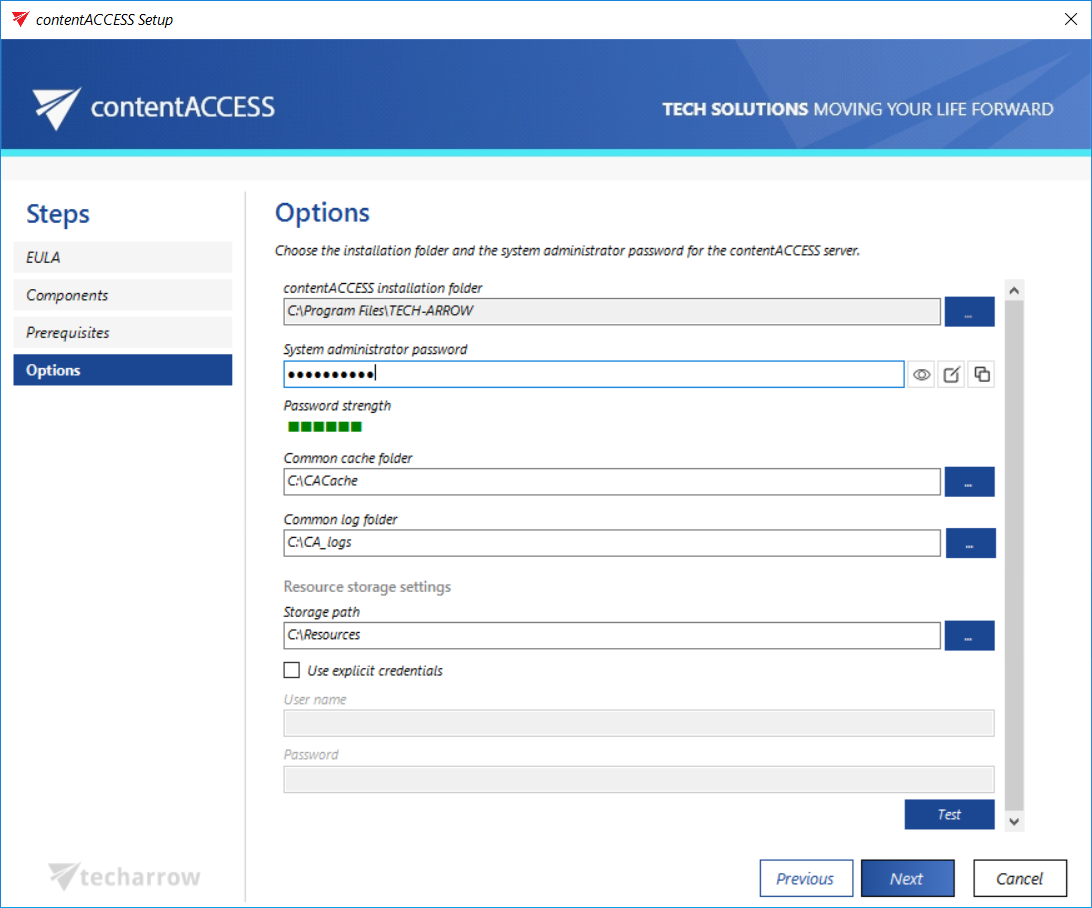
Set the system administrator password
This page also requires you to enter the system administrator password. You can:
- Enter an existing password and verify it by clicking the Show password button.
- Generate a new password by clicking the Create password button.
- Copy the password using the Copy password button.
Click NEXT to continue.