SharePoint shortcut handler
Introduction
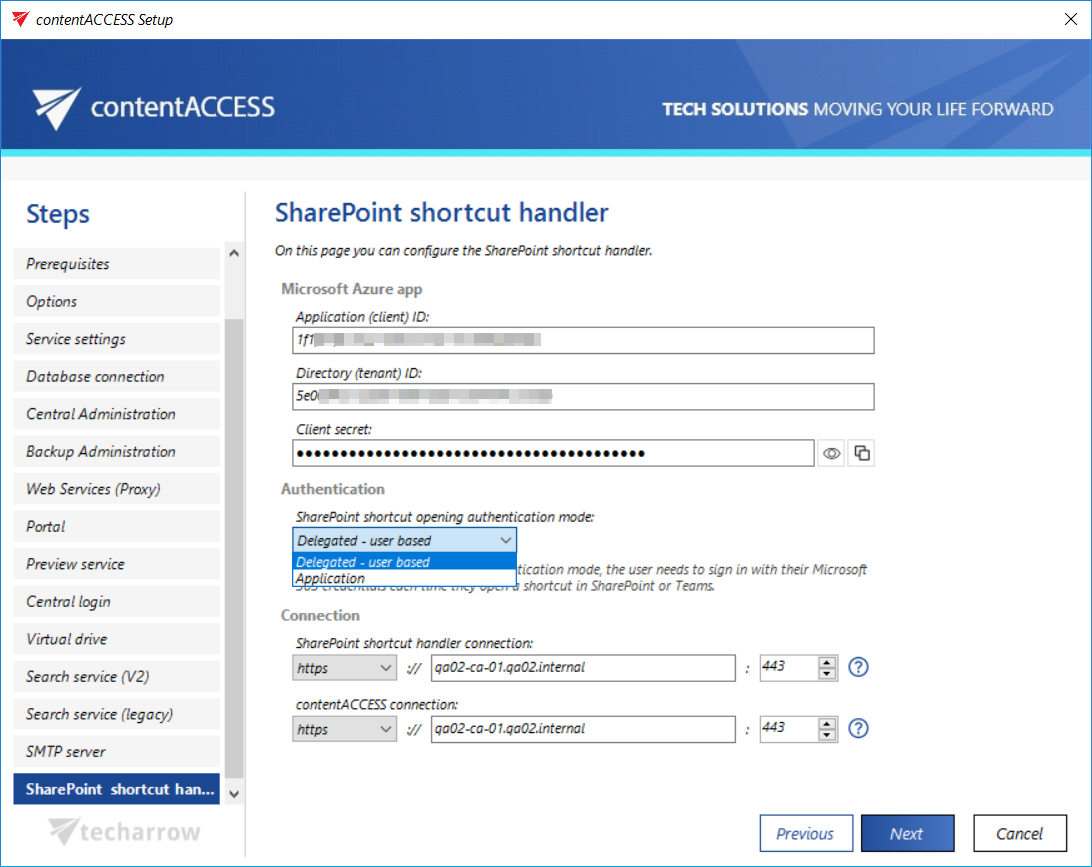
The SharePoint shortcut handler page allows you to configure the component that enables the use of modern shortcuts in SharePoint, OneDrive, and Teams archive.
Once this component is installed, the modern shortcut appears as a third option on the shortcut configuration page, alongside Keep original and HTML shortcut, allowing files to be archived in this format as well.
This page covers how to configure the Microsoft Azure app connection, select the authentication mode, and review the connection details before continuing with the setup.
Configure the Microsoft Azure app
In the Microsoft Azure app section, the connection with the Microsoft SharePoint application is established.
- Application ID and Directory ID are automatically generated during the App registration on the Azure Portal.
- Client secret can be manually generated in the Certificates & secrets section after the application is registered. The client secret can be copied using the Copy secret icon or verified using the Show password icon.
SharePoint archive registration is described in the Azure app registration for Microsoft 365 archiving section.
Select the authentication mode
In the Authentication section, select the mode for opening shortcuts:
- Delegated – user-based: If you choose delegated mode, you need to sign in with your Microsoft 365 credentials each time you open a shortcut.
- Application: This option allows you to connect to the SharePoint endpoint of the Graph API without providing a username and password.
Review the connection
The Connection section displays the specified connection details for both the SharePoint shortcut handler and contentACCESS. Both are automatically filled in based on the information provided on the previous pages.
Review these settings and make any necessary adjustments before proceeding. Ensuring the connection details are correct is essential for proper archiving and seamless integration between SharePoint, OneDrive, and Teams.
Click Next to continue to the next step of the contentACCESS setup.