Managing the index reset or migration
Introduction
Elasticsearch 5.6, used by earlier versions of contentACCESS, is outdated and no longer supported. The current version of contentACCESS uses Elasticsearch 8.x, replacing the previous version. Because the indexes created by these two Elasticsearch versions are incompatible, they must be migrated to remain usable with the new search service.
This page describes the two available options for handling existing indexes during an update — migrating the existing indexes from SearchV1 (legacy) to SearchV2, or resetting the indexing and rebuilding it from scratch with SearchV2 — and provides step-by-step instructions for performing an index reset using the contentACCESS Reset Index Tool.
Note: Index migration or reset is only required when updating from a contentACCESS version earlier than 6.X. In this case, the setup includes both search services (V1 and V2), and both can be installed side by side. After the update, the administrator can decide whether to continue searching in legacy (V1) mode or switch to V2 mode.
Choose between index migration and index reset
After updating from a version earlier than 6.X, administrators can choose between the following two options:
-
Index migration — This option is highly recommended. Migration can be ordered as a service from customer service, ensuring a smooth and transparent transition. During migration, search continues to work without interruption because the Search server mode is set to Migration mode, allowing the two search services to work together. Both previously indexed and newly indexed data remain searchable throughout the process.
To request index migration, contact customer service at support@tech-arrow.com.
-
Index reset — With this option, the indexing bookmarks are reset, and all documents are re-indexed by the new search service (V2). During re-indexing, only the newly indexed documents are searchable, since previously indexed data is not carried over. This process also takes longer, as all documents must be retrieved from storage to extract their text again.
Important: The index reset operation is irreversible. Once the reset is performed, it cannot be rolled back.
Reset the index using the Reset Index Tool
If the administrator does not want to migrate the existing indexes from SearchV1 (legacy) to SearchV2 — which is the recommended approach — the index can instead be reset using a command line tool.
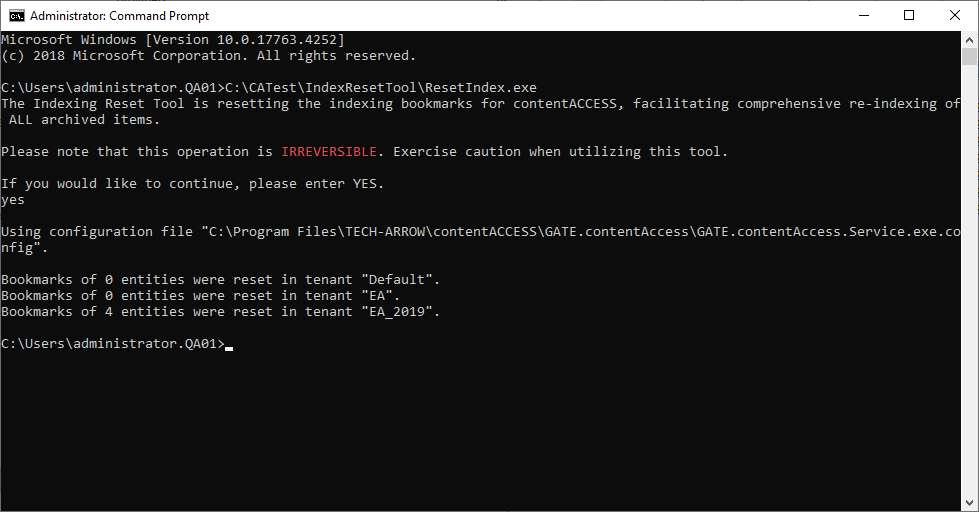
The tool resets the contentACCESS indexing bookmarks by removing the stored bookmarks and clearing any failed items from previous indexing runs. As a result, the next execution of the index job(s) will start indexing from the beginning. The tool does not modify the existing indexes on Elasticsearch, which remain unchanged.
The tool can be downloaded from this link.
Perform the index reset
- Disable the index jobs to prevent them from starting with an incorrect configuration during the reset process.
- Download the zip package (and unblock it), then extract it to any location on the contentACCESS server.
- Execute
ResetIndex.exeas Administrator and typeYESto confirm. - Go to Central Administration and change the index service to V2. Click the Test button to make sure the connection is working, then Save the settings.
- Restart the contentACCESS service to make sure nothing is cached.
- Enable and start the index jobs, and wait until everything is indexed.
- Turn off the old SearchV1 service and Elasticsearch 5.6.
- Verify that search is working correctly.
- Uninstall the old search service.
- Delete the old indexes (V1) from disk.