LoboDMS job
Introduction
The LoboDMS job collects emails and transmits them to LoboDMS based on configurable processing rules. This job is not connected with the contentACCESS LoboDMS storage; instead, it uses a separate storage type in LoboDMS where the processed emails are stored.
The job scans the configured mailboxes for items matching the Processing pattern and, according to its configuration, decides whether an email should be sent to LoboDMS and have a category applied. The category signals to the user that the email has already been processed and can be found in LoboDMS.
This page describes how to create a LoboDMS job and configure its processing rules, authentication, database, Exchange connection, mailbox, notification, and resource settings.
Create a LoboDMS job
- Go to Custom jobs -> Jobs.
- Click +New.
- In the popup window, select Lobo DMS Categorization and provide a display name.
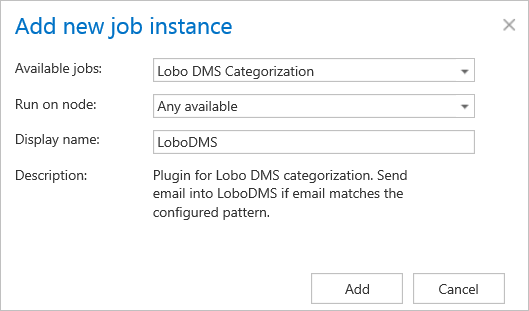
The job configuration page contains several sections. Some of them are optional, while others are required.
LoboDMS job processing configuration
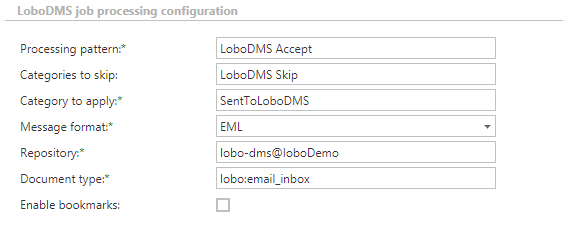
- Processing pattern: Regular expressions that are tested against the email subject. If the email subject matches the expression, the email is transmitted into LoboDMS.
- Categories to skip: A comma-separated list of categories. The job skips any email having a category from this list, even if the processing pattern matches.
- Category to apply: The category that is applied to emails that were processed and sent to LoboDMS.
- Message format: The format of the message in which the email is sent to LoboDMS.
- Repository: The repository ID defined in LoboDMS.
- Document type: The type defined in LoboDMS where the emails are stored.
- Enable bookmarks: The job processes folders, sorting items according to their modification date. When bookmarking is enabled, the job saves the modification date of the last processed item and, on the next run, processes only items from Exchange that are younger than the bookmarked date. When bookmarking is disabled, the job requests all items from Exchange and skips items that were already processed.
LoboDMS job authentication
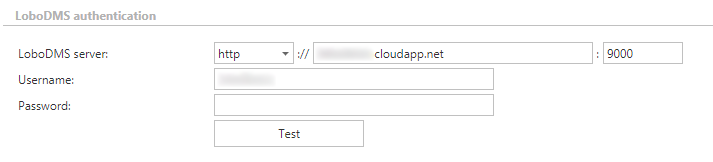
The job uses the server and credentials specified here to communicate with the given LoboDMS instance.
Database settings
The job requires a database where certain data is stored during the run and configuration.

Exchange connection settings
Select the Exchange connection that the job will use to connect with Exchange. New connections can be added in the Exchange connections tab.

Mailbox settings
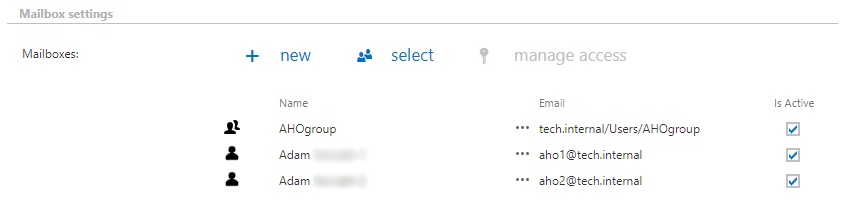
Based on the Exchange connection settings, select the mailboxes and groups that will be processed by the job.
Notification settings
Configure when notification emails should be sent from the job. You can set notifications to be sent always, never, or only when an error or warning occurs during processing — for example, if the processing of one or more items fails.
In the Recipient list field, enter the email addresses of the people who should receive these notifications. If there are multiple recipients, separate the addresses with , or ;.

Resource settings
Set the value that determines how many threads will process the selected mailboxes simultaneously. The recommended value is 2.

Note: Always click Save in the upper-left corner of the UI to save your job configuration.