How to assign database, storage and index zone to an Exchange group?
Introduction
The Assign database, storage and index zone function in Email Archive allows administrators to assign a database, storage, and index zone to all mailboxes belonging to a specific Exchange group at once. This function is accessed from the address book and provides a way to configure archiving targets for multiple mailboxes simultaneously, instead of configuring each mailbox individually.
Assign database, storage and index zone to an Exchange group
- Navigate to Email Archive ⇒ Archive ⇒ View address book.
- Select the required group.
- Click the … (ellipsis) icon and select Assign database, storage and index zone from the context menu.
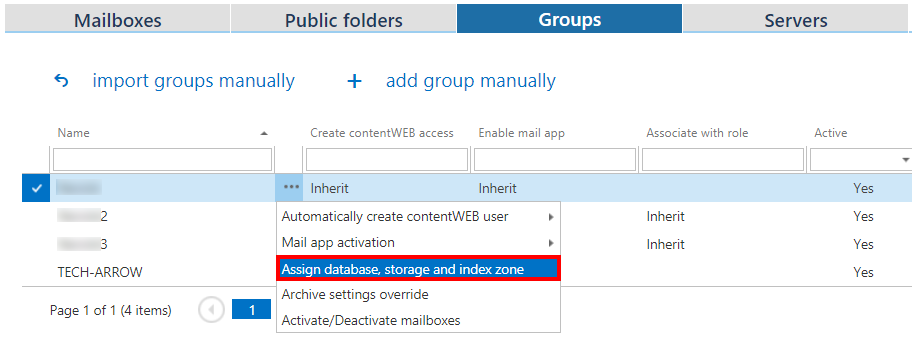 Screenshot A: Assign database, storage and index zone context menu.
- Fill in the database, storage, and index zone in the Group management repository window.
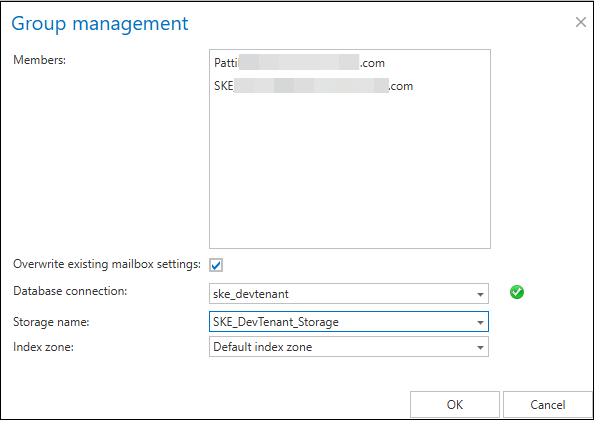 Screenshot B: Group management repository window.
Next to Members, all mailboxes belonging to the selected Exchange group are listed.
Group management settings
- Database, Storage, Index zone: Assign a database, storage, and index zone to the mailboxes of the Exchange group.
- Overwrite existing settings: Determines whether the newly assigned database, storage, and index zone override the existing settings of mailboxes that already have their own configuration.
Important: It is very important to keep in mind that by checking the Overwrite existing settings checkbox, mailboxes that already have their own database, storage, and index zone settings will lose access to items previously archived into another database, storage, or with another index zone. A contentACCESS pop-up window (shown below) will warn the administrator about this before the change is applied.
If the Overwrite existing settings checkbox is left unchecked, the newly assigned database, storage, and index zone will only be applied to mailboxes that are not yet associated with any database, storage, or index zone.

Note: If the database, storage, and index zone have not been selected manually in the address book, they will be automatically assigned to the mailbox according to the settings of the email archive job the next time it runs.