Microsoft 365 SuperUser mailbox configuration
Introduction
The Microsoft 365 SuperUser mailbox configuration describes the permissions and access rights that must be set up for the SuperUser account before it can be used for archiving in Microsoft 365. This page covers:
- setting the required permissions for the SuperUser in Exchange Online;
- granting Full Access rights for the SuperUser on all mailboxes.
Set permissions in Exchange Online
Five roles are recommended for the SuperUser:
- View-Only Recipients
- View-Only Configuration
- Org Custom Apps
- Org Marketplace Apps
- User Options
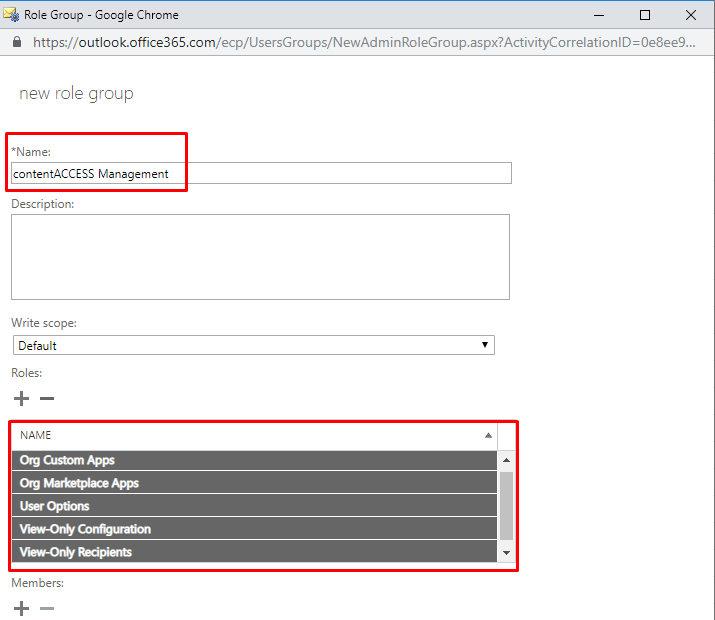
The easiest and most secure way to assign these roles is to create an Admin role group called contentACCESS Management, assign the roles listed above to the group, and add the SuperUser as a member of the group.
For more information about how the role group should look, see the screenshot below.
Grant Full Access rights for the SuperUser on all mailboxes
The easiest way to grant Full Access rights for the SuperUser is through PowerShell.
- Log in to Exchange Online PowerShell.
- Run the following command, replacing
SuperUserwith the real SuperUser account:
Get-Mailbox | Add-MailboxPermission -User SuperUser -AccessRights fullaccess -InheritanceType all
To connect to Exchange Online PowerShell, see the official Microsoft documentation.
Important: This user will have access to all mailboxes, so a strong password must be set for it.