Solution for Outlook security patches
Introduction
The Solution for Outlook security patches page describes the impact of the Outlook security updates released on September 12, 2017 on the contentACCESS email archive, and provides the registry-based fix required to restore correct shortcut behavior.
Important: The security updates for Outlook released on September 12, 2017 affect the contentACCESS email archive. Users are no longer able to open the original archived messages from shortcuts — only the shortcut itself opens. This is caused by Microsoft's decision to disable Outlook form scripting by default.
After installing the affected security updates, emails archived by third-party applications show unwanted behavior. All programs and applications that use custom Outlook forms are affected.
Affected security updates
The following security updates are causing the issue:
- Security Update for Microsoft Office Outlook 2007 (KB4011110) https://www.microsoft.com/en-us/download/details.aspx?id=55957
- Security Update for Microsoft Outlook 2010 (KB4011089) 64-Bit Edition https://www.microsoft.com/en-us/download/details.aspx?id=55924
- Security Update for Microsoft Outlook 2010 (KB4011089) 32-Bit Edition https://www.microsoft.com/en-us/download/details.aspx?id=55881
- Security Update for Microsoft Outlook 2013 (KB4011090) 64-Bit Edition https://www.microsoft.com/en-us/download/details.aspx?id=55930
- Security Update for Microsoft Outlook 2013 (KB4011090) 32-Bit Edition https://www.microsoft.com/en-us/download/details.aspx?id=55894
- Security Update for Microsoft Outlook 2016 (KB4011091) 64-Bit Edition https://www.microsoft.com/en-us/download/details.aspx?id=55941
- Security Update for Microsoft Outlook 2016 (KB4011091) 32-Bit Edition https://www.microsoft.com/en-us/download/details.aspx?id=55934
What is affected
Email archive
The security patches prevent archived emails from opening correctly. When a user double-clicks an archived email (shortcut), only the shortcut is opened instead of the original item. Attachments are only accessible if the shortcut was configured to contain the links.
The following figure shows an example of an opened shortcut:
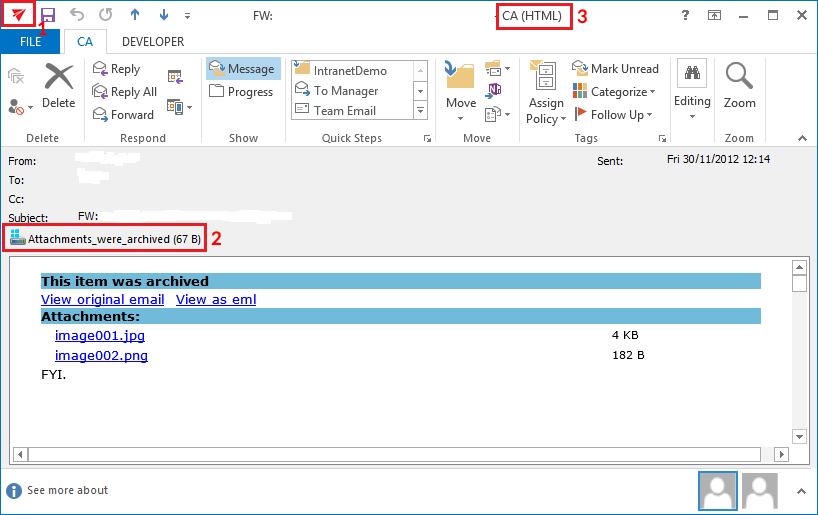 Screenshot: The shortcut with attachments is opened.
The following signs can be observed:
- The icon of the email is different.
- If the mail had attachments, an "Attachments_were_archived" text is displayed.
- The title of the window contains "CA" instead of "Message".
How to fix the problem
Outlook form scripting is disabled by default, but it can be re-enabled using registry keys, as described in Microsoft's article Custom form script is now disabled by default.
We have prepared registry files that can be applied on the affected client computers. There is a separate registry file for each Outlook version and Windows version combination. Download and extract the ZIP file from: https://www.tech-arrow.com/download/CustomFormFix.zip
Choose the correct .reg file depending on your Outlook and Windows versions, and apply it on the client computer by executing the .reg file.
Note: The registry key for Microsoft Outlook 2016 also works with Microsoft Outlook 2019.
Fix for Outlook 2007
| Outlook and Windows version | Path in the ZIP file |
|---|---|
| Outlook 2007 on Windows 32-bit | Outlook 2007\Forms-2007-samebit.reg |
| Outlook 2007 on Windows 64-bit | Outlook 2007\Forms-2007-64win.reg |
Fix for Outlook 2010
| Outlook and Windows version | Path in the ZIP file |
|---|---|
| Outlook 2010 32-Bit Edition on Windows 32-bit | Outlook 2010\Forms-2010-samebit.reg |
| Outlook 2010 32-Bit Edition on Windows 64-bit | Outlook 2010\Forms-2010-64win.reg |
| Outlook 2010 64-Bit Edition on Windows 64-bit | Outlook 2010\Forms-2010-samebit.reg |
Fix for Outlook 2013
| Outlook and Windows version | Path in the ZIP file |
|---|---|
| Outlook 2013 32-Bit Edition on Windows 32-bit | Outlook 2013\Forms-2013-samebit.reg |
| Outlook 2013 32-Bit Edition on Windows 64-bit | Outlook 2013\Forms-2013-64win.reg |
| Outlook 2013 64-Bit Edition on Windows 64-bit | Outlook 2013\Forms-2013-samebit.reg |
Fix for Outlook 2016
| Outlook and Windows version | Path in the ZIP file |
|---|---|
| Outlook 2016 32-Bit Edition on Windows 32-bit | Outlook 2016\Forms-2016-samebit.reg |
| Outlook 2016 32-Bit Edition on Windows 64-bit | Outlook 2016\Forms-2016-64win.reg |
| Outlook 2016 64-Bit Edition on Windows 64-bit | Outlook 2016\Forms-2016-samebit.reg |
Support
If you need any help solving your problem with custom Outlook forms, contact us at support@tech-arrow.com.