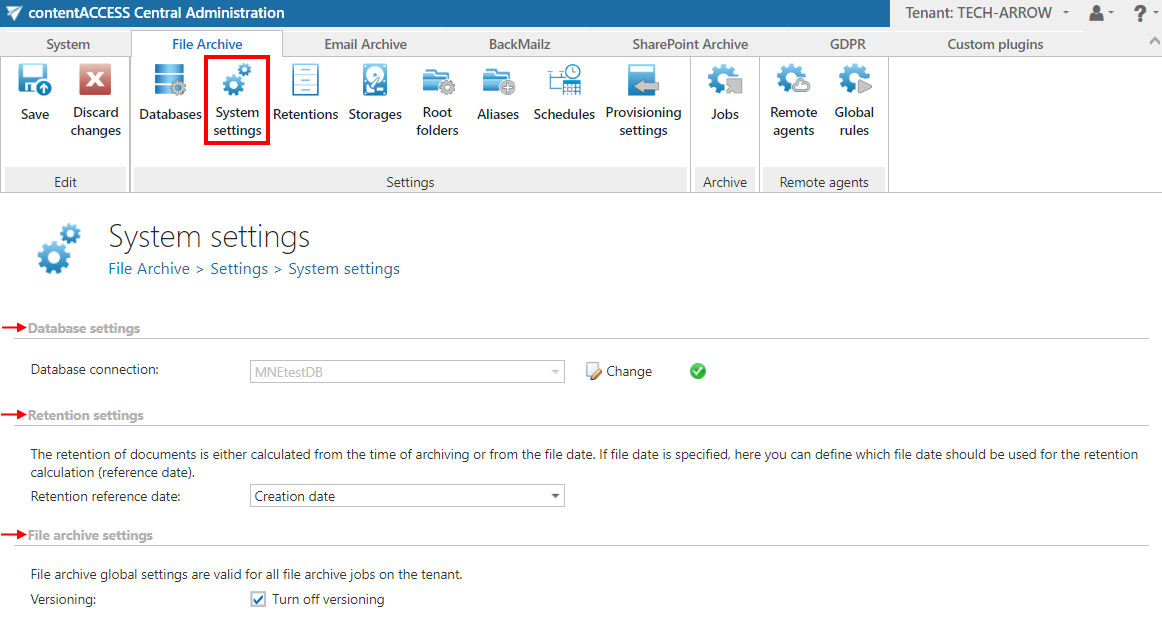
File archive System settings
Introduction
The File archive System settings page allows administrators to configure the core database and versioning behavior used by File Archive. From this page, you can select the main system database that stores root folder configurations, define how the retention reference date is calculated, and control whether File Archive supports document versioning.
Configure the file archive database
The main system database for File Archive is selected on this page. All root folders — and their settings — that are applied in archive jobs are kept in this database.
Select the database connection to be applied from the dropdown list (for example, MNEtestDB).
Note: A database connection already configured on the Databases page (File Archive ⇒ Settings ⇒ Databases) can be selected as a file archive database.
Configure the retention reference date
The date from which document retention is calculated can be selected here. Choose the setting to be applied from the dropdown list.
There are three types of retention reference dates:
- Creation date: The date when the document was originally created. If you select Creation date as the retention reference date, the retention period is calculated starting from when the document was first created.
- Modification date: The date when the document was last modified or updated. Selecting Modification date means the retention period begins from the last time the document was edited or changed.
- Most recent date: The most recent significant date associated with the document, which can be either the creation date or the last modification date, depending on which is later. Using Most recent date as the retention reference means the retention period is calculated from the latest relevant activity on the document.

Versioning
By default, File Archive supports versioning. When a file is archived by File Archive for the first time, the first (original) version is created.
If File Archive is creating shortcuts, the shortcuts are opened using the Virtual Drive. When a user opens a shortcut, the file is opened in read/write mode and can be edited. The Virtual Drive detects the changes, and after the file is closed, a new version is created in File Archive. Users always get the latest version when accessing a file or shortcut.
Turn off versioning
If the requirement is to not allow changes to archived files, versioning can be disabled in File Archive. To do this, check the Turn off versioning checkbox in File Archive ⇒ Settings ⇒ System settings, under the File archive settings section.
If versioning is turned off:
- File Archive will not allow the creation of versions, either through the file archive job or through shortcuts/Virtual Drive.
- If a user changes the file on the file system, the file archive job will not create a new version. Instead, it generates a warning (see System logs).
- File Archive will not create a new version from the modified file.
Note: After the versioning settings are changed and saved, the Virtual Drive needs to be restarted.
Save your settings.