Teams archive Licensing
Introduction
Licensing for Teams archive is based on the users who are members of a team. This page explains how licenses are assigned to team members, how a team's archiving eligibility is determined, how to revoke a user's license manually, and what telemetry data is collected for Teams archive.
If a new user is added to any team and that user is not yet licensed, the system checks whether free licenses are available and, if so, assigns one to the user. A team is archived only if all its members are licensed. The archive job checks the team's license status before starting the archiving process and writes a monitoring warning if a team is not fully licensed and cannot be archived.
Note: Private chat archiving can be performed only when it is allowed in System settings, and only for licensed users.
Archiving process
- Provisioning adds all members of the teams (selected in the provisioning job) into the database.
- Each user's license state is unassigned at this point.
- The archive job picks up the team(s) and reads the team members. For each member without an assigned license, it checks whether the tenant has free licenses available:
- If yes, a new license is assigned to the user.
- If no, the user remains unlicensed.
- Once all users are checked, the archive job verifies whether all team members are licensed:
- If yes, the team(s) are archived.
- If no, the team(s) are not archived, and a monitoring warning is written.
Revoking a user license
When a member is removed from a team (in the Teams app), the contentACCESS Teams archive license is not revoked automatically. It must be revoked manually in Central Administration.
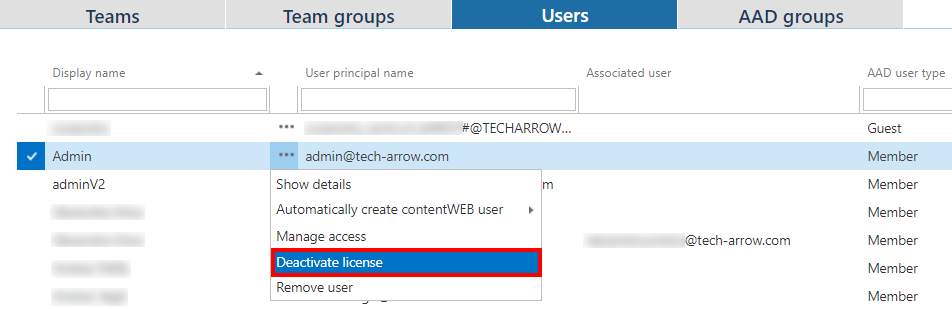
To revoke a license from a user:
- Go to Teams archive > Archive > View address book > Users tab.
- Click the user, then select Deactivate license from the context menu.
- If the user is part of multiple teams, the system displays a warning listing the teams that will no longer be archived if the license is revoked. Click OK.
- The user is marked as unlicensed.
Telemetry
Telemetry counts the licensed users, number of teams, number of chat items/users, chat size, and storage used by Teams archive. This information is sent to the license server.