Tenant limitations
Introduction
The Tenant limitations page in contentACCESS allows system administrators to define which processes and features a tenant is permitted to use, and to what extent. Each tenant can manage only the processes for which it has the necessary rights. For example, one tenant may have the right to archive emails only, while another may be allowed to archive both files and emails.
On this page, administrators can configure:
- System limitations — the jobs and stores that the given tenant is allowed to use.
- Limitations related to the allowed jobs — for example, if the Email archive job is allowed, the maximum email count, mailbox count, and email size that the job can process.
Note: Only a system administrator has the necessary rights to manage tenant limitations. A tenant administrator can view their own tenant's limitations only in read-only mode.
Open the Tenant limitations page
The Tenant limitations page can be opened from the context menu of the given tenant.
- Open the context menu of the tenant.
- Select Edit tenant license.
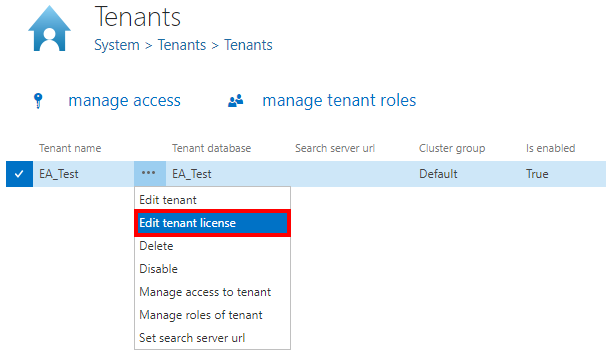
Sections of the Tenant limitations page
The Tenant limitations page is divided into the following sections.
System limitations
The System limitations section allows administrators to restrict the jobs and stores available to the given tenant.
By unchecking the Unlimited checkbox, the list of jobs and stores becomes available. Check the jobs and stores that the tenant should be allowed to use.
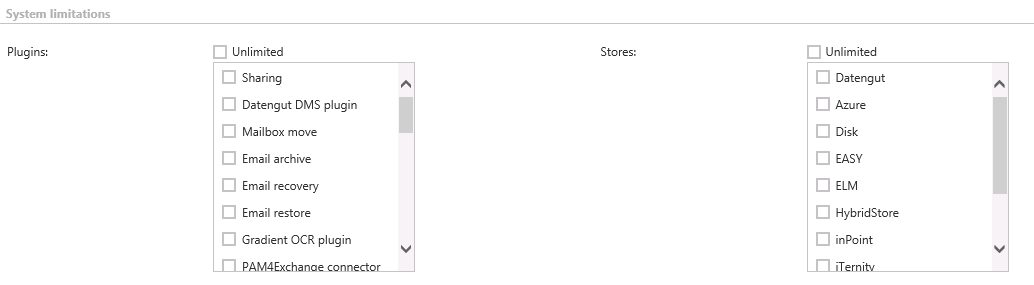
Tenant limitations
The Tenant limitations section allows administrators to limit the maximum number of jobs processed by the tenant at a time.

Email archive limitations
If the Email archive job is allowed, administrators can limit:
- the active and deactivated mailbox count;
- the email size;
- the email count that the tenant is allowed to archive.
It is also possible to allow public folders by checking the Public Folders allowed checkbox, and to select whether deactivated mailboxes should be hidden.

PST import limitations
If PST import is allowed, administrators can limit the count of mailboxes with imported PSTs and the size of emails imported from PSTs.

File archive limitations
If the File archive job is allowed, administrators can limit the root folder count, file count, and file size that the tenant is allowed to archive.

GDPR for File system limitations
Administrators can limit the number of file system roots and file system items.

GDPR for Exchange limitations
Administrators can limit the mailbox count and email count the tenant is allowed to archive.

GDPR for applications limitations
Administrators can limit the application count and the number of application records.

SharePoint archive limitations
If the SharePoint archive job is allowed, administrators can limit the count of connections, the file count, and the size of processed files.

Teams archive limitations
Administrators can limit the user count, team count, size of archived items, deactivated user count, deactivated team count, and item count.

Note: If a limitation text box is left empty, the corresponding count or size is unlimited.