Browse page
Introduction
The Browse page allows you to browse archived content in the entities you have permission to access, including Email, File, OneDrive, SharePoint, Teams, Teams chat archive, Sharing, and GDPR.
Browse archived content
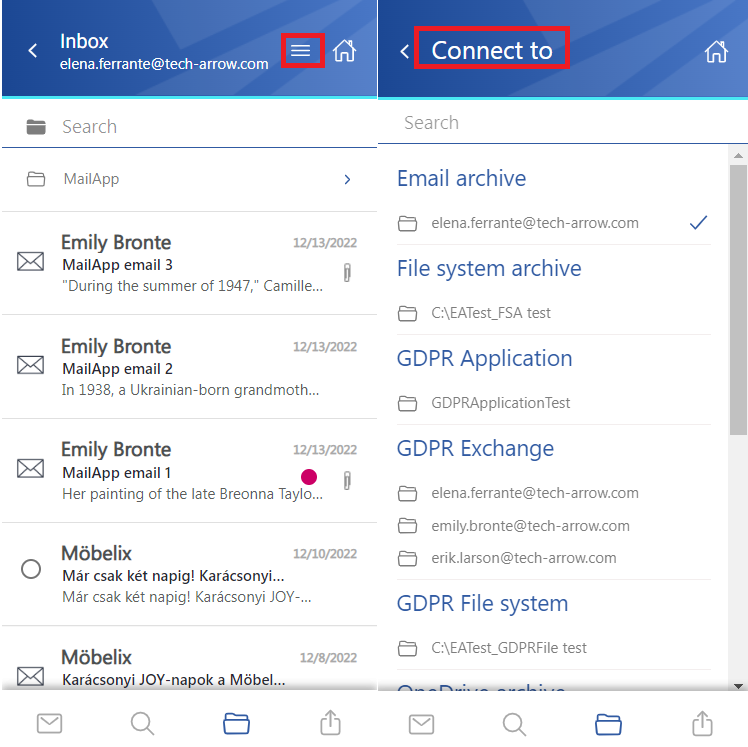
By default, the Email archive opens when you select the Browse tab on the Home page.
To browse another model, open the Connect to menu and select the required model.
What the next chapters cover
- Subfolder view: how to enable or disable subfolder mode while browsing archived content.
- Email archive: email list and preview layout, item actions, attachment handling, and in-entity filtering.
- File system archive: file-focused browsing with metadata, versions, preview, and context menu actions.
- OneDrive archive: browsing OneDrive archived items, searching in folders, preview, and sharing actions.
- SharePoint archive: browsing SharePoint archived files with search, preview, and common item operations.
- Teams archive: handling Teams files and messages, including selection actions and preview behavior.
- Teams chat archive: viewing archived chat messages, filtering, preview options, and item actions.
- GDPR Application: browsing GDPR Application items, selecting files, and using basic file actions.
- GDPR Exchange: working with archived GDPR emails, participant details, attachments, and restore-related actions.
- GDPR File system: browsing GDPR file system items with preview, download, and sharing options.
- Sharing: navigating shared items, understanding sharing status, and reviewing or modifying sharing details.