XML distribution with GPO in distributed company environment
Introduction
officeGATE can be pre-configured for Group Policy installation by distributing the officeGATE_Configuration.xml file to domain users before installing officeGATE. The XML file contains global and connection settings that are applied when officeGATE is installed.
The configuration file can be generated from contentACCESS Central Administration and distributed using Group Policy before the officeGATE installation.
Generate the configuration file from contentACCESS
The officeGATE_Configuration.xml file generated from contentACCESS contains the specified global settings and connection settings between officeGATE and the contentACCESS provider.
The configuration can include the following parameters:
- License key.
- Required login provider.
- Language settings.
- contentACCESS FQDN settings.
To generate the configuration file:
-
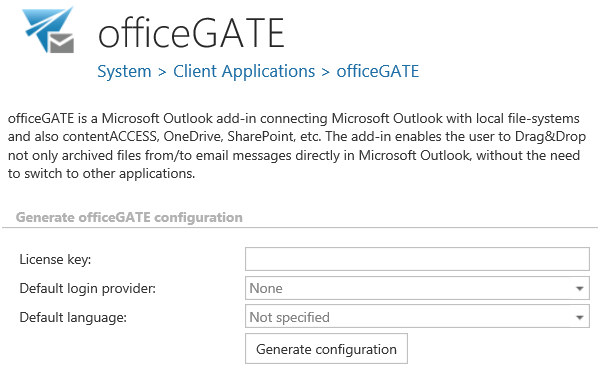
In contentACCESS Central Administration, go to System => Client applications => officeGATE.
-
Specify the required parameters, including the license key, login provider, and default language.
-
Click Generate configuration.
Distribute the configuration file
Distribute the generated officeGATE_Configuration.xml file to the required domain users using Group Policy.
For detailed instructions, see the How to copy officeGate_Configuration.xml using Group Policy chapter in the Installing officeGATE with Group Policy in a distributed company environment guide.
Install officeGATE using Group Policy
After the XML file has been distributed to the users, install officeGATE using Group Policy.
Distributing the configuration file before the installation ensures that officeGATE is installed with the global and connection settings defined in the XML file.