Updating the offline items based on the online changes
Introduction
The Automatic synchronization and manual synchronization options in officeGATE allow changes made to folders and documents in the source system to be downloaded to the corresponding offline files. Automatic synchronization runs periodically according to the Offline synchronization settings, while manual synchronization can be started from the context menu.
Synchronize changes automatically
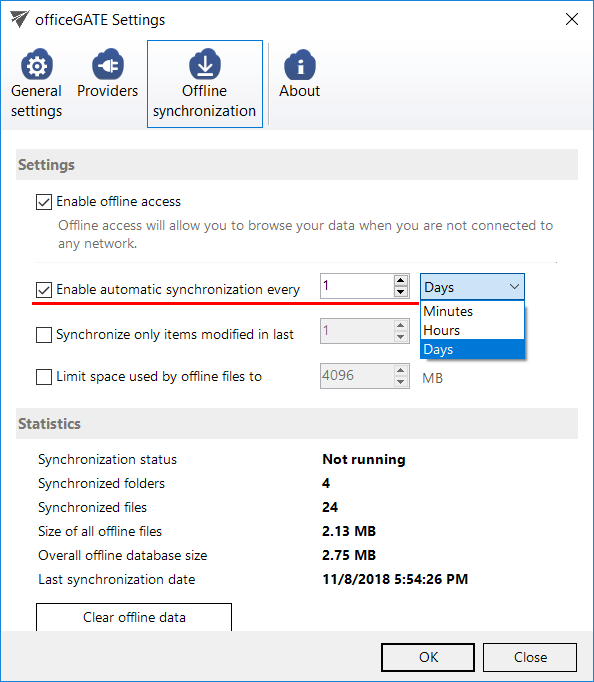
Automatic synchronization runs based on the Offline synchronization settings and updates the offline files and folders according to changes made in the source system:
- Updates a file if it has been changed in the source system.
- Adds a new file to the offline files if it has been added to the source system.
- Adds new folders for offline access if they have been added to the source system, provided that recursive offline access was enabled on the selected folder.
Automatic synchronization runs for the first time when it is enabled in the Settings section. After that, it runs periodically according to the specified time intervals.
Synchronize changes manually
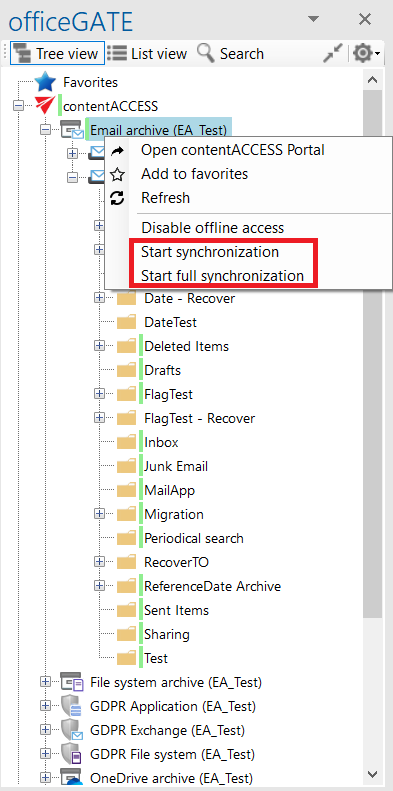
You can manually synchronize offline files and folders using the following context menu options:
- Start synchronization: Updates offline files and folders based on changes made in the source system.
- Start full synchronization: Downloads everything from the source system from scratch for offline access.