Disabling offline access
Introduction
The Offline synchronization settings and context menu options allow you to control whether selected folders and their contents remain available in offline mode. You can remove offline files and metadata completely or turn off offline synchronization while keeping the files that have already been downloaded.
Disable offline access
You can disable offline access for selected folders and their subfolders using the Disable offline access context menu option.
Selecting this option removes all offline metadata and offline files of the selected folder(s) and all of their subfolders. The removed items will no longer be available in offline mode.
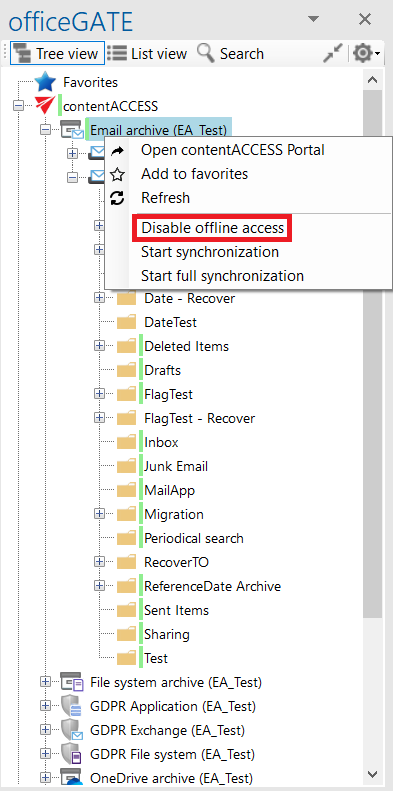
Screenshot A
Turn off offline synchronization
You can turn off offline synchronization by unchecking the first checkbox in the Offline synchronization settings.
Turning off this option does not delete the offline files that have already been downloaded. However, new files cannot be downloaded for offline access while the option is turned off.
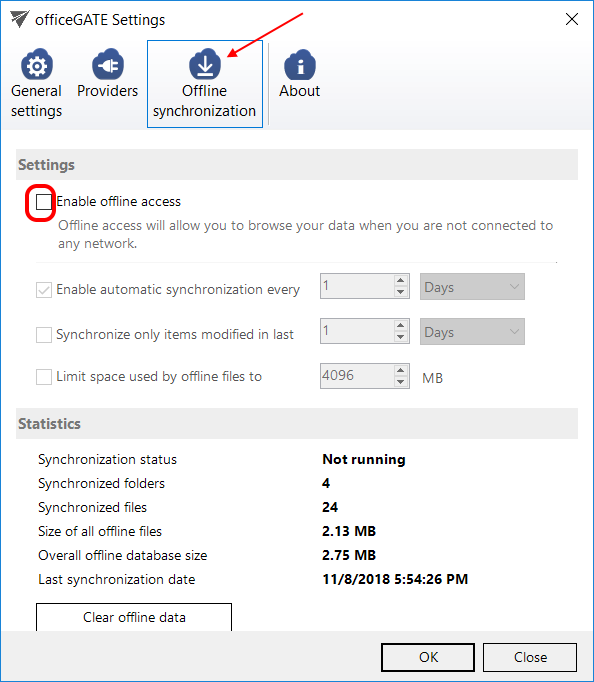
Screenshot B