Tasks supported by entities (models)
Introduction
contentACCESS Portal provides entity-specific tasks that can be triggered from the toolbar above the items grid. These tasks allow users to refresh item lists, export items, create reports, share items, recover deleted items, manage deletion, and place items on legal hold. The available tasks depend on the selected entity and can also be triggered from the search page.
Available tasks
The following tasks are available from the toolbar:
-
Refresh – Manually updates the item list.
-
Export to PST – Exports selected mailbox items or folders, or all items in the selected folder, to Outlook PST format.
-
Export to ZIP – Exports selected items or folders, or all items in the selected folder, to a compressed ZIP file. Emails are saved as MSG files and compressed into the ZIP file.
-
Create report – Creates an XLS file containing a list of the selected files and their details.
-
Share item(s) – Allows users to share items with selected users or the entire organization directly from contentACCESS Portal without using another application or sending large attachments. Individual items can also be shared using the Share button in the upper-right corner.
-
Recovery – Recovers selected items, folders, or the entire folder structure if they have been deleted from the original location, either from a mailbox or the file system.
-
Delete – Allows users to mark or unmark documents for deletion.
-
Legal hold – Allows users to create a legal hold case and subsequently add documents to the case.
Important: Documents under a legal hold case cannot be deleted from the system until the legal hold case expires.
Important: Cross-tenant sharing is not allowed. If the logged-in user is assigned to Tenant 1, data from Tenant 2 cannot be shared, even if the user has access to that data. The user can view the sharing details but cannot share the items.
Important: When items are selected to mark/unmark documents for or from deletion from the search results list, and the task is completed from the Task list, the index job must run. Otherwise, the bin icon does not appear or disappear next to the selected items.
Task toolbar
The task toolbar is available above the items grid and can also be accessed from the search page.
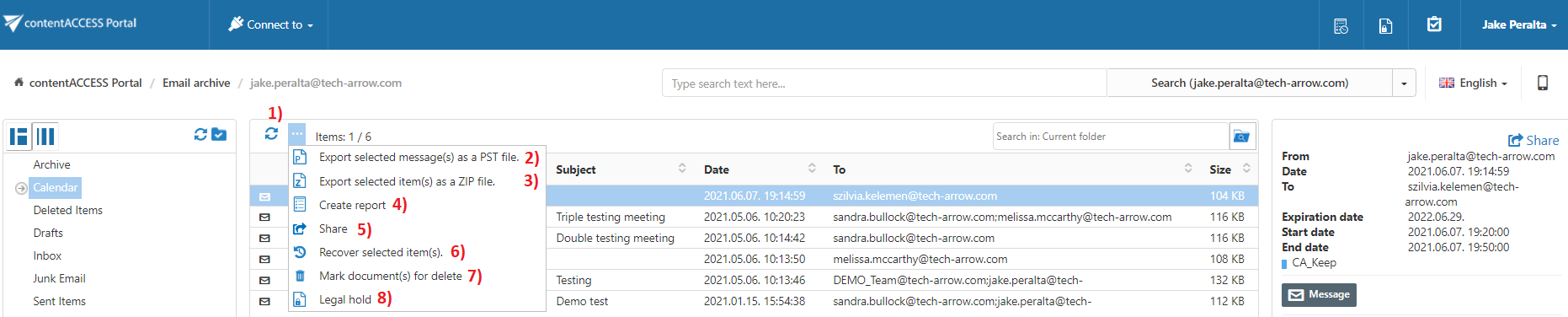
Screenshot: Toolbar buttons used to trigger Email archive tasks
Note: For more information about these functionalities in the File System Archive and Email Archive, see File Archive tasks and Email Archive tasks.