contentACCESS Version 3.0

✨ Highlights
- Introduces online documentation with full-text search and context-sensitive help integrated into Central Administration.
- Adds mailbox deactivation to help administrators better control and manage license usage.
- Delivers a configurable contentACCESS Mail App, allowing administrators to enable or disable archive and restore functions.
- Improves contentWEB performance, especially when working with large folder structures.
mycompanyarchive
contentACCESS is now available as a cloud solution. TECH-ARROW is proud to announce mycompanyarchive.com, the next generation of archiving for all your document sources. Access your data anywhere, at any time. Use the scalability and reliability of our cloud solution and choose the services according to your needs.
With mycompanyarchive, you can build a single, secure, and well-structured archive.
Common features
✓ Redesigned login page + Microsoft authentication: contentACCESS 3.0 includes a redesigned login page with support for Microsoft accounts (Azure, LiveID, Microsoft 365).
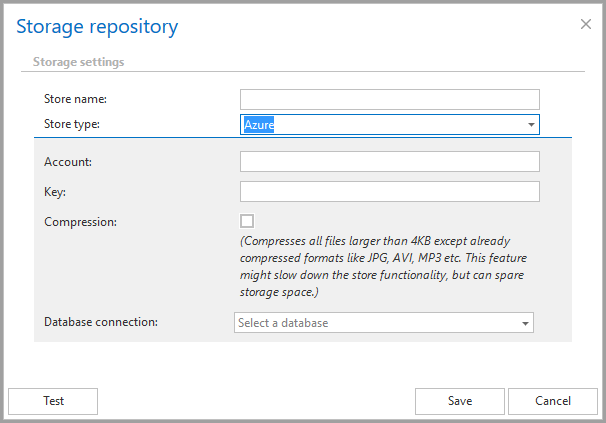
✓ Azure store: The list of supported storage systems has been extended to include MS Azure Storage.
✓ Online documentation: The documentation for contentACCESS is now available online with an easy search option. It is also connected to contentACCESS Central Administration, allowing you to access context-related help at any time by clicking the “Online help” button in the lower-right corner of a page. Check it out here.
✓ Better tenant management: In Central Administration, it is now possible to set limits for tenants. This is useful in multi-tenant environments where license limits are managed by the system administrator via Central Administration.
Email Archive
✓ Shortcut synchronization job: The shortcut synchronization job keeps live emails in sync with the archive. As mails and shortcuts are reorganized in mailboxes, the shortcut synchronization job updates the structure saved in the archive according to the new structure. Of course, old versions are preserved if required.
✓ Moving mailboxes between locations (databases and stores) is now supported in OEM versions: With contentACCESS 3.0, OEM versions also support the “Mailbox move” feature. This allows you to organize mailboxes across multiple email archive databases.
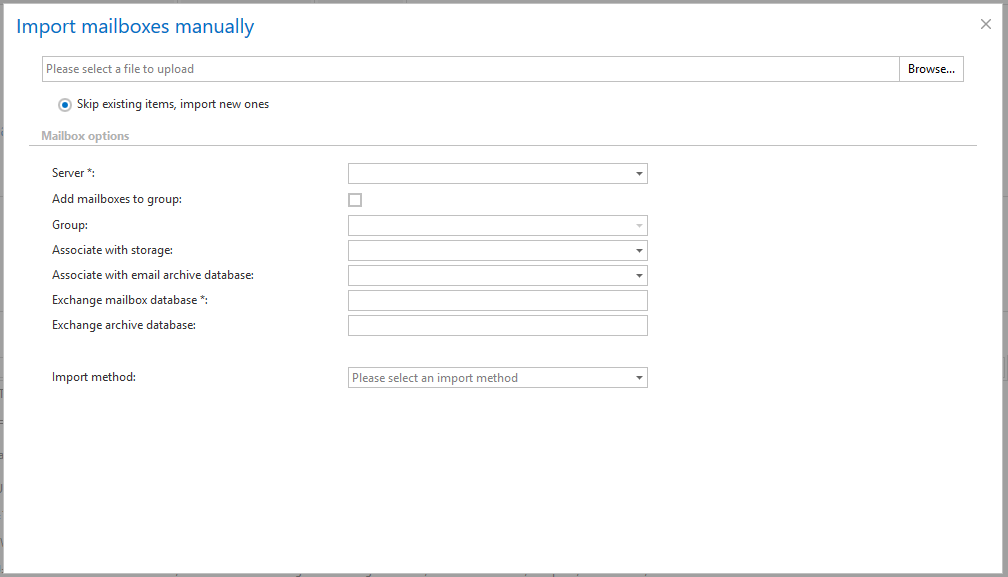
✓ Import mailboxes manually: Ever wondered how to add mailboxes that are no longer available to the email archive? With this new feature, it is no longer necessary to create a physical mailbox. Instead, mailbox information can be imported from CSV or XML files.

✓ Exchange 2016 support: contentACCESS 3.0 officially supports Exchange 2016.
Licensing
✓ Proxy support: The contentACCESS setup now allows you to enter connection details for a web proxy server, if required to connect to the Internet and activate the license key online.
✓ Mailbox deactivation: This feature allows you to deactivate mailboxes that are no longer in use, helping to keep licenses under control. Deactivated mailboxes do not count toward license evaluation. Limitations for such mailboxes include the inability to archive, restore, move, or synchronize them; however, archived content remains accessible via contentWEB and officeGATE. Please note that once the license limit is reached, the system will not allow the archiving of any new mailboxes.
Client Applications / Tools
✓ Configurable Mail App: The functionality of the contentACCESS Mail App can be configured by the administrator. It is possible to allow or deny the “archive” and “restore” functions. If you want to disable manual archiving in your organization while still allowing shortcut restoration, simply adjust the Mail App configuration in Central Administration.
✓ contentWEB performance optimization: The data visualization performance of contentWEB has been optimized, especially for large folder structures.