contentACCESS Version 3.8

✨ Highlights
- Advanced filtering with a new engine, including custom properties and full-text filtering for more precise job configuration.
- Improved monitoring by storing monitoring data directly in Elasticsearch to reduce load on the system database.
- Support for hybrid Exchange environments, enabling seamless transitions between on-premise and cloud setups.
- A new journal post-processing job that makes archived emails accessible to end users.
- Improved performance with paged loading of the Address Book.
Common features
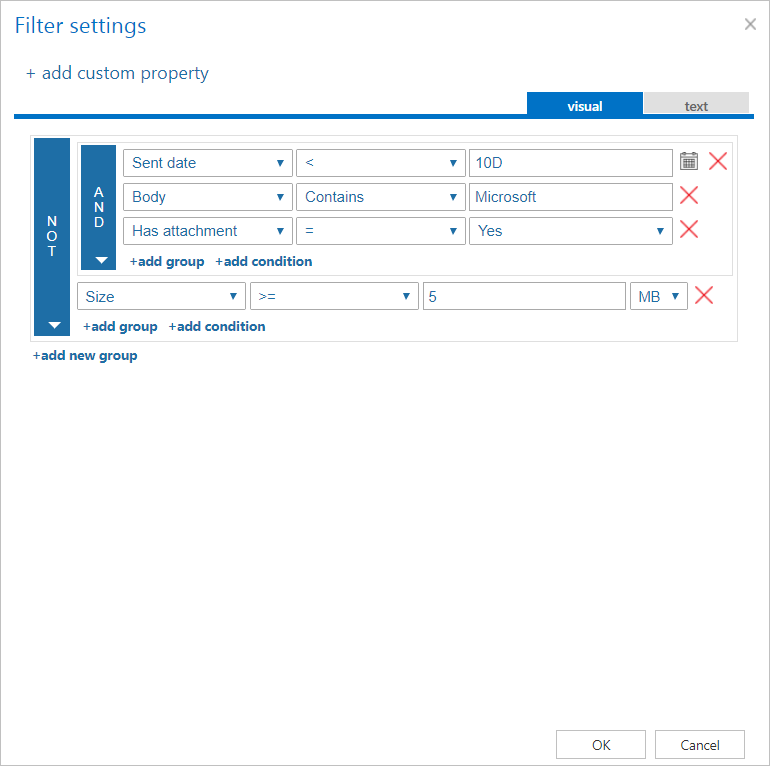
✓ Advanced filtering: Major improvements were made to job filtering. It is now easier to define which items should be processed and which should be excluded. If none of the predefined properties meet your requirements, you can also define a custom one. The new filtering engine can even filter by the full-text content of an item. Due to these significant changes, we recommend checking backward compatibility.
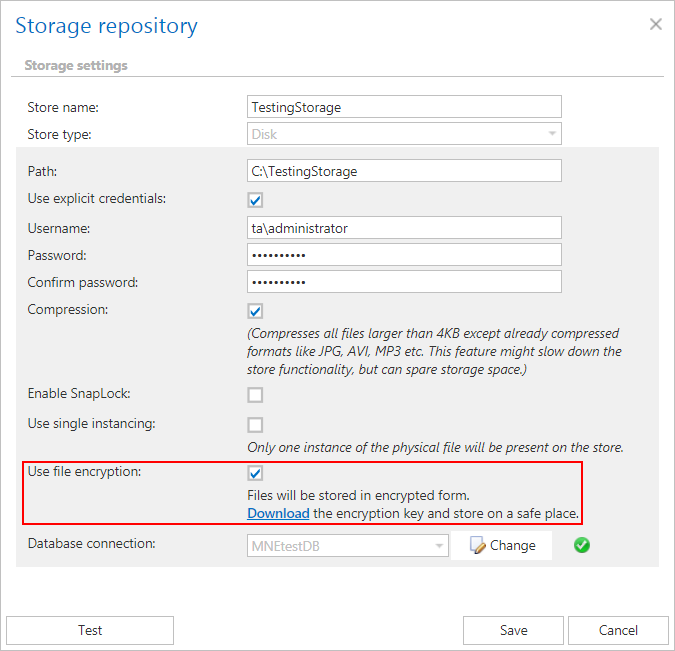
✓ Disk storage encryption: Encrypt and store your files in one step. With the new storage encryption option, it is easy to add an additional level of security to your archive.
✓ Monitoring data stored in Elasticsearch: To reduce the load on the contentACCESS system database caused by monitoring logs, it is now possible to store them directly in Elasticsearch. This is especially helpful in scenarios where database performance may be limited, such as in cloud environments.
✓ Time zone and time formatting: Time zone and time formatting can be specified at the system and/or tenant level. These settings are applied to Central Administration and contentWEB.

✓ Index zone auto splitting: To increase search performance and reduce the load on the search server, the indexing job was enhanced with the ability to split mailboxes into multiple index groups within a single index zone. The number of entities per index group is configurable.

Email archive
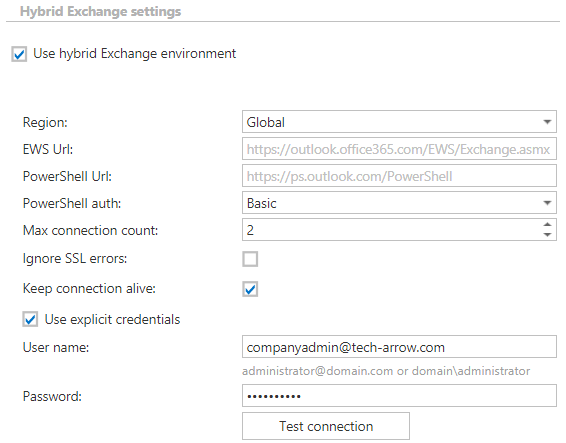
✓ Hybrid Exchange environment support: If your environment consists of both cloud and on-premise or hosted Exchange, there is no need to worry. The latest contentACCESS version also supports hybrid environment configurations. The transition period from on-premise to hybrid is fully supported, allowing you to continuously move mailboxes to the cloud and shut down the on-premise Exchange afterward. Users can choose whether to use Windows or O365 authentication to access their archived data.
✓ Journal post-processing job: Were you archiving only the journal mailbox but now want to give users access to their emails? The new journal post-processing job can handle this. The job walks through all emails in the journal archive mailbox and duplicates missing emails into the recipient mailboxes that are present in the Address Book.
✓ Address Book paged loading: Do you have many mailboxes and experience slow Address Book loading? With the changes introduced in contentACCESS 3.8, the Address Book now loads fewer items at once than in previous versions. This noticeably improves loading speed and overall performance.
✓ Keep inline attachments: If you want to keep inline attachments in the email body during shortcut creation, you can do so by selecting the “Keep inline attachments” checkbox. This requires using a formatted HTML shortcut template.
✓ Storing envelope data directly in the store: Starting with contentACCESS 3.8, envelope data is stored directly in the store to help keep the Email Archive database small.
✓ Automatic store and database assignment (SMTP): The new version of contentACCESS can automatically assign a store and database to newly added mailboxes and prepare them for advanced SMTP archiving.

✓ Automatic contentWEB access creation: Creating contentWEB users is now much easier. Simply select the “Create contentWEB user” checkbox in the Email Archive provisioning configuration, and the provisioning job will take care of the rest.
✓ Outlook forms authentication for cloud: With contentACCESS 3.8, it is now possible to use Outlook forms together with link security in a cloud environment.
GDPR
✓ Incremental GDPR Exchange crawling: The GDPR Exchange job was enhanced to locate the required emails more quickly.
✓ Impersonation rights: The GDPR Exchange job now requires the user specified under the Exchange connections to have impersonation rights for the mailbox or mailboxes to be processed.