contentACCESS Version 7.0

✨ Highlights
- Introduces a brand-new administration UI and guided activation wizard, enabling Microsoft 365 backup to be set up and secured in just a few minutes.
- Adds Just-in-Time Email Backup to capture incoming and outgoing emails in near real time, reducing the risk of data loss.
- Expands user self-service with Backup+ features, allowing end users to browse, search, and restore their own backed-up data.
- Improves storage resilience with enhanced redundancy and failover capabilities, including support for multiple replica storages.
- Broadens platform flexibility with PostgreSQL support and a simplified installation mode for faster, easier deployments.
Microsoft 365 backup
✓ Secure your M365 data in a couple of minutes
Experience peace of mind with contentACCESS backup for Microsoft 365, meticulously crafted for simplicity without compromising security. Safeguard your critical business data, including emails, SharePoint, OneDrive, Teams, and team chats, effortlessly. With seamless storage handling, implementing the 3-2-1 backup strategy is a breeze, ensuring redundancy and resilience. In just a couple of minutes, you can fortify your data against potential threats, ensuring it remains impeccably secure while minimizing administrative overhead.
✓ NEW Administration UI
The new Microsoft 365 Backup product is configurable through contentACCESS’s new, modern administration UI, which ensures swift and seamless setup. Reflecting a decade of insights from our customers and professional services team, this redesigned interface combines sleek modernity with user-centric design. Experience unprecedented speed, simplicity, and efficiency in configuration, optimizing your productivity like never before.
Modern design: Step into a world of modernity with our revamped administration portal, featuring an intuitive interface designed to streamline navigation and enhance the user experience.
Faster loading and work: Experience a new level of productivity with optimized workflows and faster loading times, ensuring that tasks are completed swiftly and efficiently.
Simplified operations: Say goodbye to complexity as we’ve fine-tuned every aspect of the portal to make operations simpler and more intuitive, from automated Azure Entra app registration to easier job setup.
Multi-tab support: Boost your productivity with multi-tab support, enabling you to work on multiple tasks simultaneously within the administration portal.
Multi-language support: Break down language barriers and enhance accessibility with support for multiple languages, allowing users to interact with the portal in their preferred language.
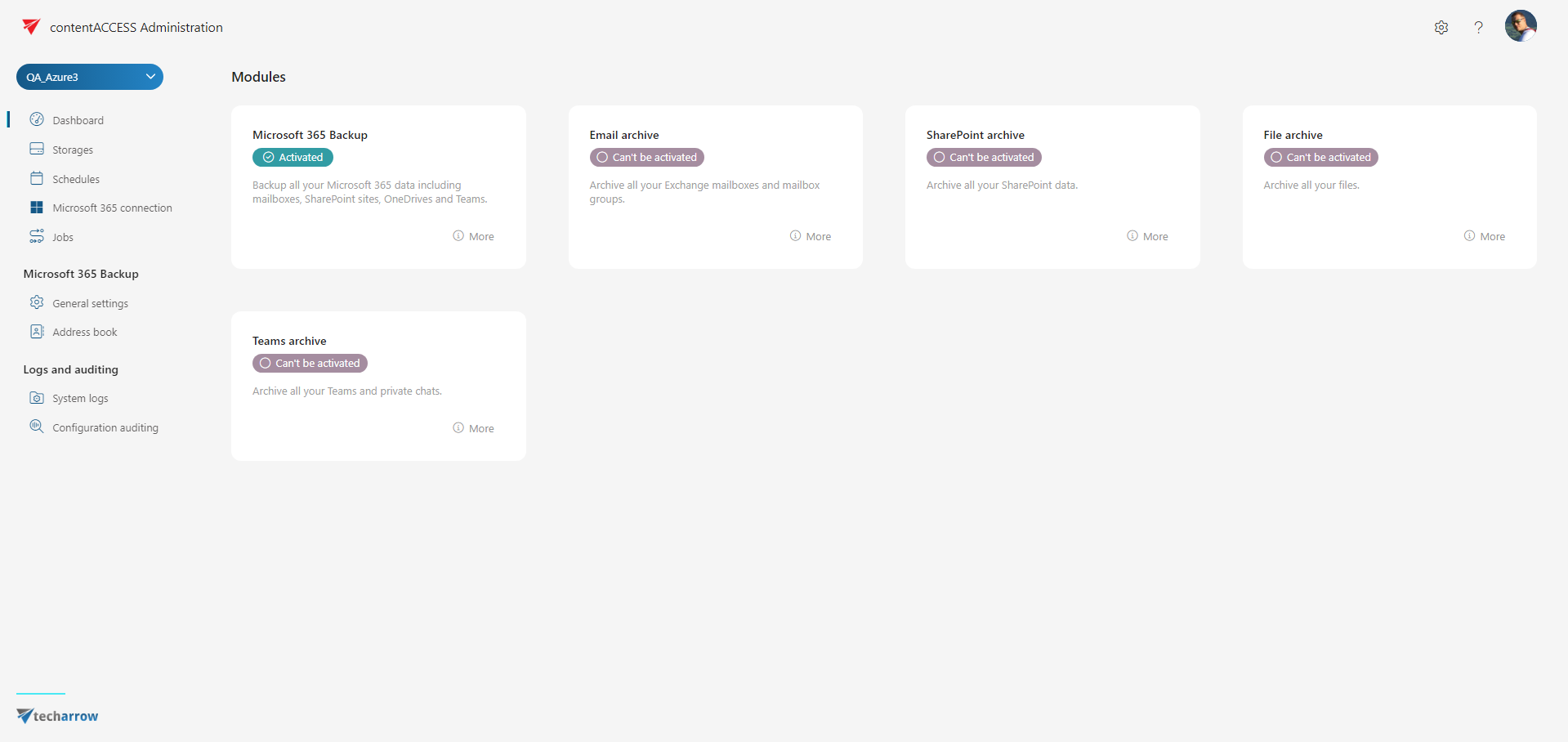
✓ Activation and configuration wizard
Initiate your contentACCESS journey effortlessly through our user-friendly product activation wizard. In just four straightforward steps, you’ll configure the system and swiftly initiate your backup process. The wizard also registers the Entra app, enabling easy connection to your Microsoft 365 data. Enjoy a hassle-free setup experience designed for maximum efficiency and simplicity. With our streamlined activation process, you’ll be safeguarding your critical data in no time.
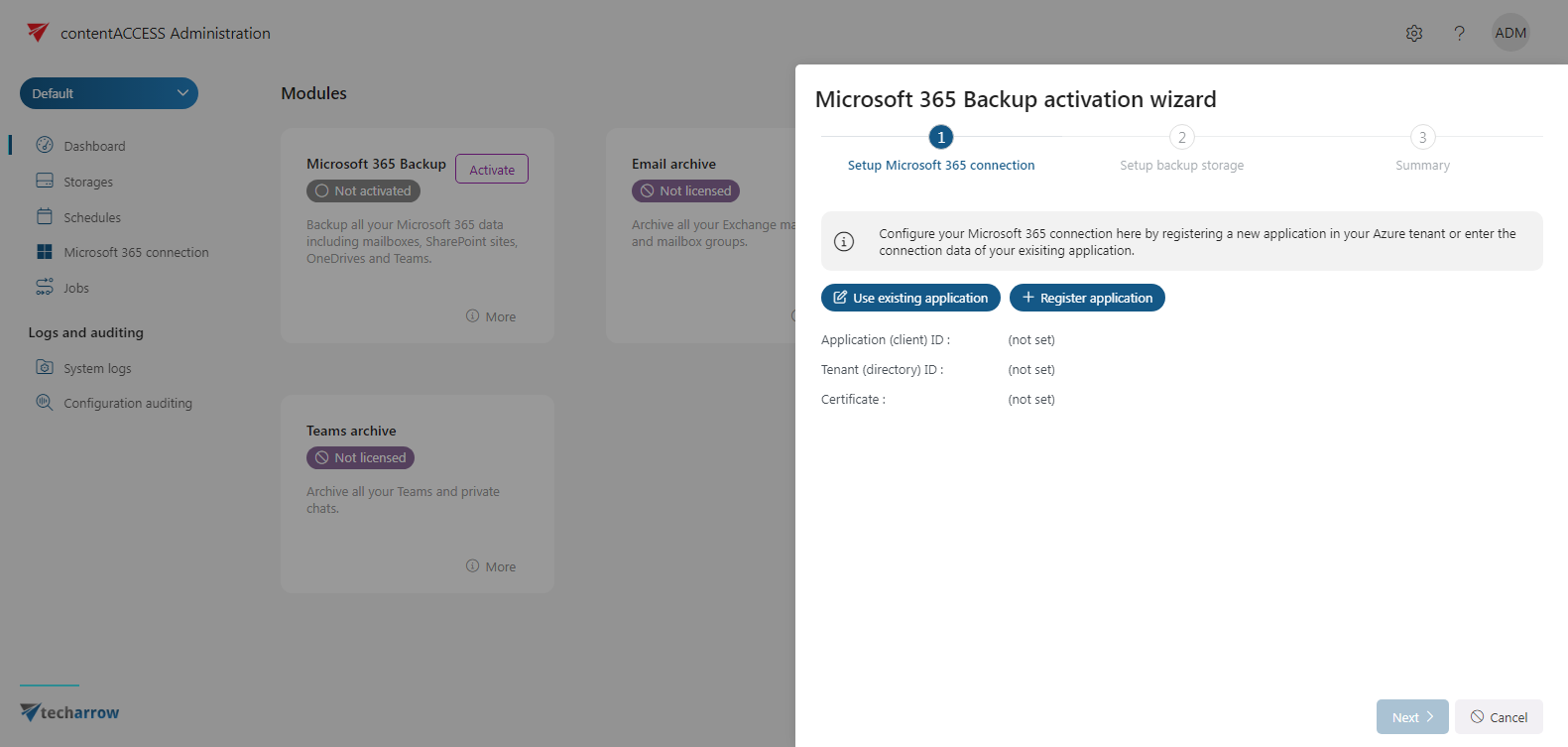
✓ Just in time email backup
Introducing our innovative “Just-in-Time Email Backup” feature, powered by contentACCESS’s built-in SMTP server. With this functionality, Microsoft 365 can forward all incoming and outgoing email traffic to the contentACCESS SMTP server in near real time. This ensures that no email goes unrecorded, minimizing the risk of accidental deletions and safeguarding your entire email communication. Rest assured, every sent and received email is securely stored, providing comprehensive protection and peace of mind for your organization’s critical communication data.
Additionally, our “Just-in-Time Email Backup” feature includes retrospective mailbox scanning to preserve users’ folder structures. Throughout this process, no backup occurs; instead, emails are only organized into their respective folders within the backup, maintaining the original user folder structure intact. This ensures that not only are emails backed up in real time, but also that the organization and accessibility of users’ email backups are upheld, providing a comprehensive and user-centric email backup solution.
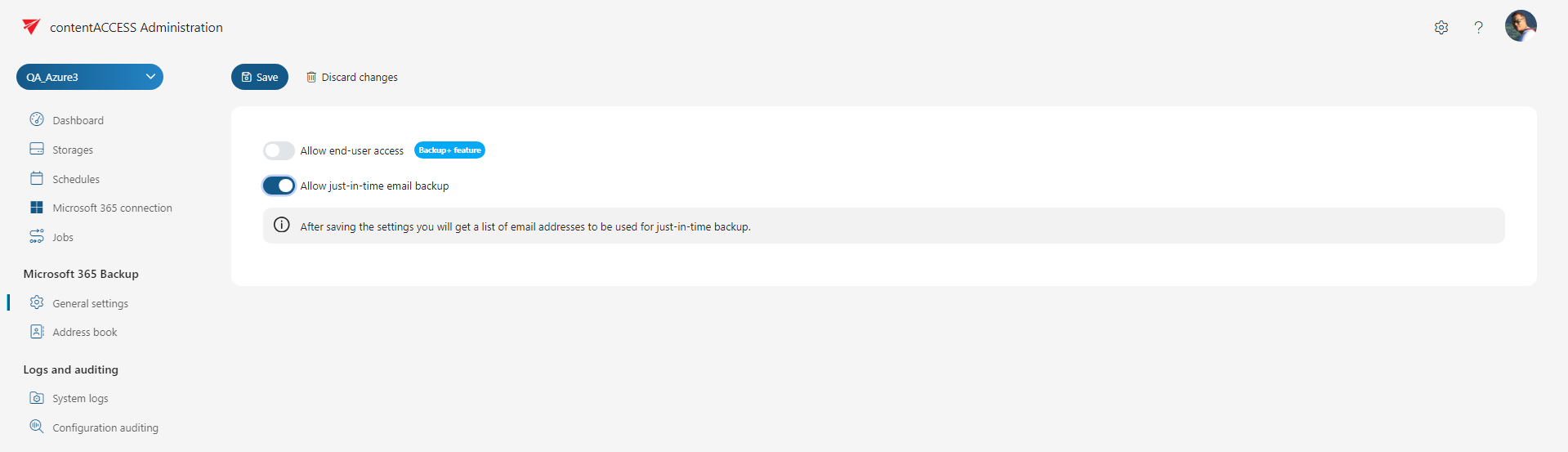
✓ Backup+ features
With the Backup+ feature enabled, every end user gains direct access to their backed-up data through our client tools. This empowers users to effortlessly browse, search, and even restore their data independently, eliminating the need for administrator intervention. When users have direct access to their backups, it ensures business continuity in critical situations, such as data loss or service outages, as they can always retrieve their data promptly, minimizing disruptions and maintaining productivity levels.
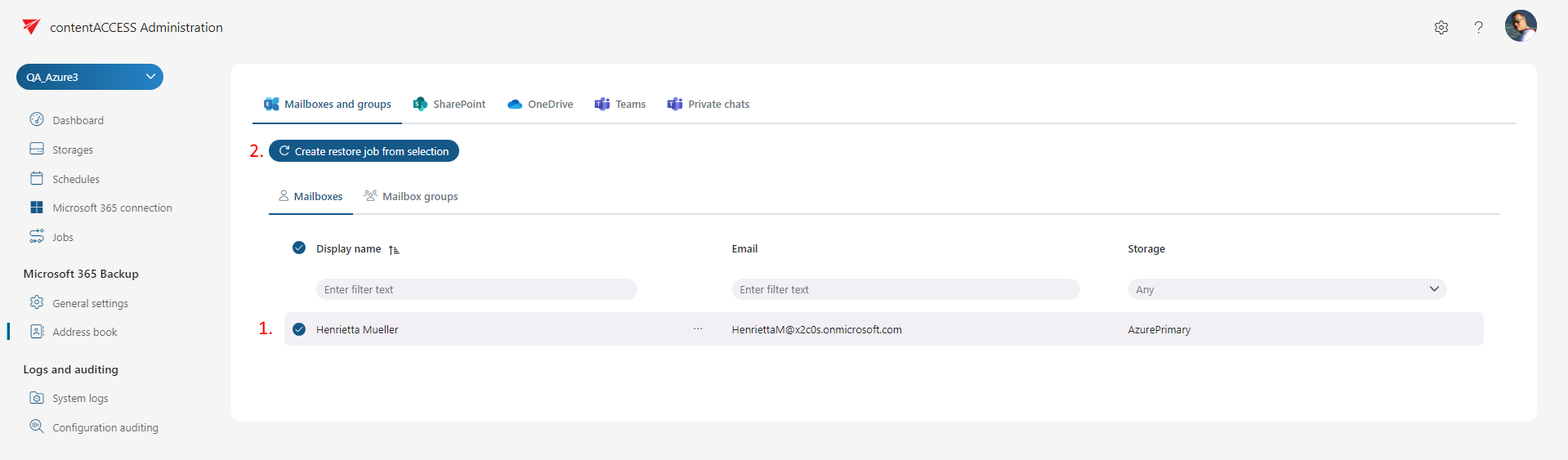
✓ Easy restore
The restore feature is a critical component of every backup solution, and we designed it to be as user-friendly as possible. Whether you need to recover a mailbox, a SharePoint site, or a Team, the process is straightforward. With just one click, you can initiate the restore process, effortlessly bringing back your data. For instances where only a single item needs restoration, our client tools provide a seamless solution. You can browse or conduct full-text searches within the client tools, selecting the desired data with ease. Upon clicking restore, the data is swiftly returned to its original location, ensuring a smooth and efficient recovery process.
✓ Storage redundancy and failover
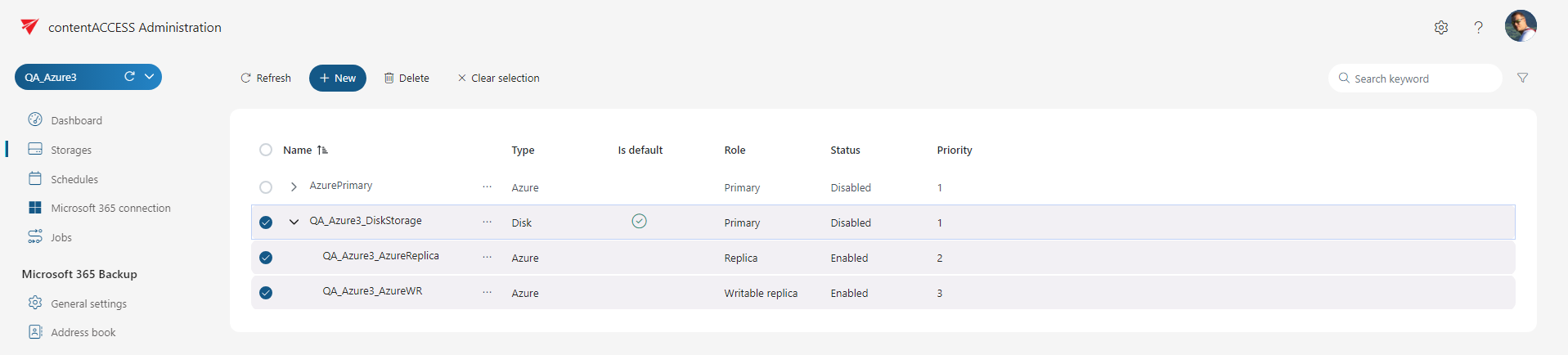
We’re pleased to announce significant enhancements to our storage redundancy and failover layer within contentACCESS. This crucial aspect of our system is now more transparent and simpler to configure, ensuring a seamless user experience. The system now supports multiple secondary or replica storages alongside a primary storage, offering heightened redundancy and failover capabilities. Administrators also have the flexibility to use cloud storage as replica storage, expanding their options for data storage.
Additionally, the ability to set priorities for replica storage adds another layer of customization and control. In the event of primary storage damage, administrators can seamlessly nominate a replica storage as the primary, ensuring uninterrupted access to and modification of critical data. These enhancements collectively make the contentACCESS storage system more robust and powerful, further strengthening its role in data management and protection.
Common
✓ PostgreSQL support
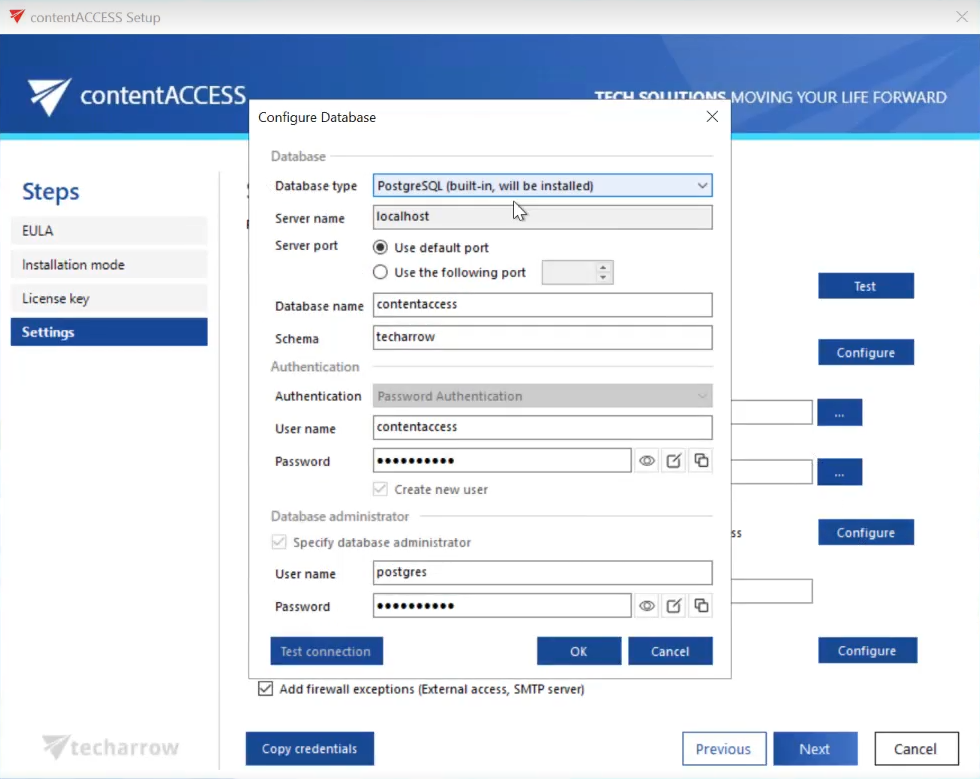
We are pleased to announce full support for PostgreSQL as a database option in contentACCESS. Until now, contentACCESS required SQL Server, often a costly investment for organizations without an existing license. With this update, customers can choose a powerful, open-source alternative, significantly reducing costs without compromising performance or reliability.
This flexibility goes beyond a single choice. With contentACCESS, you can now mix and match database types to suit your needs—for example, using SQL Server for one module and PostgreSQL for another. contentACCESS ensures seamless compatibility across both database types without restrictions.
To make adoption easier, the enhanced setup process now includes the option to install PostgreSQL, allowing you to get started with minimal effort.
✓ Simplified installation mode
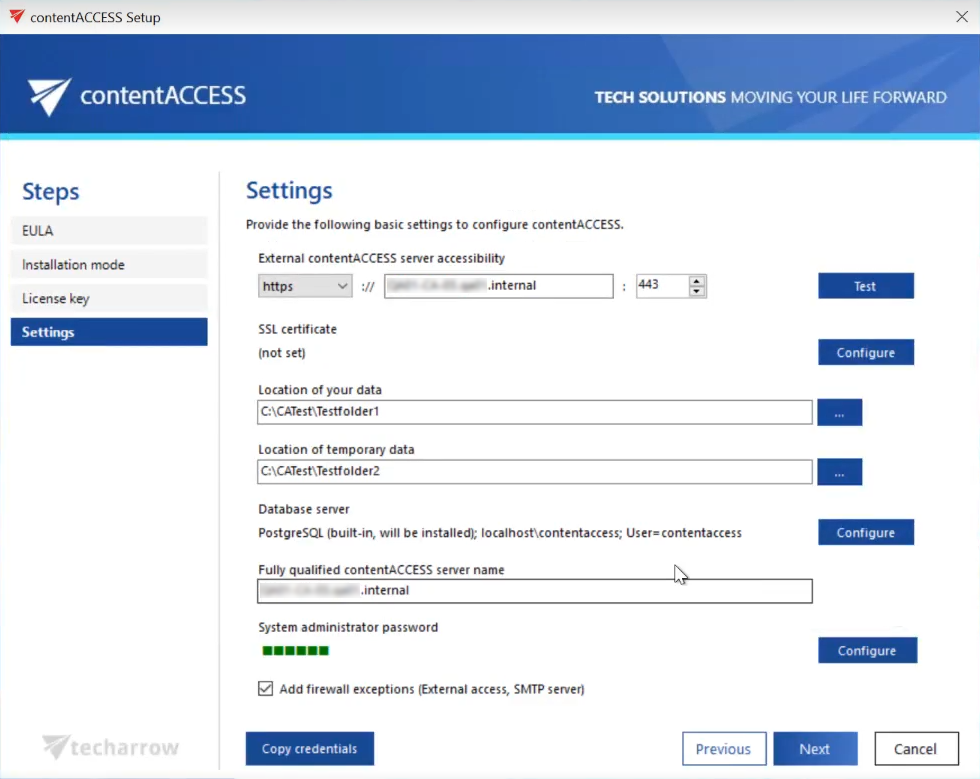
Setting up contentACCESS is now faster and more straightforward with the new simplified installation mode. The setup process has been refined to collect all required information in a single step, eliminating duplicate data entry and streamlining the overall experience.
The installer now automatically handles critical configurations, including SSL certificate generation, firewall exception setup, and PostgreSQL installation when required. To enhance security, the setup process also enforces secure storage of all entered credentials.
This improved installation mode provides a more efficient way to get your contentACCESS environment up and running.
✓ Wasabi storage support
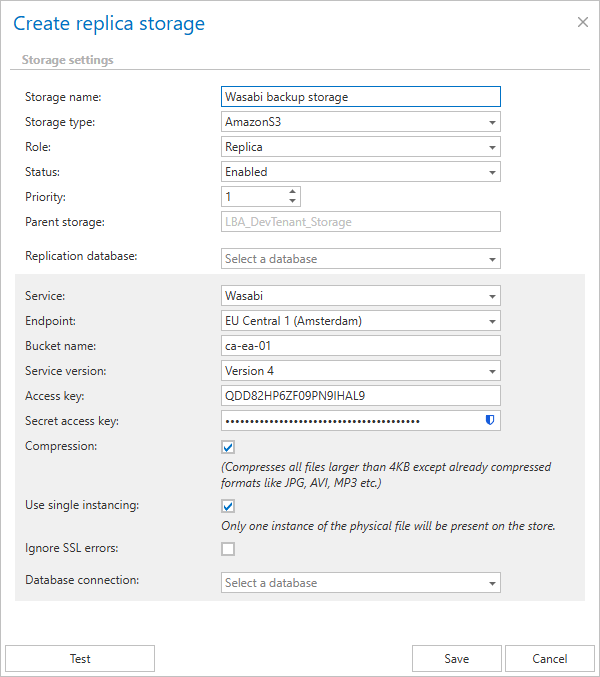
contentACCESS now supports Wasabi storage, offering a cost-effective and reliable cloud storage option for businesses of all sizes. Wasabi provides an alternative to traditional cloud storage, combining affordability with the security and performance you expect.
For on-premises environments, Wasabi can be used as backup storage to implement the 3-2-1 backup rule, ensuring your data remains protected and accessible. With contentACCESS’s replication service, configuring Wasabi as backup storage is straightforward and efficient.
This integration helps reduce costs while maintaining a secure and flexible storage environment.
✓ Performance and stability fixes
Improvements were made to enhance system performance and stability, further improving the overall contentACCESS experience.
Email archiving
✓ Selective journaling
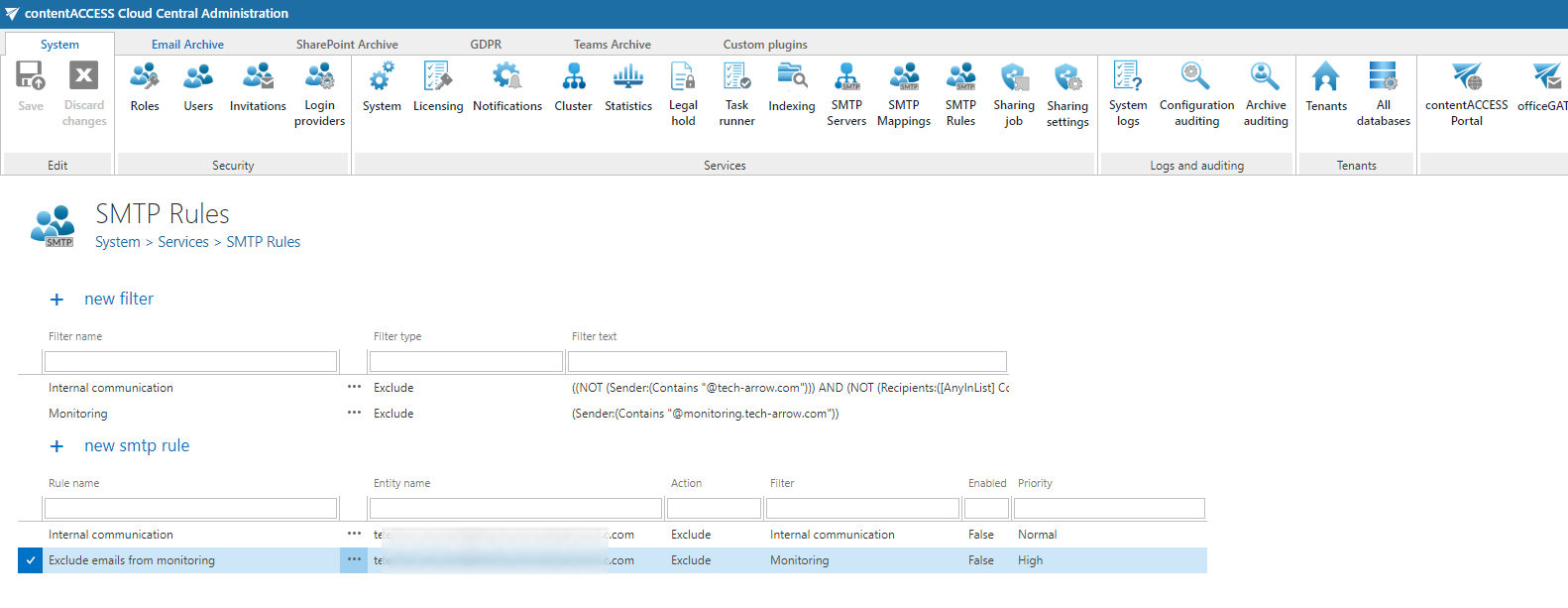
With the Selective Journaling feature, you can optimize your archiving process by filtering out emails that do not need to be archived. This feature allows you to simulate Premium Exchange Journaling by excluding specific emails from the archive. A common use case is focusing on external communications while excluding internal emails.
You can also use a wide range of email properties to create custom filters, such as sender, recipient, subject line, or specific keywords. This gives you full control over what gets archived, ensuring that only relevant emails are stored while conserving storage space.
✓ Enhanced SMTP security
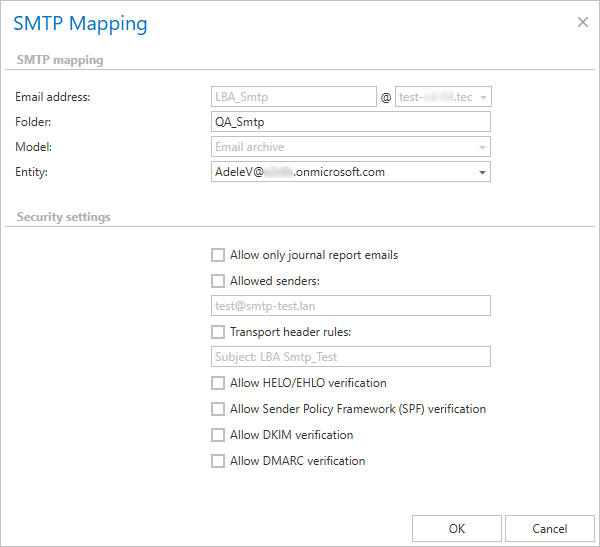
The latest version of contentACCESS introduces Enhanced SMTP Security, providing stronger protection and greater flexibility in managing your email receiving flow. Administrators can now control key security settings at a mapping level, allowing configurations tailored to organizational requirements.
Advanced options include defining allowed senders, configuring transport header rules, and enabling SPF, DKIM, and DMARC verification to combat spoofing and improve email authentication. These features provide robust tools to secure and manage SMTP operations while maintaining flexibility.
✓ Optimized shortcut repair
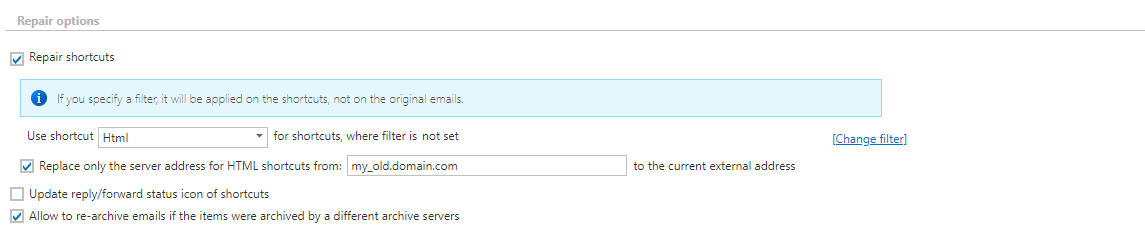
The shortcut repair process has been significantly optimized, dramatically reducing the time required for common repair scenarios such as updating the server DNS name or protocol. Instead of regenerating the entire shortcut, the system now directly modifies the shortcut body during the repair operation, resulting in a faster and more efficient process.
A new option within the shortcut repair job allows you to control this behavior, providing greater flexibility over how repairs are handled.
SharePoint archiving
✓ Optimized metadata storage
contentACCESS introduces improved metadata storage for SharePoint archiving, delivering greater efficiency. These enhancements reduce the database space required to store SharePoint metadata by approximately 5–8 times.
A smaller database reduces storage costs, enables faster processing, and simplifies maintenance, making the system more cost-effective and easier to manage over time.